2026年版 セルフホストできるOpenClawの代替おすすめ
OpenClawに代わるオープンソースの選択肢7つを、離れる理由別にランキング。デフォルトでサンドボックスなし、大きなコードベース、テレメトリ、ハードウェア要件。
早わかり
| ボット | ライセンス | チャットアプリ | |||||
|---|---|---|---|---|---|---|---|
| OpenClaw | MIT | 39.4万 | あり | なし | Telegram, WhatsApp, iMessage, Discord, Slack | 無料 | |
| ZeroClaw | MIT OR Apache-2.0 | 3.3万 | あり | あり | Telegram, WhatsApp, Discord | 無料 | |
| NanoClaw | MIT | 3.1万 | あり | あり | Telegram, WhatsApp, iMessage, Discord, Slack | 無料 | |
| Hermes Agent | MIT | 26.2万 | あり | なし | Telegram, WhatsApp, iMessage, Discord, Slack | 月額$20から | |
| Rakazo | Apache-2.0 | 7538 | あり | あり | Telegram, WhatsApp, iMessage, Slack | 月額$10から | |
| NemoClaw | Apache-2.0 | 2.3万 | あり | あり | Telegram, Discord, Slack | 無料 | |
| PicoClaw | MIT | 3万 | あり | なし | Telegram, WhatsApp, Discord, Slack | 無料 | |
| nanobot | MIT | 5万 | あり | なし | Telegram, WhatsApp, Discord, Slack | 無料 |


チェックリスト
OpenClawはオープンソースエージェントの定番です。MITライセンスで、2026年11月8日時点でGitHubスター数394,193、29のチャットチャネルに対応し、すべてのデスクトップとスマートフォン向けにアプリがあります。代替を探す人の多くは、その機能に不満があるわけではありません。不安なのは、そのやり方です。
OpenClawから離れる理由
よく挙がる理由は4つあり、以下のランキングもそれに基づいています。
デフォルトでサンドボックスなし。 OpenClawのサンドボックスは初期状態でオフのため、承認機能やサンドボックスを自分でオンにしない限り、エージェントはホスト上でコマンドを実行します。これにメールやメッセージへのアクセス、サードパーティのスキルが加わると、プロンプトインジェクションは現実的なリスクになります。メンテナー自身も、技術に詳しくないユーザーにはリスクがあると警告しています。詳しくはOpenClawは安全か?で解説しています。
規模と複雑さ。 142の公式プラグインと64のモデル・メディアプロバイダーにより高機能ですが、信頼して最新に保つべきコードが大量にあり、セットアップにはコマンドラインが前提です。
テレメトリ。 デフォルトで、OpenClawのバージョン、OS、Node.jsのバージョン、CPUアーキテクチャに加え、インストール数とアップデートレポートを付けてプロジェクトのサーバーに毎日接続します。些細なものでupdate.checkOnStart: falseでオフにできますが、そうするまではオンのままです。
ハードウェアとランタイム。 Node 24.16+または26.1+が必要です。ノートPCなら問題ありませんが、Raspberry Piやルーターでは厳しくなります。
代替は、中核となる役割(チャットアプリから話しかける常時稼働のエージェント)を果たしつつ、これらの問題をいくつ解決しているかでランク付けしました。
1. ZeroClaw:「安全なデフォルトのOpenClaw」に最も近い
ZeroClawは4つすべてを解決します。TOML設定ファイル1つの単一Rustバイナリで、macOS、Linux、Windows、FreeBSD、Android、Raspberry Piで動作します。推奨のBalancedプロファイルでは、中リスクの操作の前に確認を求め、高リスクの操作をブロックし、ファイルアクセスをワークスペース内に制限し、ツールをOSサンドボックス(macOSではSeatbelt、LinuxではFirejail)で実行します。ドキュメントにはテレメトリを送信しないと明記されています。
難点はチャネルです。Slack、iMessage、Signalは標準リリースに含まれていないため、追加機能付きでソースからビルドする必要があります。WhatsApp、Telegram、Discordを主に使うなら問題になりません。詳しい比較はZeroClaw vs OpenClawをご覧ください。

2. NanoClaw:本格的なコンテナ分離と小さなコードベース
NanoClawは、OpenClawをより小さく、コンテナで分離した形で作り直したものとして始まりました。各エージェントは専用のDockerコンテナで動作し、マウントしたフォルダーしか見えません。外部へのAPI呼び出しは認証情報ゲートウェイを経由するため、エージェントが生のキーを持つことはありません。ホストはNodeプロセス1つと少数のファイルだけです。
ZeroClawより下位なのには2つの理由があります。ClaudeとClaude Codeを中心に構築されていること(カスタマイズとはClaude Codeに自分のフォークを編集させることで、設定ファイルはありません)、そしてNANOCLAW_NO_DIAGNOSTICS=1を設定しない限り匿名のセットアップ診断情報を送信することです。NanoClaw vs OpenClawをご覧ください。

3. Hermes Agent:最も乗り換えやすい
Nous ResearchのHermes Agentは、OpenClawユーザーを念頭に置いて作られています。OpenClawの設定、メモリ、スキルを1つのコマンドでインポートでき、20以上のチャットプラットフォームに対応し、共有メトリクスはデフォルトでオフです。さらに、OpenClawが前面に出していない機能も加えています。複雑なタスクの後に、自らスキルを作成し改良するのです。
ただし、サンドボックスの問題は解決しません。ターミナルバックエンドのデフォルトはローカルで、コンテナ分離はオプションです。安全性ではなく、テレメトリと機能を理由に選んでください。詳しくはHermes vs OpenClawをご覧ください。

4. Rakazo:ボットごとのサンドボックス化されたコンピューター
Rakazo(私たちが開発しています)は、各ボットにブラウザー、ターミナル、デスクトップを備えた専用のサンドボックス化されたコンピューターを与えるため、エージェントのコマンドはホストではなくそこで実行されます。Apache-2.0で、セルフホスト版はプロダクト分析データを送信せず、OllamaやLM Studio経由でローカルモデルを実行できます。どの操作に承認が必要かは自分で設定します。
上記の選択肢より重く(Docker EngineとCompose)、まだベータ版で、Telegram、WhatsApp、iMessageはセルフホスト時のみ動作します。


5. NemoClaw:OpenClawはそのままに、檻を追加
OpenClawは気に入っていて、マシン上で野放しに動くことだけが不満なら、NemoClawはOpenClawをOpenShellサンドボックス内で動かすためのNVIDIAのスタックです。未承認のネットワーク接続先はオペレーターが承認するまでブロックされ、認証情報はサンドボックスの外に置かれます。
一方で、残りの3つの不満は悪化します。最低8 GBのRAM(推奨16 GB)、コンテナランタイム、NEMOCLAW_DISABLE_TELEMETRY=1を設定しない限りNVIDIAへのテレメトリ、そしてアルファ版という位置づけです。NemoClaw vs OpenClawをご覧ください。

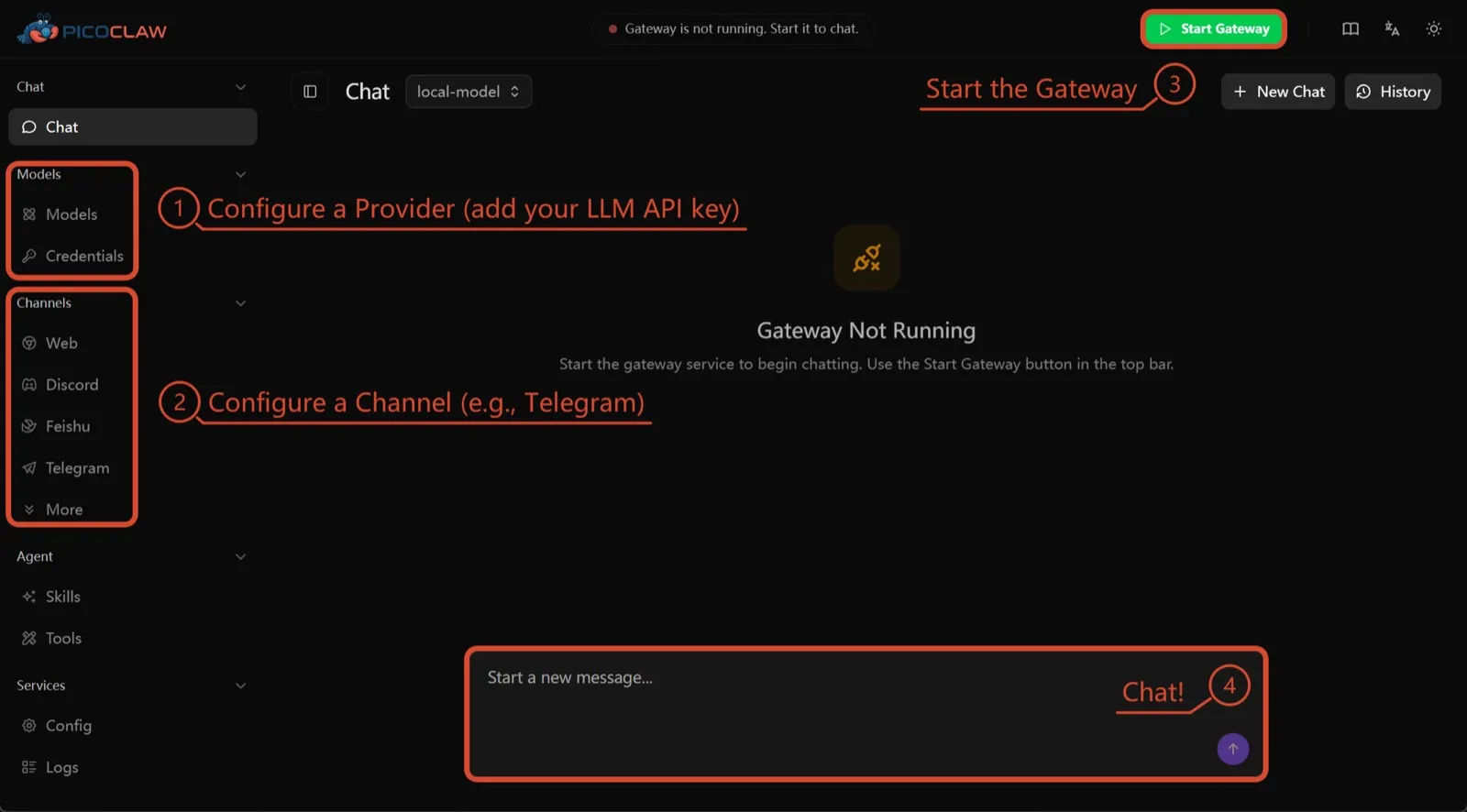
6. PicoClaw:小型ハードウェア向け
SipeedのPicoClawは、最低10 MBの空きRAM(推奨32 MB以上)で動く1つのGoバイナリで、x86、ARM、RISC-V、MIPS上で動作します。$10のボード、ルーター、古いAndroidスマートフォンでも動きます。テレメトリは文書化されておらず、約19のチャットチャネルに対応しています。
ここに入っているのはハードウェアのためだけです。プロセス分離はデフォルトでオフで、プロジェクト自身もv1.0より前は本番環境で使わないよう述べています。
7. nanobot:小さく読みやすいPython
香港大学Data Intelligence Labのnanobotは、洗練されたブラウザーUI、ターミナルUI、スケジュール実行の自動化、多数のチャットチャネルを備えたコンパクトなPythonエージェントです。テレメトリはなく、Ollama、vLLM、LM Studioで動作します。
OpenClawと同様に、bubblewrapやSeatbeltをオンにするまでシェルコマンドはサンドボックス化されず、Windowsにはサンドボックスがまったくありません。午後のうちに読み切れるコードが欲しいなら選んでください。

どれを選ぶべきか
- OpenClawと同じ役割を、安全なデフォルトとテレメトリなしで求めるなら:ZeroClaw。
- すべてのエージェントをコンテナに入れたく、Claude Codeが気にならないなら:NanoClaw。
- OpenClawの環境を引き継ぎつつテレメトリを止めたいなら:Hermes Agent。
- OpenClaw自体をサンドボックス化して使い続けたく、RAMに余裕があるなら:NemoClaw。
- ボードや古いスマートフォンで動かすなら:PicoClaw。
OpenClawを軸にしない、より幅広いリストはおすすめのセルフホスト型AIエージェントをご覧ください。
代替ツール
Personal AI agent in one Rust binary, MIT or Apache-2.0, with local or cloud models, 30+ channels, approval gates and an OS sandbox on by default.
Meets every check: one Rust binary, approval gates and an OS sandbox on by default, no telemetry, local models.
ZeroClawを開く長所
- Safe defaults: the recommended profile asks before medium-risk actions, blocks high-risk ones, keeps files in the workspace and runs tools in an OS sandbox
- One small Rust binary with one config file, running on macOS, Linux, Windows and boards like a Raspberry Pi
- More than 30 channels, plus a web dashboard for chat, memory, config and cron
- Provider fallback chains, local models through Ollama, and cryptographic receipts for tool calls
- States plainly that it sends no telemetry and needs no cloud account or license server
短所
- Slack, iMessage, Signal and several other channels are not in the standard release; you build from source with extra features to get them
- `zeroclaw quickstart` only sets up the model provider; channels and risk profiles mean editing the TOML config file
- The Docker sandbox backend isn't picked automatically under the default native runtime
- Model costs are on you
Small, MIT-licensed OpenClaw alternative that runs each agent in its own Docker container and chats with you on WhatsApp, Telegram, Slack, Discord and more.
Every agent in its own container and a tiny codebase, but tied to Claude Code and sends setup diagnostics by default.
NanoClawを開く長所
- Every agent runs in its own Docker container and sees only the folders you mount, so shell access stays off your host
- Small codebase (one host process and a handful of files) that you customize by having Claude Code edit your fork
- Agents never hold raw API keys: outbound calls go through a credential gateway with per-agent policies and rate limits
- Many chat channels, including WhatsApp, Telegram, Slack, Discord, iMessage, Teams, Matrix and email, with one or several agents per channel
- Scheduled tasks with optional script gates that skip waking the agent when there's nothing to do
短所
- Built around Claude and Claude Code: customizing, debugging and adding channels all go through Claude Code
- Sends anonymous setup diagnostics unless you set NANOCLAW_NO_DIAGNOSTICS=1
- No config files by design, so every change means editing code in your own fork
- Needs Docker, and Windows only works through WSL2
Free, MIT-licensed AI agent from Nous Research that runs on your own machine or server, learns reusable skills, and chats with you on Telegram, Slack and more.
MIT licensed, no telemetry and lives in your chat apps, but commands aren't sandboxed by default.
Hermes Agentを開く長所
- Free and MIT licensed, and runs on hardware you control
- Writes and refines its own skills from experience, on top of persistent memory and cross-session search
- One gateway for 20+ chat platforms, including Telegram, Discord, Slack, WhatsApp, Signal and email
- Run several separate agents as profiles, each with its own model, memory and skills, and let them talk in group chats
- Model-agnostic, with a one-command import from OpenClaw
短所
- Setup expects comfort with the command line and with running your own server
- Model costs are on you unless you use free models, and hosted web search, images and speech need a paid Nous Portal plan or your own keys
- iMessage needs a separate BlueBubbles server on a Mac
- No native mobile app; Android support is a command-line install through Termux
Open-source, self-hostable platform for persistent AI bots that each get a job, a computer, memory and routines, using the model you choose.
Our own product. Meets every check: Apache-2.0, sandboxed bot computers, no telemetry by default, any model you connect.
Rakazoを開く長所
- Open source (Apache-2.0) and fully self-hostable, including with local models
- Choice of model per bot, including existing Claude or ChatGPT subscriptions
- Bots keep working on schedules and triggers with their own cloud computer
- Approval controls over which actions a bot may take on its own
短所
- Still in beta, with frequent releases
- You supply and pay for the model on the hosted plans, unless you buy Rakazo credits
- Telegram, WhatsApp and iMessage/SMS are only available when self-hosted
- More setup than a single chat app
NVIDIA's Apache-2.0 stack for running OpenClaw, Hermes or Deep Agents inside locked-down OpenShell sandboxes with managed inference. Alpha.
Puts OpenClaw or Hermes in a locked-down sandbox, but it's alpha, heavy to run and sends telemetry by default.
NemoClawを開く長所
- Puts OpenClaw or Hermes Agent in a sandbox with network, filesystem and process controls instead of running it on your host
- Unapproved network destinations are blocked and surfaced for an operator to approve
- Inference, messaging and MCP credentials stay outside the sandbox
- Backed by NVIDIA, with local inference through Ollama, vLLM or NIM and a tested path on DGX Spark
短所
- Alpha: maintainers support it on a best-effort basis, and several channels are experimental
- A wrapper, not an agent: what the bot can do depends on the OpenClaw or Hermes version inside
- Heavier than running the agent alone: 8 GB RAM minimum, a 2.4 GB sandbox image and a container runtime
- The CLI sends operation telemetry to NVIDIA unless you set NEMOCLAW_DISABLE_TELEMETRY=1
Free, MIT-licensed personal AI agent written in Go that runs as one small binary on cheap boards, old phones and PCs, and chats on Telegram, Discord and more.
Runs on cheap boards in a few dozen MB of RAM with no telemetry, but it's pre-1.0 and commands aren't sandboxed by default.
PicoClawを開く長所
- Tiny footprint: one Go binary that Sipeed says boots in under a second and needs only 10 to 20 MB of RAM
- Runs on hardware others can't, from $10 RISC-V boards and routers to old Android phones
- About 19 chat channels, including Telegram, Discord, Slack, WhatsApp, Matrix, LINE and Delta Chat
- Web search works without an API key through a built-in DuckDuckGo fallback
- Heartbeat check-ins, cron reminders, MCP tools and routing between several agents
短所
- The project warns it is in early rapid development, may have unresolved security issues, and should not be used in production before v1.0
- The default workspace restriction only checks paths; true process isolation is off by default and implemented only on Linux and Windows
- Native WhatsApp needs a custom build or a separate bridge
- No built-in image generation, and voice messages are only transcribed if you add a provider such as Groq
Free, MIT-licensed personal AI agent in Python with a browser UI and terminal app, scheduled tasks, memory, and chat on Telegram, Discord, Slack and more.
Small, readable Python with a good web UI and no telemetry, but shell commands aren't sandboxed by default.
nanobotを開く長所
- Free and MIT licensed, with a small Python core that is meant to be read and modified
- Polished bundled WebUI with projects, file diffs, an MCP app catalog and an automations calendar, plus a terminal UI
- Many chat channels, including Telegram, Discord, Slack, WhatsApp, WeChat, Feishu, Teams, Matrix and email
- Scheduled automations, long-running goals and a heartbeat that reports only useful results to your last chat
- Works with local models through Ollama, vLLM or LM Studio
短所
- Shell commands are not sandboxed by default; the bubblewrap or macOS Seatbelt sandbox must be turned on, and Windows has none
- Model costs are on you, and voice messages need a separate transcription provider such as Groq or OpenAI
- No native mobile or desktop app; on a phone you use the WebUI in a browser or a chat app
- Missed scheduled runs are not replayed and interrupted subagent tasks are not relaunched after a restart
機能
出典
OpenClaw
- OpenClaw homepage and Foundation section
- OpenClaw integrations: channels, providers and plugins
- openclaw/openclaw on GitHub (MIT, v2026.11.1)
- OpenClaw docs: Sandboxing (off by default)
- Wikipedia: OpenClaw
- Notebookcheck: OpenClaw can burn through hundreds of dollars per day
- OpenClaw docs: Memory overview
- OpenClaw docs: Automations
- OpenClaw docs: Chat channels
- OpenClaw docs: iMessage
- OpenClaw docs: Heartbeat, now a default Proactive check job
- OpenClaw docs: Multi-agent routing
- OpenClaw docs: Platforms (macOS, Windows, Linux, iOS and Android apps)
- OpenClaw docs: Tools (exec, browser, web search)
- OpenClaw docs: Audio and voice notes (inbound transcription)
- OpenClaw docs: Image and media support (inbound media)
- OpenClaw docs: Install (system requirements, installer script, npm, desktop apps, Docker)
- OpenClaw docs: One-click deploy on Railway
- OpenClaw docs: Usage telemetry and update checks (on by default, feature statistics opt-in)
- OpenClaw docs: Ollama provider (local models)
ZeroClaw
- zeroclaw-labs/zeroclaw on GitHub (MIT OR Apache-2.0, v0.8.7, README)
- ZeroClaw website
- ZeroClaw docs: Sandboxing
- ZeroClaw source: risk presets (Balanced, recommended, has the sandbox on)
- ZeroClaw docs: Channels overview (default and standard release bundles)
- ZeroClaw docs: You own it (no telemetry)
- ZeroClaw docs: Docker and containers
- ZeroClaw source: tools (image generation, screenshot, web)
NanoClaw
Hermes Agent
- NousResearch/hermes-agent on GitHub (MIT, v0.23.0)
- Hermes Agent homepage and Nous Portal pricing
- Hermes Agent documentation
- Hermes Agent docs: Profiles, running multiple agents
- Hermes Agent docs: Bot Mode
- Hermes Agent docs: Voice mode
- Hermes Agent docs: Vision and image paste
- Hermes Agent docs: iMessage via BlueBubbles
- Nous Research on X: Meet Hermes Agent (February 25, 2026)
- Hermes Agent docs: Session heartbeats and cron watchdogs
- Hermes Agent docs: FAQ (Is my data sent anywhere?)
- Hermes Agent docs: Installation (desktop packages, install script, Docker)
- Hermes Agent docs: Platform support (no Linux desktop package; PyPI installs unsupported)
- Hermes Agent docs: Docker setup
- Hermes Agent docs: Configuration (terminal backend defaults to local)
- Hermes Agent docs: Security (approval modes, optional container isolation)
- Hermes Agent docs: Local models
- Hermes Agent example config (shared metrics off by default)
Rakazo
- Rakazo homepage
- Rakazo pricing
- Rakazo privacy policy
- Rakazo on GitHub (README and license)
- Rakazo changelog
- Rakazo releases
- Rakazo docs: Image and video generation
- Rakazo docs: Memory
- Rakazo docs: Connect apps
- Rakazo docs: Routines
- Rakazo docs: Chat apps
- Rakazo docs: Messaging apps (self-hosting)
- Rakazo docs: Bots and chats (add another bot, bot templates)
- Rakazo docs: Groups (several bots in one chat)
- Rakazo docs: Mobile app (notifications)
- Rakazo privacy policy (updated Sep 14, 2026)
- Rakazo privacy policy source on GitHub
- Rakazo docs: Logs and monitoring (product analytics off by default)
- Rakazo docs: Desktop app (run locally in Docker, updates)
- Rakazo docs: Docker computers
- Rakazo docs: Self-hosted models (Ollama, LM Studio)
- Rakazo Railway template setup guide
NemoClaw
- NVIDIA/NemoClaw on GitHub (Apache-2.0, README: supported agents, alpha status)
- NemoClaw docs: Overview
- NemoClaw docs: Prerequisites and platforms
- NemoClaw docs: Choose an inference provider (Ollama, vLLM, NIM)
- NemoClaw docs index: messaging channels (WhatsApp, Teams, Google Chat, WeChat experimental)
- NemoClaw source: telemetry delivery and NEMOCLAW_DISABLE_TELEMETRY
PicoClaw
- sipeed/picoclaw on GitHub (MIT, README with security notice and channel list)
- PicoClaw releases (v0.0.1 on February 9, 2026; v0.3.1 on July 3, 2026)
- PicoClaw official website and downloads
- PicoClaw docs: Configuration (workspace restriction, heartbeat, voice, multi-agent routing)
- PicoClaw source: subprocess isolation, disabled by default
- PicoClaw docs: Tools configuration (web search, exec, cron, MCP, skills)
- PicoClaw docs: Chat apps (WhatsApp native build or bridge)
- PicoClaw docs: Hardware compatibility and minimum requirements
- PicoClaw docs: Docker
nanobot
- HKUDS/nanobot on GitHub (MIT, v0.4.1, README)
- nanobot documentation
- nanobot release archive (officially launched February 2, 2026)
- nanobot docs: Chat apps
- nanobot docs: Providers and models (Ollama, vLLM, LM Studio)
- nanobot docs: Configuration (security, exec sandbox off by default, transcription, Langfuse)
- nanobot docs: Automations and heartbeat
- nanobot docs: Concepts (heartbeat delivery, subagent recovery)
- nanobot docs: Memory and Dream
- nanobot docs: Multiple instances
- nanobot docs: Deployment (Docker, services, Render)
- nanobot source: skills installer runs with DISABLE_TELEMETRY