2026'da Kendi Sunucunuzda Barındırabileceğiniz En İyi OpenClaw Alternatifleri
İnsanları OpenClaw'dan uzaklaştıran nedenlere göre sıralanmış yedi açık kaynak alternatif: varsayılan sandbox yok, büyük kod tabanı, telemetri ve donanım.
Kısaca
| Bot | Lisans | Sohbet uygulamaları | |||||
|---|---|---|---|---|---|---|---|
| OpenClaw | MIT | 394,2 B | Evet | Hayır | Telegram, WhatsApp, iMessage, Discord, Slack | Ücretsiz | |
| ZeroClaw | MIT OR Apache-2.0 | 33,3 B | Evet | Evet | Telegram, WhatsApp, Discord | Ücretsiz | |
| NanoClaw | MIT | 31,1 B | Evet | Evet | Telegram, WhatsApp, iMessage, Discord, Slack | Ücretsiz | |
| Hermes Agent | MIT | 261,7 B | Evet | Hayır | Telegram, WhatsApp, iMessage, Discord, Slack | Aylık $20 ve üzeri | |
| Rakazo | Apache-2.0 | 7,5 B | Evet | Evet | Telegram, WhatsApp, iMessage, Slack | Aylık $10 ve üzeri | |
| NemoClaw | Apache-2.0 | 23 B | Evet | Evet | Telegram, Discord, Slack | Ücretsiz | |
| PicoClaw | MIT | 30,1 B | Evet | Hayır | Telegram, WhatsApp, Discord, Slack | Ücretsiz | |
| nanobot | MIT | 49,9 B | Evet | Hayır | Telegram, WhatsApp, Discord, Slack | Ücretsiz |


Kontrol listesi
| OpenClaw | ZeroClaw | NanoClaw | Hermes Agent | Rakazo | NemoClaw | PicoClaw | nanobot | |
|---|---|---|---|---|---|---|---|---|
| Açık kaynak lisans | Evet | Evet | Evet | Evet | Evet | Evet | Evet | Evet |
| Yerel modellerle çalışır | Evet | Evet | Evet | Evet | Evet | Evet | Evet | Evet |
| Varsayılan olarak sandbox | Hayır | Evet | Evet | Hayır | Evet | Evet | Hayır | Hayır |
| Varsayılan olarak telemetri yok | Hayır | Evet | Hayır | Evet | Evet | Hayır | Evet | Evet |
| Sohbet uygulamalarınızda yaşar | Evet | Evet | Evet | Evet | Evet | Evet | Evet | Evet |
| Siz yokken de çalışır | Evet | Evet | Evet | Evet | Evet | Evet | Evet | Evet |
OpenClaw varsayılan açık kaynak ajan: MIT lisanslı, 8 Kasım 2026 itibarıyla 394.193 GitHub yıldızı, 29 sohbet kanalı ve her masaüstü ile telefon için uygulamalar. Alternatif arayanların çoğu, yapabildiklerinden memnuniyetsiz değil. Bunu nasıl yaptığı konusunda tedirginler.
İnsanlar OpenClaw’dan neden ayrılıyor
Dört neden öne çıkıyor ve aşağıdaki sıralamayı bunlar belirledi.
Varsayılan sandbox yok. OpenClaw’ın sandbox’ı kutudan çıktığı hâliyle kapalı; yani onayları veya sandbox’ı kendiniz açmadıkça ajan komutları doğrudan host’unuzda çalıştırıyor. Buna e-postalarınıza, mesajlarınıza ve üçüncü taraf skill’lere erişimi de eklerseniz prompt injection gerçek bir risk hâline geliyor. Kendi bakımcıları bile teknik olmayan kullanıcılar için riskli olduğu konusunda uyarıyor. Bunu OpenClaw güvenli mi? yazısında daha ayrıntılı ele alıyoruz.
Boyut ve karmaşıklık. 142 resmî eklenti ve 64 model ve medya sağlayıcısı onu yetenekli kılıyor, ama bu güvenmeniz ve güncel tutmanız gereken çok fazla kod demek; kurulum da komut satırı bekliyor.
Telemetri. Varsayılan olarak projenin sunucusuyla her gün iletişim kuruyor; OpenClaw sürümünüzü, işletim sisteminizi, Node.js sürümünüzü ve CPU mimarinizi, ayrıca kurulum sayısını ve güncelleme raporlarını gönderiyor. Küçük bir şey ve update.checkOnStart: false ile kapanıyor, ama siz kapatana kadar açık.
Donanım ve çalışma ortamı. Node 24.16+ veya 26.1+ gerektiriyor; bu bir dizüstünde sorun değil, bir Raspberry Pi veya router’da o kadar da değil.
Alternatifleri, temel işi yapmaya devam ederken bu sorunlardan kaçını çözdüklerine göre sıraladık: bir sohbet uygulamasından konuştuğunuz, sürekli açık bir ajan.
1. ZeroClaw: “güvenli varsayılanlarla OpenClaw”a en yakın şey
ZeroClaw dördünü de çözüyor. Tek bir TOML yapılandırma dosyasına sahip tek bir Rust binary’si; macOS, Linux, Windows, FreeBSD, Android veya Raspberry Pi üzerinde çalışıyor. Önerilen Balanced profili orta riskli eylemlerden önce soruyor, yüksek riskli olanları engelliyor, dosya erişimini çalışma alanıyla sınırlıyor ve araçları bir işletim sistemi sandbox’ında çalıştırıyor (macOS’ta Seatbelt, Linux’ta Firejail). Belgeleri hiç telemetri göndermediğini belirtiyor.
Sorun kanallarda: Slack, iMessage ve Signal standart sürümde yok, bu yüzden ek özelliklerle kaynaktan derlemeniz gerekiyor. WhatsApp, Telegram veya Discord’da yaşıyorsanız bunun önemi yok. Tam karşılaştırma: ZeroClaw vs OpenClaw.

2. NanoClaw: gerçek konteyner izolasyonu, küçük kod tabanı
NanoClaw, OpenClaw’ın daha küçük ve konteynerle izole edilmiş bir yorumu olarak başladı. Her ajan kendi Docker konteynerinde çalışıyor ve yalnızca bağladığınız klasörleri görüyor; dışarıya giden API çağrıları bir kimlik bilgisi gateway’inden geçiyor, böylece ajanlar hiçbir zaman ham anahtarları tutmuyor. Host tek bir Node süreci ve bir avuç dosyadan oluşuyor.
İki nedenle ZeroClaw’ın altında: Claude ve Claude Code etrafında kurulmuş (özelleştirmek, Claude Code’un fork’unuzu düzenlemesi demek ve yapılandırma dosyası yok) ve NANOCLAW_NO_DIAGNOSTICS=1 ayarlamadığınız sürece anonim kurulum tanılama verileri gönderiyor. NanoClaw vs OpenClaw yazısına bakın.

3. Hermes Agent: en kolay geçiş
Nous Research’ün Hermes Agent’ı OpenClaw kullanıcıları düşünülerek geliştirildi. OpenClaw ayarlarınızı, hafızalarınızı ve skill’lerinizi tek komutla içe aktarıyor, 20’den fazla sohbet platformunu destekliyor ve paylaşılan metrikleri varsayılan olarak kapalı. Ayrıca OpenClaw’ın öne çıkarmadığı bir şey ekliyor: karmaşık görevlerden sonra kendi skill’lerini yazıp geliştiriyor.
Ancak sandbox sorununu çözmüyor. Terminal backend’i varsayılan olarak yerel ve konteyner izolasyonu isteğe bağlı. Onu güvenlik için değil, telemetri ve özellikler için seçin. Daha fazlası: Hermes vs OpenClaw.

4. Rakazo: her bot için sandbox içinde bilgisayarlar
Bizim geliştirdiğimiz Rakazo, her bota tarayıcı, terminal ve masaüstü içeren kendi sandbox’lı bilgisayarını veriyor; böylece ajan komutları sizin host’unuz yerine orada çalışıyor. Apache-2.0 lisanslı, self-hosted kurulum ürün analitiği göndermiyor ve yerel modelleri Ollama veya LM Studio üzerinden çalıştırıyor. Hangi eylemlerin onayınızı gerektireceğini siz belirliyorsunuz.
Yukarıdaki seçeneklerden daha ağır (Compose ile Docker Engine), hâlâ beta aşamasında ve Telegram, WhatsApp ile iMessage yalnızca kendi sunucunuzda barındırdığınızda çalışıyor.


5. NemoClaw: OpenClaw’ı koruyun, bir kafes ekleyin
OpenClaw’ı seviyor ve yalnızca makinenizde serbestçe çalışmasına itiraz ediyorsanız, NemoClaw NVIDIA’nın OpenClaw’ı bir OpenShell sandbox’ı içinde çalıştırmak için sunduğu yığın. Onaylanmamış ağ hedefleri, bir operatör onaylayana kadar engelleniyor ve kimlik bilgileri sandbox’ın dışında kalıyor.
Diğer üç şikâyeti ise kötüleştiriyor: en az 8 GB RAM (16 GB önerilir), bir konteyner çalışma ortamı, NEMOCLAW_DISABLE_TELEMETRY=1 ayarlamadığınız sürece NVIDIA’ya telemetri ve alpha durumu. NemoClaw vs OpenClaw yazısına bakın.

6. PicoClaw: küçük donanımlar için
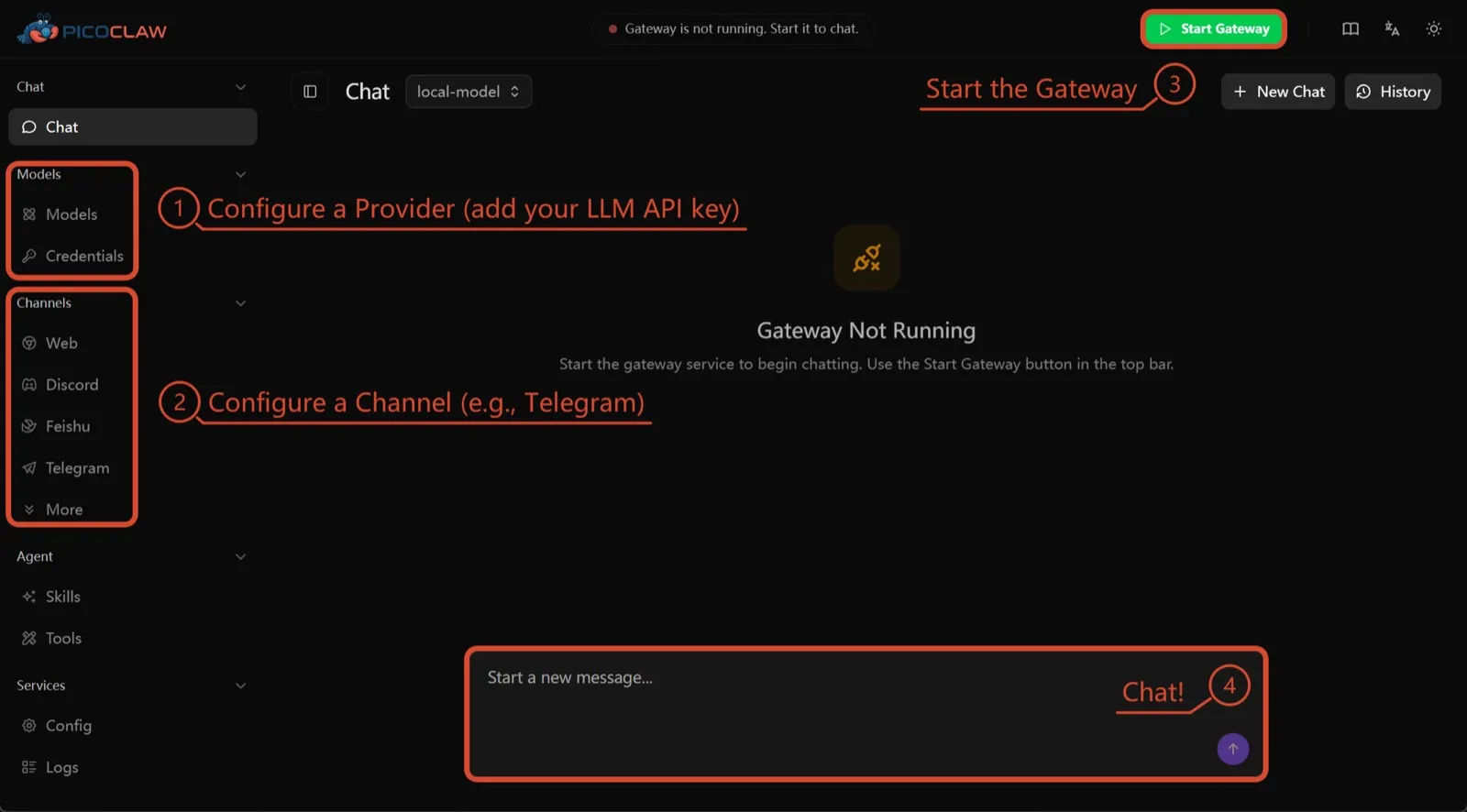
Sipeed’in PicoClaw’ı, en az 10 MB boş RAM (32 MB+ önerilir) gerektiren tek bir Go binary’si; 10 dolarlık kartlar, router’lar ve eski Android telefonlar dahil x86, ARM, RISC-V ve MIPS üzerinde çalışıyor. Belgelenmiş bir telemetri yok ve yaklaşık 19 sohbet kanalı destekleniyor.
Listede yalnızca donanım için yer alıyor. Süreç izolasyonu varsayılan olarak kapalı ve projenin kendisi v1.0’dan önce production’da kullanılmamasını söylüyor.
7. nanobot: küçük, okunabilir Python
Hong Kong Üniversitesi Data Intelligence Lab’inden nanobot, şık bir tarayıcı arayüzü, terminal arayüzü, zamanlanmış otomasyonlar ve çok sayıda sohbet kanalı sunan kompakt bir Python ajanı. Telemetrisi yok ve Ollama, vLLM veya LM Studio ile çalışıyor.
OpenClaw gibi, bubblewrap veya Seatbelt’i açana kadar shell komutları sandbox içinde çalışmıyor ve Windows’ta hiç sandbox yok. Bir öğleden sonrada okuyabileceğiniz bir kod istiyorsanız onu seçin.

Hangisini seçmeli
- OpenClaw’ın işini güvenli varsayılanlarla ve telemetri olmadan istiyorsanız: ZeroClaw.
- Her ajanın bir konteynerde olmasını istiyor ve Claude Code’a itirazınız yoksa: NanoClaw.
- OpenClaw kurulumunuzu koruyup telemetriyi durdurmak istiyorsanız: Hermes Agent.
- OpenClaw’ın kendisini sandbox içinde tutmak istiyor ve yeterli RAM’iniz varsa: NemoClaw.
- Bir kart veya eski bir telefon üzerinde çalıştırıyorsanız: PicoClaw.
OpenClaw etrafında şekillenmemiş daha geniş bir liste için en iyi self-hosted AI ajanları yazısına bakın.
Alternatifler
Personal AI agent in one Rust binary, MIT or Apache-2.0, with local or cloud models, 30+ channels, approval gates and an OS sandbox on by default.
Meets every check: one Rust binary, approval gates and an OS sandbox on by default, no telemetry, local models.
ZeroClaw sitesine gitGüçlü yanlar
- Safe defaults: the recommended profile asks before medium-risk actions, blocks high-risk ones, keeps files in the workspace and runs tools in an OS sandbox
- One small Rust binary with one config file, running on macOS, Linux, Windows and boards like a Raspberry Pi
- More than 30 channels, plus a web dashboard for chat, memory, config and cron
- Provider fallback chains, local models through Ollama, and cryptographic receipts for tool calls
- States plainly that it sends no telemetry and needs no cloud account or license server
Zayıf yanlar
- Slack, iMessage, Signal and several other channels are not in the standard release; you build from source with extra features to get them
- `zeroclaw quickstart` only sets up the model provider; channels and risk profiles mean editing the TOML config file
- The Docker sandbox backend isn't picked automatically under the default native runtime
- Model costs are on you
Small, MIT-licensed OpenClaw alternative that runs each agent in its own Docker container and chats with you on WhatsApp, Telegram, Slack, Discord and more.
Every agent in its own container and a tiny codebase, but tied to Claude Code and sends setup diagnostics by default.
NanoClaw sitesine gitGüçlü yanlar
- Every agent runs in its own Docker container and sees only the folders you mount, so shell access stays off your host
- Small codebase (one host process and a handful of files) that you customize by having Claude Code edit your fork
- Agents never hold raw API keys: outbound calls go through a credential gateway with per-agent policies and rate limits
- Many chat channels, including WhatsApp, Telegram, Slack, Discord, iMessage, Teams, Matrix and email, with one or several agents per channel
- Scheduled tasks with optional script gates that skip waking the agent when there's nothing to do
Zayıf yanlar
- Built around Claude and Claude Code: customizing, debugging and adding channels all go through Claude Code
- Sends anonymous setup diagnostics unless you set NANOCLAW_NO_DIAGNOSTICS=1
- No config files by design, so every change means editing code in your own fork
- Needs Docker, and Windows only works through WSL2
Free, MIT-licensed AI agent from Nous Research that runs on your own machine or server, learns reusable skills, and chats with you on Telegram, Slack and more.
MIT licensed, no telemetry and lives in your chat apps, but commands aren't sandboxed by default.
Hermes Agent sitesine gitGüçlü yanlar
- Free and MIT licensed, and runs on hardware you control
- Writes and refines its own skills from experience, on top of persistent memory and cross-session search
- One gateway for 20+ chat platforms, including Telegram, Discord, Slack, WhatsApp, Signal and email
- Run several separate agents as profiles, each with its own model, memory and skills, and let them talk in group chats
- Model-agnostic, with a one-command import from OpenClaw
Zayıf yanlar
- Setup expects comfort with the command line and with running your own server
- Model costs are on you unless you use free models, and hosted web search, images and speech need a paid Nous Portal plan or your own keys
- iMessage needs a separate BlueBubbles server on a Mac
- No native mobile app; Android support is a command-line install through Termux
Open-source, self-hostable platform for persistent AI bots that each get a job, a computer, memory and routines, using the model you choose.
Our own product. Meets every check: Apache-2.0, sandboxed bot computers, no telemetry by default, any model you connect.
Rakazo sitesine gitGüçlü yanlar
- Open source (Apache-2.0) and fully self-hostable, including with local models
- Choice of model per bot, including existing Claude or ChatGPT subscriptions
- Bots keep working on schedules and triggers with their own cloud computer
- Approval controls over which actions a bot may take on its own
Zayıf yanlar
- Still in beta, with frequent releases
- You supply and pay for the model on the hosted plans, unless you buy Rakazo credits
- Telegram, WhatsApp and iMessage/SMS are only available when self-hosted
- More setup than a single chat app
NVIDIA's Apache-2.0 stack for running OpenClaw, Hermes or Deep Agents inside locked-down OpenShell sandboxes with managed inference. Alpha.
Puts OpenClaw or Hermes in a locked-down sandbox, but it's alpha, heavy to run and sends telemetry by default.
NemoClaw sitesine gitGüçlü yanlar
- Puts OpenClaw or Hermes Agent in a sandbox with network, filesystem and process controls instead of running it on your host
- Unapproved network destinations are blocked and surfaced for an operator to approve
- Inference, messaging and MCP credentials stay outside the sandbox
- Backed by NVIDIA, with local inference through Ollama, vLLM or NIM and a tested path on DGX Spark
Zayıf yanlar
- Alpha: maintainers support it on a best-effort basis, and several channels are experimental
- A wrapper, not an agent: what the bot can do depends on the OpenClaw or Hermes version inside
- Heavier than running the agent alone: 8 GB RAM minimum, a 2.4 GB sandbox image and a container runtime
- The CLI sends operation telemetry to NVIDIA unless you set NEMOCLAW_DISABLE_TELEMETRY=1
Free, MIT-licensed personal AI agent written in Go that runs as one small binary on cheap boards, old phones and PCs, and chats on Telegram, Discord and more.
Runs on cheap boards in a few dozen MB of RAM with no telemetry, but it's pre-1.0 and commands aren't sandboxed by default.
PicoClaw sitesine gitGüçlü yanlar
- Tiny footprint: one Go binary that Sipeed says boots in under a second and needs only 10 to 20 MB of RAM
- Runs on hardware others can't, from $10 RISC-V boards and routers to old Android phones
- About 19 chat channels, including Telegram, Discord, Slack, WhatsApp, Matrix, LINE and Delta Chat
- Web search works without an API key through a built-in DuckDuckGo fallback
- Heartbeat check-ins, cron reminders, MCP tools and routing between several agents
Zayıf yanlar
- The project warns it is in early rapid development, may have unresolved security issues, and should not be used in production before v1.0
- The default workspace restriction only checks paths; true process isolation is off by default and implemented only on Linux and Windows
- Native WhatsApp needs a custom build or a separate bridge
- No built-in image generation, and voice messages are only transcribed if you add a provider such as Groq
Free, MIT-licensed personal AI agent in Python with a browser UI and terminal app, scheduled tasks, memory, and chat on Telegram, Discord, Slack and more.
Small, readable Python with a good web UI and no telemetry, but shell commands aren't sandboxed by default.
nanobot sitesine gitGüçlü yanlar
- Free and MIT licensed, with a small Python core that is meant to be read and modified
- Polished bundled WebUI with projects, file diffs, an MCP app catalog and an automations calendar, plus a terminal UI
- Many chat channels, including Telegram, Discord, Slack, WhatsApp, WeChat, Feishu, Teams, Matrix and email
- Scheduled automations, long-running goals and a heartbeat that reports only useful results to your last chat
- Works with local models through Ollama, vLLM or LM Studio
Zayıf yanlar
- Shell commands are not sandboxed by default; the bubblewrap or macOS Seatbelt sandbox must be turned on, and Windows has none
- Model costs are on you, and voice messages need a separate transcription provider such as Groq or OpenAI
- No native mobile or desktop app; on a phone you use the WebUI in a browser or a chat app
- Missed scheduled runs are not replayed and interrupted subagent tasks are not relaunched after a restart
Özellikler
| OpenClaw | ZeroClaw | NanoClaw | Hermes Agent | Rakazo | NemoClaw | PicoClaw | nanobot | |
|---|---|---|---|---|---|---|---|---|
| Web araması | Evet | Evet | Evet | Evet | Evet | Evet | Evet | Evet |
| Görsel üretimi | Evet | Evet | Bilinmiyor | Evet | Evet | Bilinmiyor | Hayır | Evet |
| Sesli mod | Evet | Evet | Bilinmiyor | Evet | Evet | Bilinmiyor | Evet | Evet |
| Dosya yükleme | Evet | Evet | Evet | Evet | Evet | Bilinmiyor | Evet | Evet |
| Hafıza | Evet | Evet | Evet | Evet | Evet | Bilinmiyor | Evet | Evet |
| Sizin yerinize işlem yapar | Evet | Evet | Evet | Evet | Evet | Evet | Evet | Evet |
| Uygulama entegrasyonları | Evet | Evet | Evet | Evet | Evet | Evet | Evet | Evet |
| Kendi başına çalışır | Evet | Evet | Evet | Evet | Evet | Evet | Evet | Evet |
| İlk mesajı kendisi atar | Evet | Evet | Evet | Evet | Evet | Bilinmiyor | Evet | Evet |
| Birden çok bot | Evet | Evet | Evet | Evet | Evet | Bilinmiyor | Evet | Evet |
Kaynaklar
OpenClaw
- OpenClaw homepage and Foundation section
- OpenClaw integrations: channels, providers and plugins
- openclaw/openclaw on GitHub (MIT, v2026.11.1)
- OpenClaw docs: Sandboxing (off by default)
- Wikipedia: OpenClaw
- Notebookcheck: OpenClaw can burn through hundreds of dollars per day
- OpenClaw docs: Memory overview
- OpenClaw docs: Automations
- OpenClaw docs: Chat channels
- OpenClaw docs: iMessage
- OpenClaw docs: Heartbeat, now a default Proactive check job
- OpenClaw docs: Multi-agent routing
- OpenClaw docs: Platforms (macOS, Windows, Linux, iOS and Android apps)
- OpenClaw docs: Tools (exec, browser, web search)
- OpenClaw docs: Audio and voice notes (inbound transcription)
- OpenClaw docs: Image and media support (inbound media)
- OpenClaw docs: Install (system requirements, installer script, npm, desktop apps, Docker)
- OpenClaw docs: One-click deploy on Railway
- OpenClaw docs: Usage telemetry and update checks (on by default, feature statistics opt-in)
- OpenClaw docs: Ollama provider (local models)
ZeroClaw
- zeroclaw-labs/zeroclaw on GitHub (MIT OR Apache-2.0, v0.8.7, README)
- ZeroClaw website
- ZeroClaw docs: Sandboxing
- ZeroClaw source: risk presets (Balanced, recommended, has the sandbox on)
- ZeroClaw docs: Channels overview (default and standard release bundles)
- ZeroClaw docs: You own it (no telemetry)
- ZeroClaw docs: Docker and containers
- ZeroClaw source: tools (image generation, screenshot, web)
NanoClaw
Hermes Agent
- NousResearch/hermes-agent on GitHub (MIT, v0.23.0)
- Hermes Agent homepage and Nous Portal pricing
- Hermes Agent documentation
- Hermes Agent docs: Profiles, running multiple agents
- Hermes Agent docs: Bot Mode
- Hermes Agent docs: Voice mode
- Hermes Agent docs: Vision and image paste
- Hermes Agent docs: iMessage via BlueBubbles
- Nous Research on X: Meet Hermes Agent (February 25, 2026)
- Hermes Agent docs: Session heartbeats and cron watchdogs
- Hermes Agent docs: FAQ (Is my data sent anywhere?)
- Hermes Agent docs: Installation (desktop packages, install script, Docker)
- Hermes Agent docs: Platform support (no Linux desktop package; PyPI installs unsupported)
- Hermes Agent docs: Docker setup
- Hermes Agent docs: Configuration (terminal backend defaults to local)
- Hermes Agent docs: Security (approval modes, optional container isolation)
- Hermes Agent docs: Local models
- Hermes Agent example config (shared metrics off by default)
Rakazo
- Rakazo homepage
- Rakazo pricing
- Rakazo privacy policy
- Rakazo on GitHub (README and license)
- Rakazo changelog
- Rakazo releases
- Rakazo docs: Image and video generation
- Rakazo docs: Memory
- Rakazo docs: Connect apps
- Rakazo docs: Routines
- Rakazo docs: Chat apps
- Rakazo docs: Messaging apps (self-hosting)
- Rakazo docs: Bots and chats (add another bot, bot templates)
- Rakazo docs: Groups (several bots in one chat)
- Rakazo docs: Mobile app (notifications)
- Rakazo privacy policy (updated Sep 14, 2026)
- Rakazo privacy policy source on GitHub
- Rakazo docs: Logs and monitoring (product analytics off by default)
- Rakazo docs: Desktop app (run locally in Docker, updates)
- Rakazo docs: Docker computers
- Rakazo docs: Self-hosted models (Ollama, LM Studio)
- Rakazo Railway template setup guide
NemoClaw
- NVIDIA/NemoClaw on GitHub (Apache-2.0, README: supported agents, alpha status)
- NemoClaw docs: Overview
- NemoClaw docs: Prerequisites and platforms
- NemoClaw docs: Choose an inference provider (Ollama, vLLM, NIM)
- NemoClaw docs index: messaging channels (WhatsApp, Teams, Google Chat, WeChat experimental)
- NemoClaw source: telemetry delivery and NEMOCLAW_DISABLE_TELEMETRY
PicoClaw
- sipeed/picoclaw on GitHub (MIT, README with security notice and channel list)
- PicoClaw releases (v0.0.1 on February 9, 2026; v0.3.1 on July 3, 2026)
- PicoClaw official website and downloads
- PicoClaw docs: Configuration (workspace restriction, heartbeat, voice, multi-agent routing)
- PicoClaw source: subprocess isolation, disabled by default
- PicoClaw docs: Tools configuration (web search, exec, cron, MCP, skills)
- PicoClaw docs: Chat apps (WhatsApp native build or bridge)
- PicoClaw docs: Hardware compatibility and minimum requirements
- PicoClaw docs: Docker
nanobot
- HKUDS/nanobot on GitHub (MIT, v0.4.1, README)
- nanobot documentation
- nanobot release archive (officially launched February 2, 2026)
- nanobot docs: Chat apps
- nanobot docs: Providers and models (Ollama, vLLM, LM Studio)
- nanobot docs: Configuration (security, exec sandbox off by default, transcription, Langfuse)
- nanobot docs: Automations and heartbeat
- nanobot docs: Concepts (heartbeat delivery, subagent recovery)
- nanobot docs: Memory and Dream
- nanobot docs: Multiple instances
- nanobot docs: Deployment (Docker, services, Render)
- nanobot source: skills installer runs with DISABLE_TELEMETRY