Die besten OpenClaw-Alternativen zum Selbst-Hosten 2026
Sieben Open-Source-Alternativen zu OpenClaw, sortiert nach den Gründen, die Nutzer abschrecken: keine Standard-Sandbox, große Codebasis, Telemetrie, Hardware.
Auf einen Blick
| Bot | Lizenz | Chat-Apps | |||||
|---|---|---|---|---|---|---|---|
| OpenClaw | MIT | 394.193 | Ja | Nein | Telegram, WhatsApp, iMessage, Discord, Slack | Gratis | |
| ZeroClaw | MIT OR Apache-2.0 | 33.269 | Ja | Ja | Telegram, WhatsApp, Discord | Gratis | |
| NanoClaw | MIT | 31.096 | Ja | Ja | Telegram, WhatsApp, iMessage, Discord, Slack | Gratis | |
| Hermes Agent | MIT | 261.682 | Ja | Nein | Telegram, WhatsApp, iMessage, Discord, Slack | Ab 20 $/Monat | |
| Rakazo | Apache-2.0 | 7538 | Ja | Ja | Telegram, WhatsApp, iMessage, Slack | Ab 10 $/Monat | |
| NemoClaw | Apache-2.0 | 22.984 | Ja | Ja | Telegram, Discord, Slack | Gratis | |
| PicoClaw | MIT | 30.110 | Ja | Nein | Telegram, WhatsApp, Discord, Slack | Gratis | |
| nanobot | MIT | 49.932 | Ja | Nein | Telegram, WhatsApp, Discord, Slack | Gratis |


Checkliste
| OpenClaw | ZeroClaw | NanoClaw | Hermes Agent | Rakazo | NemoClaw | PicoClaw | nanobot | |
|---|---|---|---|---|---|---|---|---|
| Open-Source-Lizenz | Ja | Ja | Ja | Ja | Ja | Ja | Ja | Ja |
| Läuft mit lokalen Modellen | Ja | Ja | Ja | Ja | Ja | Ja | Ja | Ja |
| Standardmäßig in Sandbox | Nein | Ja | Ja | Nein | Ja | Ja | Nein | Nein |
| Standardmäßig keine Telemetrie | Nein | Ja | Nein | Ja | Ja | Nein | Ja | Ja |
| Lebt in deinen Chat-Apps | Ja | Ja | Ja | Ja | Ja | Ja | Ja | Ja |
| Arbeitet, während du weg bist | Ja | Ja | Ja | Ja | Ja | Ja | Ja | Ja |
OpenClaw ist der Standard unter den Open-Source-Agenten: MIT-lizenziert, 394.193 GitHub-Sterne (Stand 8. November 2026), 29 Chat-Kanäle und Apps für jeden Desktop und jedes Smartphone. Die meisten, die nach einer Alternative suchen, sind nicht unzufrieden mit dem, was es kann. Sie haben Bedenken, wie es das tut.
Warum Nutzer OpenClaw verlassen
Vier Gründe tauchen immer wieder auf, und sie haben das folgende Ranking geprägt.
Standardmäßig keine Sandbox. Das Sandboxing von OpenClaw ist ab Werk ausgeschaltet, der Agent führt Befehle also auf Ihrem Host aus, sofern Sie nicht selbst Freigaben oder die Sandbox aktivieren. Kombiniert mit Zugriff auf Ihre E-Mails, Nachrichten und Skills von Drittanbietern wird Prompt Injection zu einem echten Risiko. Selbst die Maintainer warnen, dass es für nicht technisch versierte Nutzer riskant ist. Ausführlicher behandeln wir das in Ist OpenClaw sicher?
Größe und Komplexität. 142 offizielle Plugins und 64 Modell- und Medienanbieter machen es leistungsfähig, aber das ist viel Code, dem man vertrauen und den man aktuell halten muss, und die Einrichtung setzt die Kommandozeile voraus.
Telemetrie. Standardmäßig kontaktiert es täglich den Server des Projekts und übermittelt Ihre OpenClaw-Version, Ihr Betriebssystem, Ihre Node.js-Version und CPU-Architektur sowie eine Installationszählung und Update-Berichte. Das ist wenig, und update.checkOnStart: false schaltet es ab, aber bis dahin ist es aktiv.
Hardware und Laufzeitumgebung. Es benötigt Node 24.16+ oder 26.1+, was auf einem Laptop kein Problem ist, auf einem Raspberry Pi oder einem Router schon eher.
Wir haben die Alternativen danach sortiert, wie viele dieser Probleme sie lösen und dabei trotzdem die Kernaufgabe erfüllen: ein ständig verfügbarer Agent, mit dem Sie über eine Chat-App sprechen.
1. ZeroClaw: am nächsten an „OpenClaw mit sicheren Standardeinstellungen“
ZeroClaw löst alle vier. Es ist ein einzelnes Rust-Binary mit einer TOML-Konfigurationsdatei und läuft auf macOS, Linux, Windows, FreeBSD, Android oder einem Raspberry Pi. Sein empfohlenes Profil „Balanced“ fragt vor Aktionen mit mittlerem Risiko nach, blockiert Aktionen mit hohem Risiko, beschränkt den Dateizugriff auf den Workspace und führt Tools in einer Betriebssystem-Sandbox aus (Seatbelt unter macOS, Firejail unter Linux). Laut Dokumentation sendet es keine Telemetrie.
Der Haken sind die Kanäle: Slack, iMessage und Signal sind nicht im Standard-Release enthalten, Sie müssen also mit zusätzlichen Features aus dem Quellcode bauen. Wenn Sie hauptsächlich WhatsApp, Telegram oder Discord nutzen, spielt das keine Rolle. Vollständiger Vergleich: ZeroClaw vs. OpenClaw.

2. NanoClaw: echte Container-Isolation, kleine Codebasis
NanoClaw begann als kleinere, container-isolierte Variante von OpenClaw. Jeder Agent läuft in seinem eigenen Docker-Container und sieht nur die Ordner, die Sie einbinden, und ausgehende API-Aufrufe laufen über ein Credential-Gateway, sodass Agenten nie direkt Schlüssel in der Hand haben. Der Host besteht aus einem Node-Prozess und einer Handvoll Dateien.
Hinter ZeroClaw landet es aus zwei Gründen: Es ist um Claude und Claude Code herum gebaut (Anpassen bedeutet, Claude Code Ihren Fork bearbeiten zu lassen, und es gibt keine Konfigurationsdateien), und es sendet anonyme Setup-Diagnosedaten, sofern Sie nicht NANOCLAW_NO_DIAGNOSTICS=1 setzen. Siehe NanoClaw vs. OpenClaw.

3. Hermes Agent: der einfachste Umstieg
Hermes Agent von Nous Research ist mit Blick auf OpenClaw-Nutzer gebaut. Es importiert Ihre OpenClaw-Einstellungen, Erinnerungen und Skills mit einem einzigen Befehl, deckt über 20 Chat-Plattformen ab, und seine geteilten Metriken sind standardmäßig ausgeschaltet. Außerdem bringt es etwas mit, das bei OpenClaw nicht im Vordergrund steht: Nach komplexen Aufgaben schreibt und verfeinert es seine eigenen Skills.
Das Sandbox-Problem löst es allerdings nicht. Das Terminal-Backend ist standardmäßig lokal, und Container-Isolation ist optional. Wählen Sie es wegen der Telemetrie und der Features, nicht wegen der Sicherheit. Mehr dazu in Hermes vs. OpenClaw.

4. Rakazo: Sandbox-Computer pro Bot
Rakazo, das wir selbst entwickeln, gibt jedem Bot einen eigenen Sandbox-Computer mit Browser, Terminal und Desktop, sodass Agentenbefehle dort laufen statt auf Ihrem Host. Es steht unter Apache-2.0, eine selbst gehostete Installation sendet keine Produktanalysen, und es betreibt lokale Modelle über Ollama oder LM Studio. Sie legen fest, welche Aktionen Ihre Freigabe benötigen.
Es ist schwergewichtiger als die Optionen oben (Docker Engine mit Compose), noch in der Beta, und Telegram, WhatsApp und iMessage funktionieren nur beim Selbst-Hosten.


5. NemoClaw: OpenClaw behalten, einen Käfig hinzufügen
Wenn Sie OpenClaw mögen und nur etwas dagegen haben, dass es frei auf Ihrem Rechner läuft, ist NemoClaw NVIDIAs Stack, um OpenClaw in einer OpenShell-Sandbox auszuführen. Nicht freigegebene Netzwerkziele bleiben blockiert, bis ein Operator sie genehmigt, und Zugangsdaten bleiben außerhalb der Sandbox.
Die anderen drei Kritikpunkte verschärft es: mindestens 8 GB RAM (16 GB empfohlen), eine Container-Laufzeitumgebung, Telemetrie an NVIDIA, sofern Sie nicht NEMOCLAW_DISABLE_TELEMETRY=1 setzen, und Alpha-Status. Siehe NemoClaw vs. OpenClaw.

6. PicoClaw: für winzige Hardware
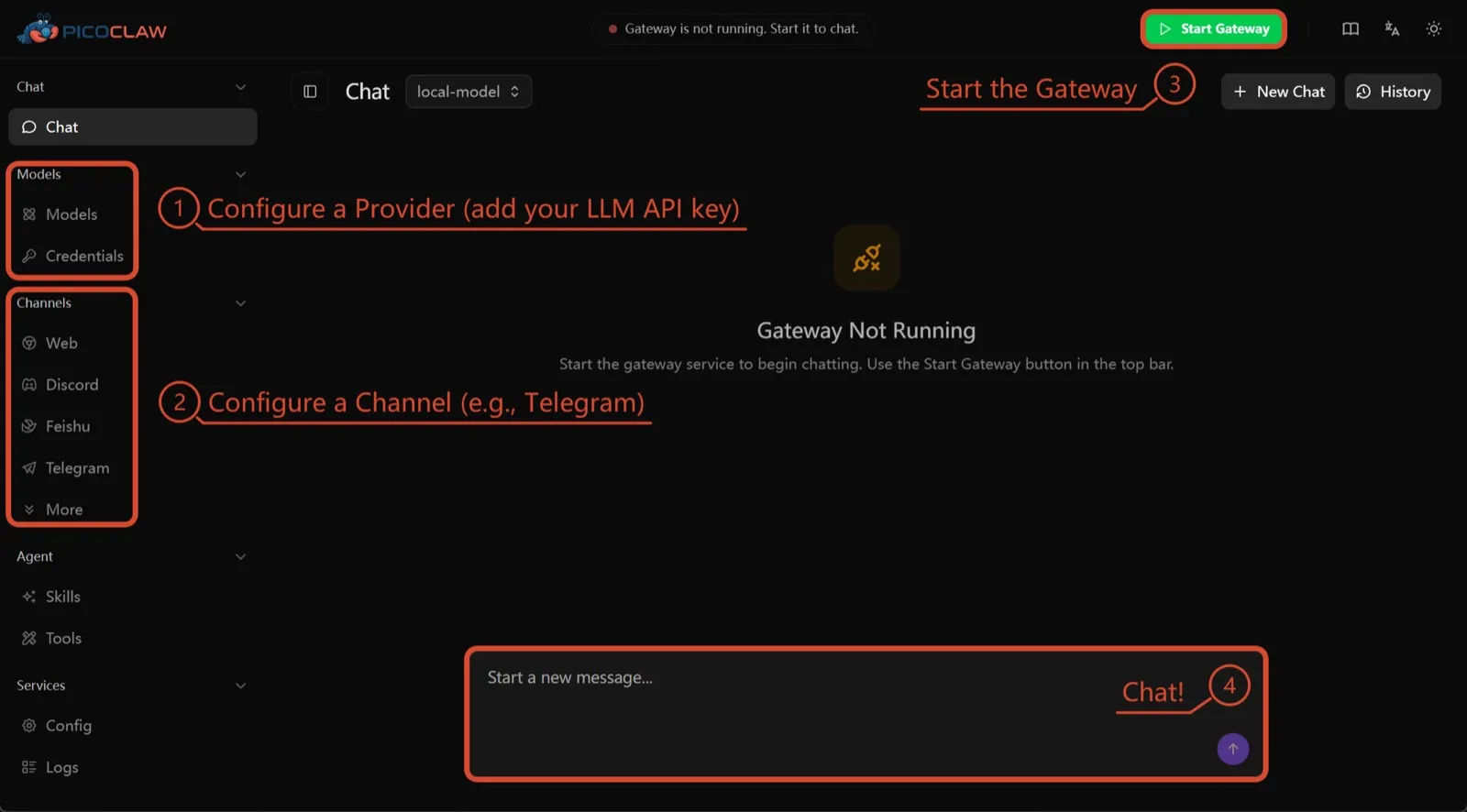
PicoClaw von Sipeed ist ein einzelnes Go-Binary, das mindestens 10 MB freien RAM benötigt (32 MB+ empfohlen) und auf x86, ARM, RISC-V und MIPS läuft, darunter 10-$-Boards, Router und alte Android-Smartphones. Telemetrie ist nicht dokumentiert, und rund 19 Chat-Kanäle werden unterstützt.
Es steht hier nur wegen der Hardware. Prozessisolation ist standardmäßig ausgeschaltet, und das Projekt selbst rät davon ab, es vor v1.0 produktiv einzusetzen.
7. nanobot: klein, lesbares Python
nanobot aus dem Data Intelligence Lab der University of Hong Kong ist ein kompakter Python-Agent mit einer ausgefeilten Browser-Oberfläche, einer Terminal-Oberfläche, geplanten Automatisierungen und vielen Chat-Kanälen. Es hat keine Telemetrie und funktioniert mit Ollama, vLLM oder LM Studio.
Wie bei OpenClaw laufen seine Shell-Befehle nicht in einer Sandbox, bis Sie bubblewrap oder Seatbelt aktivieren, und unter Windows gibt es überhaupt keine Sandbox. Wählen Sie es, wenn Sie Code möchten, den Sie an einem Nachmittag durchlesen können.

Welche Sie wählen sollten
- Sie wollen, was OpenClaw leistet, mit sicheren Standardeinstellungen und ohne Telemetrie: ZeroClaw.
- Sie wollen jeden Agenten in einem Container und haben nichts gegen Claude Code: NanoClaw.
- Sie wollen Ihr OpenClaw-Setup behalten und die Telemetrie abstellen: Hermes Agent.
- Sie wollen OpenClaw selbst behalten, in einer Sandbox, und haben den RAM dafür: NemoClaw.
- Sie arbeiten mit einem Board oder einem alten Smartphone: PicoClaw.
Eine breitere Liste, die nicht auf OpenClaw ausgerichtet ist, finden Sie unter die besten selbst gehosteten KI-Agenten.
Alternativen
Personal AI agent in one Rust binary, MIT or Apache-2.0, with local or cloud models, 30+ channels, approval gates and an OS sandbox on by default.
Meets every check: one Rust binary, approval gates and an OS sandbox on by default, no telemetry, local models.
ZeroClaw öffnenStärken
- Safe defaults: the recommended profile asks before medium-risk actions, blocks high-risk ones, keeps files in the workspace and runs tools in an OS sandbox
- One small Rust binary with one config file, running on macOS, Linux, Windows and boards like a Raspberry Pi
- More than 30 channels, plus a web dashboard for chat, memory, config and cron
- Provider fallback chains, local models through Ollama, and cryptographic receipts for tool calls
- States plainly that it sends no telemetry and needs no cloud account or license server
Schwächen
- Slack, iMessage, Signal and several other channels are not in the standard release; you build from source with extra features to get them
- `zeroclaw quickstart` only sets up the model provider; channels and risk profiles mean editing the TOML config file
- The Docker sandbox backend isn't picked automatically under the default native runtime
- Model costs are on you
Small, MIT-licensed OpenClaw alternative that runs each agent in its own Docker container and chats with you on WhatsApp, Telegram, Slack, Discord and more.
Every agent in its own container and a tiny codebase, but tied to Claude Code and sends setup diagnostics by default.
NanoClaw öffnenStärken
- Every agent runs in its own Docker container and sees only the folders you mount, so shell access stays off your host
- Small codebase (one host process and a handful of files) that you customize by having Claude Code edit your fork
- Agents never hold raw API keys: outbound calls go through a credential gateway with per-agent policies and rate limits
- Many chat channels, including WhatsApp, Telegram, Slack, Discord, iMessage, Teams, Matrix and email, with one or several agents per channel
- Scheduled tasks with optional script gates that skip waking the agent when there's nothing to do
Schwächen
- Built around Claude and Claude Code: customizing, debugging and adding channels all go through Claude Code
- Sends anonymous setup diagnostics unless you set NANOCLAW_NO_DIAGNOSTICS=1
- No config files by design, so every change means editing code in your own fork
- Needs Docker, and Windows only works through WSL2
Free, MIT-licensed AI agent from Nous Research that runs on your own machine or server, learns reusable skills, and chats with you on Telegram, Slack and more.
MIT licensed, no telemetry and lives in your chat apps, but commands aren't sandboxed by default.
Hermes Agent öffnenStärken
- Free and MIT licensed, and runs on hardware you control
- Writes and refines its own skills from experience, on top of persistent memory and cross-session search
- One gateway for 20+ chat platforms, including Telegram, Discord, Slack, WhatsApp, Signal and email
- Run several separate agents as profiles, each with its own model, memory and skills, and let them talk in group chats
- Model-agnostic, with a one-command import from OpenClaw
Schwächen
- Setup expects comfort with the command line and with running your own server
- Model costs are on you unless you use free models, and hosted web search, images and speech need a paid Nous Portal plan or your own keys
- iMessage needs a separate BlueBubbles server on a Mac
- No native mobile app; Android support is a command-line install through Termux
Open-source, self-hostable platform for persistent AI bots that each get a job, a computer, memory and routines, using the model you choose.
Our own product. Meets every check: Apache-2.0, sandboxed bot computers, no telemetry by default, any model you connect.
Rakazo öffnenStärken
- Open source (Apache-2.0) and fully self-hostable, including with local models
- Choice of model per bot, including existing Claude or ChatGPT subscriptions
- Bots keep working on schedules and triggers with their own cloud computer
- Approval controls over which actions a bot may take on its own
Schwächen
- Still in beta, with frequent releases
- You supply and pay for the model on the hosted plans, unless you buy Rakazo credits
- Telegram, WhatsApp and iMessage/SMS are only available when self-hosted
- More setup than a single chat app
NVIDIA's Apache-2.0 stack for running OpenClaw, Hermes or Deep Agents inside locked-down OpenShell sandboxes with managed inference. Alpha.
Puts OpenClaw or Hermes in a locked-down sandbox, but it's alpha, heavy to run and sends telemetry by default.
NemoClaw öffnenStärken
- Puts OpenClaw or Hermes Agent in a sandbox with network, filesystem and process controls instead of running it on your host
- Unapproved network destinations are blocked and surfaced for an operator to approve
- Inference, messaging and MCP credentials stay outside the sandbox
- Backed by NVIDIA, with local inference through Ollama, vLLM or NIM and a tested path on DGX Spark
Schwächen
- Alpha: maintainers support it on a best-effort basis, and several channels are experimental
- A wrapper, not an agent: what the bot can do depends on the OpenClaw or Hermes version inside
- Heavier than running the agent alone: 8 GB RAM minimum, a 2.4 GB sandbox image and a container runtime
- The CLI sends operation telemetry to NVIDIA unless you set NEMOCLAW_DISABLE_TELEMETRY=1
Free, MIT-licensed personal AI agent written in Go that runs as one small binary on cheap boards, old phones and PCs, and chats on Telegram, Discord and more.
Runs on cheap boards in a few dozen MB of RAM with no telemetry, but it's pre-1.0 and commands aren't sandboxed by default.
PicoClaw öffnenStärken
- Tiny footprint: one Go binary that Sipeed says boots in under a second and needs only 10 to 20 MB of RAM
- Runs on hardware others can't, from $10 RISC-V boards and routers to old Android phones
- About 19 chat channels, including Telegram, Discord, Slack, WhatsApp, Matrix, LINE and Delta Chat
- Web search works without an API key through a built-in DuckDuckGo fallback
- Heartbeat check-ins, cron reminders, MCP tools and routing between several agents
Schwächen
- The project warns it is in early rapid development, may have unresolved security issues, and should not be used in production before v1.0
- The default workspace restriction only checks paths; true process isolation is off by default and implemented only on Linux and Windows
- Native WhatsApp needs a custom build or a separate bridge
- No built-in image generation, and voice messages are only transcribed if you add a provider such as Groq
Free, MIT-licensed personal AI agent in Python with a browser UI and terminal app, scheduled tasks, memory, and chat on Telegram, Discord, Slack and more.
Small, readable Python with a good web UI and no telemetry, but shell commands aren't sandboxed by default.
nanobot öffnenStärken
- Free and MIT licensed, with a small Python core that is meant to be read and modified
- Polished bundled WebUI with projects, file diffs, an MCP app catalog and an automations calendar, plus a terminal UI
- Many chat channels, including Telegram, Discord, Slack, WhatsApp, WeChat, Feishu, Teams, Matrix and email
- Scheduled automations, long-running goals and a heartbeat that reports only useful results to your last chat
- Works with local models through Ollama, vLLM or LM Studio
Schwächen
- Shell commands are not sandboxed by default; the bubblewrap or macOS Seatbelt sandbox must be turned on, and Windows has none
- Model costs are on you, and voice messages need a separate transcription provider such as Groq or OpenAI
- No native mobile or desktop app; on a phone you use the WebUI in a browser or a chat app
- Missed scheduled runs are not replayed and interrupted subagent tasks are not relaunched after a restart
Funktionen
| OpenClaw | ZeroClaw | NanoClaw | Hermes Agent | Rakazo | NemoClaw | PicoClaw | nanobot | |
|---|---|---|---|---|---|---|---|---|
| Websuche | Ja | Ja | Ja | Ja | Ja | Ja | Ja | Ja |
| Bilderzeugung | Ja | Ja | Unbekannt | Ja | Ja | Unbekannt | Nein | Ja |
| Sprachmodus | Ja | Ja | Unbekannt | Ja | Ja | Unbekannt | Ja | Ja |
| Datei-Uploads | Ja | Ja | Ja | Ja | Ja | Unbekannt | Ja | Ja |
| Gedächtnis | Ja | Ja | Ja | Ja | Ja | Unbekannt | Ja | Ja |
| Erledigt Aufgaben für dich | Ja | Ja | Ja | Ja | Ja | Ja | Ja | Ja |
| App-Integrationen | Ja | Ja | Ja | Ja | Ja | Ja | Ja | Ja |
| Arbeitet selbstständig | Ja | Ja | Ja | Ja | Ja | Ja | Ja | Ja |
| Meldet sich von selbst | Ja | Ja | Ja | Ja | Ja | Unbekannt | Ja | Ja |
| Mehrere Bots möglich | Ja | Ja | Ja | Ja | Ja | Unbekannt | Ja | Ja |
Quellen
OpenClaw
- OpenClaw homepage and Foundation section
- OpenClaw integrations: channels, providers and plugins
- openclaw/openclaw on GitHub (MIT, v2026.11.1)
- OpenClaw docs: Sandboxing (off by default)
- Wikipedia: OpenClaw
- Notebookcheck: OpenClaw can burn through hundreds of dollars per day
- OpenClaw docs: Memory overview
- OpenClaw docs: Automations
- OpenClaw docs: Chat channels
- OpenClaw docs: iMessage
- OpenClaw docs: Heartbeat, now a default Proactive check job
- OpenClaw docs: Multi-agent routing
- OpenClaw docs: Platforms (macOS, Windows, Linux, iOS and Android apps)
- OpenClaw docs: Tools (exec, browser, web search)
- OpenClaw docs: Audio and voice notes (inbound transcription)
- OpenClaw docs: Image and media support (inbound media)
- OpenClaw docs: Install (system requirements, installer script, npm, desktop apps, Docker)
- OpenClaw docs: One-click deploy on Railway
- OpenClaw docs: Usage telemetry and update checks (on by default, feature statistics opt-in)
- OpenClaw docs: Ollama provider (local models)
ZeroClaw
- zeroclaw-labs/zeroclaw on GitHub (MIT OR Apache-2.0, v0.8.7, README)
- ZeroClaw website
- ZeroClaw docs: Sandboxing
- ZeroClaw source: risk presets (Balanced, recommended, has the sandbox on)
- ZeroClaw docs: Channels overview (default and standard release bundles)
- ZeroClaw docs: You own it (no telemetry)
- ZeroClaw docs: Docker and containers
- ZeroClaw source: tools (image generation, screenshot, web)
NanoClaw
Hermes Agent
- NousResearch/hermes-agent on GitHub (MIT, v0.23.0)
- Hermes Agent homepage and Nous Portal pricing
- Hermes Agent documentation
- Hermes Agent docs: Profiles, running multiple agents
- Hermes Agent docs: Bot Mode
- Hermes Agent docs: Voice mode
- Hermes Agent docs: Vision and image paste
- Hermes Agent docs: iMessage via BlueBubbles
- Nous Research on X: Meet Hermes Agent (February 25, 2026)
- Hermes Agent docs: Session heartbeats and cron watchdogs
- Hermes Agent docs: FAQ (Is my data sent anywhere?)
- Hermes Agent docs: Installation (desktop packages, install script, Docker)
- Hermes Agent docs: Platform support (no Linux desktop package; PyPI installs unsupported)
- Hermes Agent docs: Docker setup
- Hermes Agent docs: Configuration (terminal backend defaults to local)
- Hermes Agent docs: Security (approval modes, optional container isolation)
- Hermes Agent docs: Local models
- Hermes Agent example config (shared metrics off by default)
Rakazo
- Rakazo homepage
- Rakazo pricing
- Rakazo privacy policy
- Rakazo on GitHub (README and license)
- Rakazo changelog
- Rakazo releases
- Rakazo docs: Image and video generation
- Rakazo docs: Memory
- Rakazo docs: Connect apps
- Rakazo docs: Routines
- Rakazo docs: Chat apps
- Rakazo docs: Messaging apps (self-hosting)
- Rakazo docs: Bots and chats (add another bot, bot templates)
- Rakazo docs: Groups (several bots in one chat)
- Rakazo docs: Mobile app (notifications)
- Rakazo privacy policy (updated Sep 14, 2026)
- Rakazo privacy policy source on GitHub
- Rakazo docs: Logs and monitoring (product analytics off by default)
- Rakazo docs: Desktop app (run locally in Docker, updates)
- Rakazo docs: Docker computers
- Rakazo docs: Self-hosted models (Ollama, LM Studio)
- Rakazo Railway template setup guide
NemoClaw
- NVIDIA/NemoClaw on GitHub (Apache-2.0, README: supported agents, alpha status)
- NemoClaw docs: Overview
- NemoClaw docs: Prerequisites and platforms
- NemoClaw docs: Choose an inference provider (Ollama, vLLM, NIM)
- NemoClaw docs index: messaging channels (WhatsApp, Teams, Google Chat, WeChat experimental)
- NemoClaw source: telemetry delivery and NEMOCLAW_DISABLE_TELEMETRY
PicoClaw
- sipeed/picoclaw on GitHub (MIT, README with security notice and channel list)
- PicoClaw releases (v0.0.1 on February 9, 2026; v0.3.1 on July 3, 2026)
- PicoClaw official website and downloads
- PicoClaw docs: Configuration (workspace restriction, heartbeat, voice, multi-agent routing)
- PicoClaw source: subprocess isolation, disabled by default
- PicoClaw docs: Tools configuration (web search, exec, cron, MCP, skills)
- PicoClaw docs: Chat apps (WhatsApp native build or bridge)
- PicoClaw docs: Hardware compatibility and minimum requirements
- PicoClaw docs: Docker
nanobot
- HKUDS/nanobot on GitHub (MIT, v0.4.1, README)
- nanobot documentation
- nanobot release archive (officially launched February 2, 2026)
- nanobot docs: Chat apps
- nanobot docs: Providers and models (Ollama, vLLM, LM Studio)
- nanobot docs: Configuration (security, exec sandbox off by default, transcription, Langfuse)
- nanobot docs: Automations and heartbeat
- nanobot docs: Concepts (heartbeat delivery, subagent recovery)
- nanobot docs: Memory and Dream
- nanobot docs: Multiple instances
- nanobot docs: Deployment (Docker, services, Render)
- nanobot source: skills installer runs with DISABLE_TELEMETRY