Najlepsze alternatywy dla OpenClaw do samodzielnego hostowania w 2026
Siedem open source'owych alternatyw dla OpenClaw według tego, co od niego odpycha: brak domyślnego sandboksa, duży kod, telemetria i wymagania sprzętowe.
W skrócie
| Bot | Licencja | Komunikatory | |||||
|---|---|---|---|---|---|---|---|
| OpenClaw | MIT | 394,2 tys. | Tak | Nie | Telegram, WhatsApp, iMessage, Discord, Slack | Za darmo | |
| ZeroClaw | MIT OR Apache-2.0 | 33,3 tys. | Tak | Tak | Telegram, WhatsApp, Discord | Za darmo | |
| NanoClaw | MIT | 31,1 tys. | Tak | Tak | Telegram, WhatsApp, iMessage, Discord, Slack | Za darmo | |
| Hermes Agent | MIT | 261,7 tys. | Tak | Nie | Telegram, WhatsApp, iMessage, Discord, Slack | Od 20 USD/mies. | |
| Rakazo | Apache-2.0 | 7,5 tys. | Tak | Tak | Telegram, WhatsApp, iMessage, Slack | Od 10 USD/mies. | |
| NemoClaw | Apache-2.0 | 23 tys. | Tak | Tak | Telegram, Discord, Slack | Za darmo | |
| PicoClaw | MIT | 30,1 tys. | Tak | Nie | Telegram, WhatsApp, Discord, Slack | Za darmo | |
| nanobot | MIT | 49,9 tys. | Tak | Nie | Telegram, WhatsApp, Discord, Slack | Za darmo |


Lista kontrolna
| OpenClaw | ZeroClaw | NanoClaw | Hermes Agent | Rakazo | NemoClaw | PicoClaw | nanobot | |
|---|---|---|---|---|---|---|---|---|
| Licencja open source | Tak | Tak | Tak | Tak | Tak | Tak | Tak | Tak |
| Działa z modelami lokalnymi | Tak | Tak | Tak | Tak | Tak | Tak | Tak | Tak |
| Domyślnie w sandboksie | Nie | Tak | Tak | Nie | Tak | Tak | Nie | Nie |
| Domyślnie bez telemetrii | Nie | Tak | Nie | Tak | Tak | Nie | Tak | Tak |
| Działa w twoich komunikatorach | Tak | Tak | Tak | Tak | Tak | Tak | Tak | Tak |
| Pracuje, gdy cię nie ma | Tak | Tak | Tak | Tak | Tak | Tak | Tak | Tak |
OpenClaw to domyślny open source’owy agent: licencja MIT, 394,193 gwiazdek na GitHubie według stanu na 8 listopada 2026, 29 kanałów czatowych i aplikacje na każdy komputer i telefon. Większość osób szukających alternatywy nie narzeka na to, co potrafi. Niepokoi je raczej to, jak to robi.
Dlaczego ludzie odchodzą od OpenClaw
Powtarzają się cztery powody i to one ukształtowały poniższy ranking.
Brak domyślnego sandboksa. Sandboxing w OpenClaw jest od razu po instalacji wyłączony, więc agent uruchamia polecenia na hoście, dopóki samodzielnie nie włączy się zatwierdzeń lub sandboksa. W połączeniu z dostępem do poczty, wiadomości i umiejętności od zewnętrznych autorów prompt injection staje się realnym ryzykiem. Sami opiekunowie ostrzegają, że jest on ryzykowny dla osób nietechnicznych. Szerzej piszemy o tym w artykule Czy OpenClaw jest bezpieczny?
Rozmiar i złożoność. 142 oficjalne wtyczki i 64 dostawców modeli i mediów dają duże możliwości, ale to też dużo kodu, któremu trzeba zaufać i który trzeba aktualizować, a konfiguracja zakłada pracę w wierszu poleceń.
Telemetria. Domyślnie codziennie łączy się z serwerem projektu, wysyłając wersję OpenClaw, system operacyjny, wersję Node.js i architekturę procesora, a do tego licznik instalacji i raporty z aktualizacji. To drobiazg i update.checkOnStart: false to wyłącza, ale dopóki się tego nie zrobi, jest włączone.
Sprzęt i środowisko uruchomieniowe. Wymaga Node 24.16+ lub 26.1+, co na laptopie nie jest problemem, ale na Raspberry Pi czy routerze już tak.
Alternatywy uszeregowaliśmy według tego, ile z tych problemów rozwiązują, nadal wykonując podstawowe zadanie: agent działający cały czas, z którym rozmawia się przez aplikację czatową.
1. ZeroClaw: najbliżej „OpenClaw z bezpiecznymi ustawieniami domyślnymi”
ZeroClaw rozwiązuje wszystkie cztery. To pojedynczy plik binarny w Rust z jednym plikiem konfiguracyjnym TOML, działający na macOS, Linuksie, Windowsie, FreeBSD, Androidzie czy Raspberry Pi. Zalecany profil Balanced pyta przed działaniami o średnim ryzyku, blokuje te wysokiego ryzyka, ogranicza dostęp do plików do przestrzeni roboczej i uruchamia narzędzia w sandboksie systemu operacyjnego (Seatbelt na macOS, Firejail na Linuksie). Dokumentacja stwierdza, że nie wysyła on żadnej telemetrii.
Haczykiem są kanały: Slacka, iMessage i Signala nie ma w standardowym wydaniu, więc trzeba zbudować go ze źródeł z dodatkowymi funkcjami. Jeśli na co dzień używa się WhatsAppa, Telegrama czy Discorda, nie ma to znaczenia. Pełne porównanie: ZeroClaw vs OpenClaw.

2. NanoClaw: prawdziwa izolacja w kontenerach, mały kod
NanoClaw powstał jako mniejsza, izolowana w kontenerach wersja OpenClaw. Każdy agent działa we własnym kontenerze Dockera i widzi tylko zamontowane foldery, a wychodzące wywołania API przechodzą przez bramkę poświadczeń, więc agenci nigdy nie trzymają surowych kluczy. Host to jeden proces Node i kilka plików.
Jest niżej niż ZeroClaw z dwóch powodów: zbudowano go wokół Claude i Claude Code (modyfikacja polega na tym, że Claude Code edytuje własny fork, i nie ma plików konfiguracyjnych), a do tego wysyła anonimową diagnostykę instalacji, o ile nie ustawi się NANOCLAW_NO_DIAGNOSTICS=1. Zob. NanoClaw vs OpenClaw.

3. Hermes Agent: najłatwiejsza przesiadka
Hermes Agent od Nous Research powstał z myślą o użytkownikach OpenClaw. Jednym poleceniem importuje ustawienia, wspomnienia i umiejętności z OpenClaw, obsługuje ponad 20 platform czatowych, a udostępniane metryki są domyślnie wyłączone. Dodaje też coś, czym OpenClaw się nie wyróżnia: po złożonych zadaniach sam pisze i dopracowuje własne umiejętności.
Nie rozwiązuje jednak problemu sandboksa. Backend terminala domyślnie działa lokalnie, a izolacja w kontenerze jest opcjonalna. Warto go wybrać ze względu na telemetrię i funkcje, nie bezpieczeństwo. Więcej w Hermes vs OpenClaw.

4. Rakazo: komputery w sandboksie dla każdego bota
Rakazo, które tworzymy, daje każdemu botowi własny komputer w sandboksie z przeglądarką, terminalem i pulpitem, więc polecenia agenta wykonują się tam, a nie na hoście. Ma licencję Apache-2.0, instalacja hostowana samodzielnie nie wysyła żadnej analityki produktowej, a lokalne modele działają przez Ollama lub LM Studio. Samemu ustala się, które działania wymagają zatwierdzenia.
Jest cięższe niż powyższe opcje (Docker Engine z Compose), nadal w becie, a Telegram, WhatsApp i iMessage działają tylko przy samodzielnym hostowaniu.


5. NemoClaw: zostaw OpenClaw, dodaj klatkę
Jeśli OpenClaw się podoba, a jedynym zastrzeżeniem jest to, że działa bez ograniczeń na maszynie, NemoClaw to stos NVIDII do uruchamiania OpenClaw wewnątrz sandboksa OpenShell. Niezatwierdzone adresy sieciowe są blokowane, dopóki operator ich nie zatwierdzi, a poświadczenia pozostają poza sandboksem.
Pozostałe trzy zarzuty jednak pogłębia: minimum 8 GB RAM (zalecane 16 GB), środowisko uruchomieniowe kontenerów, telemetria do NVIDII, o ile nie ustawi się NEMOCLAW_DISABLE_TELEMETRY=1, i status alfa. Zob. NemoClaw vs OpenClaw.

6. PicoClaw: na maleńki sprzęt
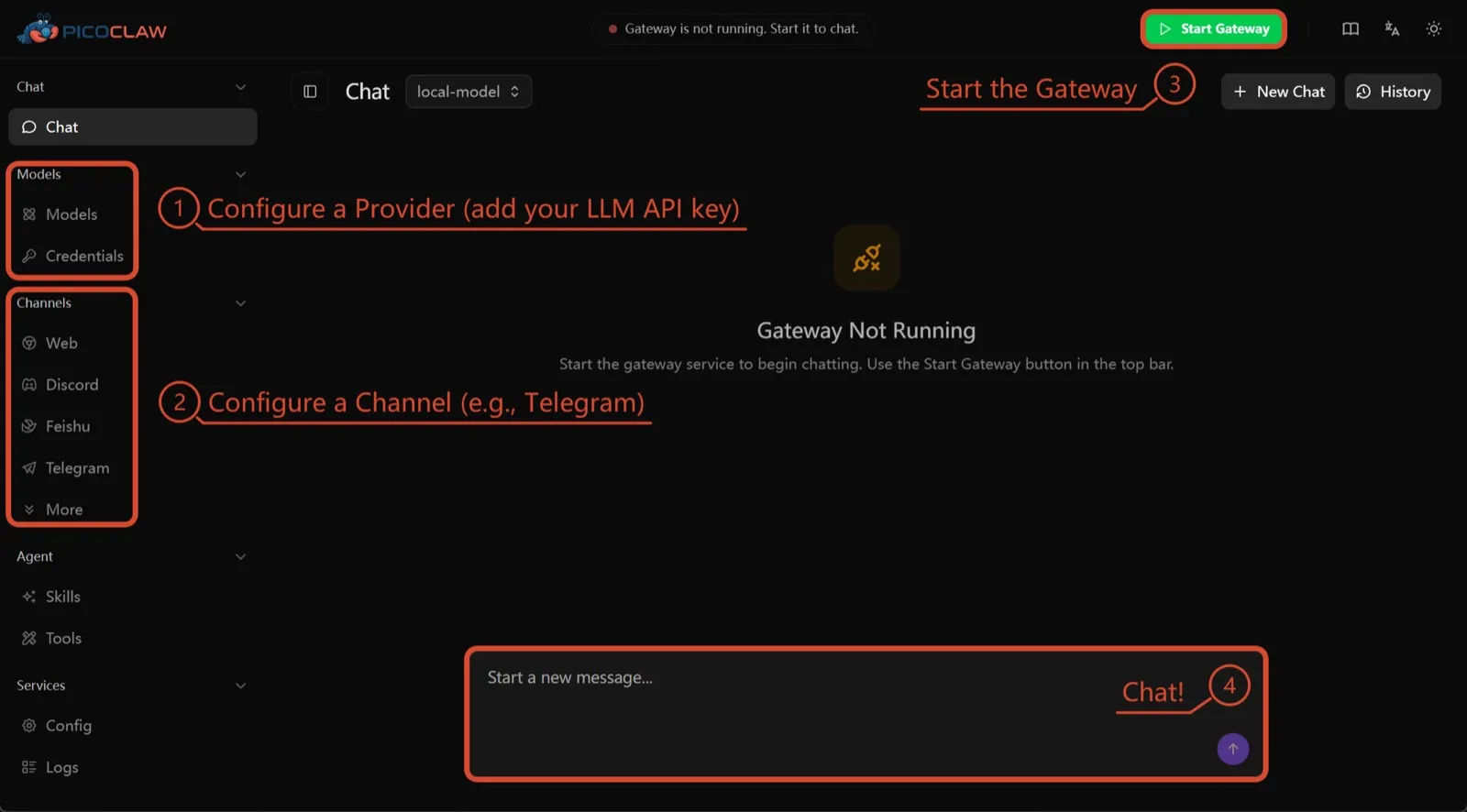
PicoClaw od Sipeed to jeden plik binarny w Go, który potrzebuje co najmniej 10 MB wolnej pamięci RAM (zalecane 32 MB+) i działa na x86, ARM, RISC-V i MIPS, w tym na płytkach za $10, routerach i starych telefonach z Androidem. Nie ma udokumentowanej telemetrii, obsługuje około 19 kanałów czatowych.
Jest tu wyłącznie ze względu na sprzęt. Izolacja procesów jest domyślnie wyłączona, a sam projekt odradza używanie go produkcyjnie przed v1.0.
7. nanobot: mały, czytelny Python
nanobot z Data Intelligence Lab Uniwersytetu w Hongkongu to kompaktowy agent w Pythonie z dopracowanym interfejsem w przeglądarce, interfejsem terminalowym, zaplanowanymi automatyzacjami i wieloma kanałami czatowymi. Nie ma telemetrii i działa z Ollama, vLLM lub LM Studio.
Podobnie jak w OpenClaw, jego polecenia powłoki nie działają w sandboksie, dopóki nie włączy się bubblewrap lub Seatbelt, a na Windowsie sandboksa nie ma wcale. Warto go wybrać, jeśli chce się kodu, który da się przeczytać w jedno popołudnie.

Który wybrać
- Zadanie OpenClaw z bezpiecznymi ustawieniami domyślnymi i bez telemetrii: ZeroClaw.
- Każdy agent w kontenerze, a Claude Code nie przeszkadza: NanoClaw.
- Zachowanie obecnej konfiguracji OpenClaw i koniec z telemetrią: Hermes Agent.
- Zachowanie samego OpenClaw, w sandboksie, przy wystarczającej ilości RAM: NemoClaw.
- Uruchamianie na płytce lub starym telefonie: PicoClaw.
Szerszą listę, niezwiązaną z OpenClaw, można znaleźć w zestawieniu najlepszych agentów AI do samodzielnego hostowania.
Alternatywy
Personal AI agent in one Rust binary, MIT or Apache-2.0, with local or cloud models, 30+ channels, approval gates and an OS sandbox on by default.
Meets every check: one Rust binary, approval gates and an OS sandbox on by default, no telemetry, local models.
Przejdź do ZeroClawMocne strony
- Safe defaults: the recommended profile asks before medium-risk actions, blocks high-risk ones, keeps files in the workspace and runs tools in an OS sandbox
- One small Rust binary with one config file, running on macOS, Linux, Windows and boards like a Raspberry Pi
- More than 30 channels, plus a web dashboard for chat, memory, config and cron
- Provider fallback chains, local models through Ollama, and cryptographic receipts for tool calls
- States plainly that it sends no telemetry and needs no cloud account or license server
Słabe strony
- Slack, iMessage, Signal and several other channels are not in the standard release; you build from source with extra features to get them
- `zeroclaw quickstart` only sets up the model provider; channels and risk profiles mean editing the TOML config file
- The Docker sandbox backend isn't picked automatically under the default native runtime
- Model costs are on you
Small, MIT-licensed OpenClaw alternative that runs each agent in its own Docker container and chats with you on WhatsApp, Telegram, Slack, Discord and more.
Every agent in its own container and a tiny codebase, but tied to Claude Code and sends setup diagnostics by default.
Przejdź do NanoClawMocne strony
- Every agent runs in its own Docker container and sees only the folders you mount, so shell access stays off your host
- Small codebase (one host process and a handful of files) that you customize by having Claude Code edit your fork
- Agents never hold raw API keys: outbound calls go through a credential gateway with per-agent policies and rate limits
- Many chat channels, including WhatsApp, Telegram, Slack, Discord, iMessage, Teams, Matrix and email, with one or several agents per channel
- Scheduled tasks with optional script gates that skip waking the agent when there's nothing to do
Słabe strony
- Built around Claude and Claude Code: customizing, debugging and adding channels all go through Claude Code
- Sends anonymous setup diagnostics unless you set NANOCLAW_NO_DIAGNOSTICS=1
- No config files by design, so every change means editing code in your own fork
- Needs Docker, and Windows only works through WSL2
Free, MIT-licensed AI agent from Nous Research that runs on your own machine or server, learns reusable skills, and chats with you on Telegram, Slack and more.
MIT licensed, no telemetry and lives in your chat apps, but commands aren't sandboxed by default.
Przejdź do Hermes AgentMocne strony
- Free and MIT licensed, and runs on hardware you control
- Writes and refines its own skills from experience, on top of persistent memory and cross-session search
- One gateway for 20+ chat platforms, including Telegram, Discord, Slack, WhatsApp, Signal and email
- Run several separate agents as profiles, each with its own model, memory and skills, and let them talk in group chats
- Model-agnostic, with a one-command import from OpenClaw
Słabe strony
- Setup expects comfort with the command line and with running your own server
- Model costs are on you unless you use free models, and hosted web search, images and speech need a paid Nous Portal plan or your own keys
- iMessage needs a separate BlueBubbles server on a Mac
- No native mobile app; Android support is a command-line install through Termux
Open-source, self-hostable platform for persistent AI bots that each get a job, a computer, memory and routines, using the model you choose.
Our own product. Meets every check: Apache-2.0, sandboxed bot computers, no telemetry by default, any model you connect.
Przejdź do RakazoMocne strony
- Open source (Apache-2.0) and fully self-hostable, including with local models
- Choice of model per bot, including existing Claude or ChatGPT subscriptions
- Bots keep working on schedules and triggers with their own cloud computer
- Approval controls over which actions a bot may take on its own
Słabe strony
- Still in beta, with frequent releases
- You supply and pay for the model on the hosted plans, unless you buy Rakazo credits
- Telegram, WhatsApp and iMessage/SMS are only available when self-hosted
- More setup than a single chat app
NVIDIA's Apache-2.0 stack for running OpenClaw, Hermes or Deep Agents inside locked-down OpenShell sandboxes with managed inference. Alpha.
Puts OpenClaw or Hermes in a locked-down sandbox, but it's alpha, heavy to run and sends telemetry by default.
Przejdź do NemoClawMocne strony
- Puts OpenClaw or Hermes Agent in a sandbox with network, filesystem and process controls instead of running it on your host
- Unapproved network destinations are blocked and surfaced for an operator to approve
- Inference, messaging and MCP credentials stay outside the sandbox
- Backed by NVIDIA, with local inference through Ollama, vLLM or NIM and a tested path on DGX Spark
Słabe strony
- Alpha: maintainers support it on a best-effort basis, and several channels are experimental
- A wrapper, not an agent: what the bot can do depends on the OpenClaw or Hermes version inside
- Heavier than running the agent alone: 8 GB RAM minimum, a 2.4 GB sandbox image and a container runtime
- The CLI sends operation telemetry to NVIDIA unless you set NEMOCLAW_DISABLE_TELEMETRY=1
Free, MIT-licensed personal AI agent written in Go that runs as one small binary on cheap boards, old phones and PCs, and chats on Telegram, Discord and more.
Runs on cheap boards in a few dozen MB of RAM with no telemetry, but it's pre-1.0 and commands aren't sandboxed by default.
Przejdź do PicoClawMocne strony
- Tiny footprint: one Go binary that Sipeed says boots in under a second and needs only 10 to 20 MB of RAM
- Runs on hardware others can't, from $10 RISC-V boards and routers to old Android phones
- About 19 chat channels, including Telegram, Discord, Slack, WhatsApp, Matrix, LINE and Delta Chat
- Web search works without an API key through a built-in DuckDuckGo fallback
- Heartbeat check-ins, cron reminders, MCP tools and routing between several agents
Słabe strony
- The project warns it is in early rapid development, may have unresolved security issues, and should not be used in production before v1.0
- The default workspace restriction only checks paths; true process isolation is off by default and implemented only on Linux and Windows
- Native WhatsApp needs a custom build or a separate bridge
- No built-in image generation, and voice messages are only transcribed if you add a provider such as Groq
Free, MIT-licensed personal AI agent in Python with a browser UI and terminal app, scheduled tasks, memory, and chat on Telegram, Discord, Slack and more.
Small, readable Python with a good web UI and no telemetry, but shell commands aren't sandboxed by default.
Przejdź do nanobotMocne strony
- Free and MIT licensed, with a small Python core that is meant to be read and modified
- Polished bundled WebUI with projects, file diffs, an MCP app catalog and an automations calendar, plus a terminal UI
- Many chat channels, including Telegram, Discord, Slack, WhatsApp, WeChat, Feishu, Teams, Matrix and email
- Scheduled automations, long-running goals and a heartbeat that reports only useful results to your last chat
- Works with local models through Ollama, vLLM or LM Studio
Słabe strony
- Shell commands are not sandboxed by default; the bubblewrap or macOS Seatbelt sandbox must be turned on, and Windows has none
- Model costs are on you, and voice messages need a separate transcription provider such as Groq or OpenAI
- No native mobile or desktop app; on a phone you use the WebUI in a browser or a chat app
- Missed scheduled runs are not replayed and interrupted subagent tasks are not relaunched after a restart
Funkcje
| OpenClaw | ZeroClaw | NanoClaw | Hermes Agent | Rakazo | NemoClaw | PicoClaw | nanobot | |
|---|---|---|---|---|---|---|---|---|
| Wyszukiwanie w sieci | Tak | Tak | Tak | Tak | Tak | Tak | Tak | Tak |
| Generowanie obrazów | Tak | Tak | Nieznane | Tak | Tak | Nieznane | Nie | Tak |
| Tryb głosowy | Tak | Tak | Nieznane | Tak | Tak | Nieznane | Tak | Tak |
| Przesyłanie plików | Tak | Tak | Tak | Tak | Tak | Nieznane | Tak | Tak |
| Pamięć | Tak | Tak | Tak | Tak | Tak | Nieznane | Tak | Tak |
| Wykonuje zadania za ciebie | Tak | Tak | Tak | Tak | Tak | Tak | Tak | Tak |
| Integracje z aplikacjami | Tak | Tak | Tak | Tak | Tak | Tak | Tak | Tak |
| Działa samodzielnie | Tak | Tak | Tak | Tak | Tak | Tak | Tak | Tak |
| Pisze pierwszy | Tak | Tak | Tak | Tak | Tak | Nieznane | Tak | Tak |
| Wiele botów | Tak | Tak | Tak | Tak | Tak | Nieznane | Tak | Tak |
Źródła
OpenClaw
- OpenClaw homepage and Foundation section
- OpenClaw integrations: channels, providers and plugins
- openclaw/openclaw on GitHub (MIT, v2026.11.1)
- OpenClaw docs: Sandboxing (off by default)
- Wikipedia: OpenClaw
- Notebookcheck: OpenClaw can burn through hundreds of dollars per day
- OpenClaw docs: Memory overview
- OpenClaw docs: Automations
- OpenClaw docs: Chat channels
- OpenClaw docs: iMessage
- OpenClaw docs: Heartbeat, now a default Proactive check job
- OpenClaw docs: Multi-agent routing
- OpenClaw docs: Platforms (macOS, Windows, Linux, iOS and Android apps)
- OpenClaw docs: Tools (exec, browser, web search)
- OpenClaw docs: Audio and voice notes (inbound transcription)
- OpenClaw docs: Image and media support (inbound media)
- OpenClaw docs: Install (system requirements, installer script, npm, desktop apps, Docker)
- OpenClaw docs: One-click deploy on Railway
- OpenClaw docs: Usage telemetry and update checks (on by default, feature statistics opt-in)
- OpenClaw docs: Ollama provider (local models)
ZeroClaw
- zeroclaw-labs/zeroclaw on GitHub (MIT OR Apache-2.0, v0.8.7, README)
- ZeroClaw website
- ZeroClaw docs: Sandboxing
- ZeroClaw source: risk presets (Balanced, recommended, has the sandbox on)
- ZeroClaw docs: Channels overview (default and standard release bundles)
- ZeroClaw docs: You own it (no telemetry)
- ZeroClaw docs: Docker and containers
- ZeroClaw source: tools (image generation, screenshot, web)
NanoClaw
Hermes Agent
- NousResearch/hermes-agent on GitHub (MIT, v0.23.0)
- Hermes Agent homepage and Nous Portal pricing
- Hermes Agent documentation
- Hermes Agent docs: Profiles, running multiple agents
- Hermes Agent docs: Bot Mode
- Hermes Agent docs: Voice mode
- Hermes Agent docs: Vision and image paste
- Hermes Agent docs: iMessage via BlueBubbles
- Nous Research on X: Meet Hermes Agent (February 25, 2026)
- Hermes Agent docs: Session heartbeats and cron watchdogs
- Hermes Agent docs: FAQ (Is my data sent anywhere?)
- Hermes Agent docs: Installation (desktop packages, install script, Docker)
- Hermes Agent docs: Platform support (no Linux desktop package; PyPI installs unsupported)
- Hermes Agent docs: Docker setup
- Hermes Agent docs: Configuration (terminal backend defaults to local)
- Hermes Agent docs: Security (approval modes, optional container isolation)
- Hermes Agent docs: Local models
- Hermes Agent example config (shared metrics off by default)
Rakazo
- Rakazo homepage
- Rakazo pricing
- Rakazo privacy policy
- Rakazo on GitHub (README and license)
- Rakazo changelog
- Rakazo releases
- Rakazo docs: Image and video generation
- Rakazo docs: Memory
- Rakazo docs: Connect apps
- Rakazo docs: Routines
- Rakazo docs: Chat apps
- Rakazo docs: Messaging apps (self-hosting)
- Rakazo docs: Bots and chats (add another bot, bot templates)
- Rakazo docs: Groups (several bots in one chat)
- Rakazo docs: Mobile app (notifications)
- Rakazo privacy policy (updated Sep 14, 2026)
- Rakazo privacy policy source on GitHub
- Rakazo docs: Logs and monitoring (product analytics off by default)
- Rakazo docs: Desktop app (run locally in Docker, updates)
- Rakazo docs: Docker computers
- Rakazo docs: Self-hosted models (Ollama, LM Studio)
- Rakazo Railway template setup guide
NemoClaw
- NVIDIA/NemoClaw on GitHub (Apache-2.0, README: supported agents, alpha status)
- NemoClaw docs: Overview
- NemoClaw docs: Prerequisites and platforms
- NemoClaw docs: Choose an inference provider (Ollama, vLLM, NIM)
- NemoClaw docs index: messaging channels (WhatsApp, Teams, Google Chat, WeChat experimental)
- NemoClaw source: telemetry delivery and NEMOCLAW_DISABLE_TELEMETRY
PicoClaw
- sipeed/picoclaw on GitHub (MIT, README with security notice and channel list)
- PicoClaw releases (v0.0.1 on February 9, 2026; v0.3.1 on July 3, 2026)
- PicoClaw official website and downloads
- PicoClaw docs: Configuration (workspace restriction, heartbeat, voice, multi-agent routing)
- PicoClaw source: subprocess isolation, disabled by default
- PicoClaw docs: Tools configuration (web search, exec, cron, MCP, skills)
- PicoClaw docs: Chat apps (WhatsApp native build or bridge)
- PicoClaw docs: Hardware compatibility and minimum requirements
- PicoClaw docs: Docker
nanobot
- HKUDS/nanobot on GitHub (MIT, v0.4.1, README)
- nanobot documentation
- nanobot release archive (officially launched February 2, 2026)
- nanobot docs: Chat apps
- nanobot docs: Providers and models (Ollama, vLLM, LM Studio)
- nanobot docs: Configuration (security, exec sandbox off by default, transcription, Langfuse)
- nanobot docs: Automations and heartbeat
- nanobot docs: Concepts (heartbeat delivery, subagent recovery)
- nanobot docs: Memory and Dream
- nanobot docs: Multiple instances
- nanobot docs: Deployment (Docker, services, Render)
- nanobot source: skills installer runs with DISABLE_TELEMETRY