החלופות הטובות ביותר ל-OpenClaw לאירוח עצמי ב-2026
שבע חלופות קוד פתוח ל-OpenClaw, מדורגות לפי מה שמרחיק ממנו אנשים: אין sandbox כברירת מחדל, בסיס קוד גדול, טלמטריה ודרישות חומרה.
במבט מהיר
| בוט | רישיון | אפליקציות צ׳אט | |||||
|---|---|---|---|---|---|---|---|
| OpenClaw | MIT | 394.2K | כן | לא | Telegram, WhatsApp, iMessage, Discord, Slack | חינם | |
| ZeroClaw | MIT OR Apache-2.0 | 33.3K | כן | כן | Telegram, WhatsApp, Discord | חינם | |
| NanoClaw | MIT | 31.1K | כן | כן | Telegram, WhatsApp, iMessage, Discord, Slack | חינם | |
| Hermes Agent | MIT | 261.7K | כן | לא | Telegram, WhatsApp, iMessage, Discord, Slack | החל מ-20 $ לחודש | |
| Rakazo | Apache-2.0 | 7.5K | כן | כן | Telegram, WhatsApp, iMessage, Slack | החל מ-10 $ לחודש | |
| NemoClaw | Apache-2.0 | 23K | כן | כן | Telegram, Discord, Slack | חינם | |
| PicoClaw | MIT | 30.1K | כן | לא | Telegram, WhatsApp, Discord, Slack | חינם | |
| nanobot | MIT | 49.9K | כן | לא | Telegram, WhatsApp, Discord, Slack | חינם |


רשימת בדיקה
OpenClaw הוא סוכן הקוד הפתוח שנבחר כברירת מחדל: רישיון MIT, 394,193 כוכבים ב-GitHub נכון ל-8 בנובמבר 2026, 29 ערוצי צ’אט ואפליקציות לכל מחשב וטלפון. רוב מי שמחפשים חלופה לא מאוכזבים ממה שהוא יודע לעשות. מה שמטריד אותם הוא איך הוא עושה את זה.
למה אנשים עוזבים את OpenClaw
ארבע סיבות חוזרות שוב ושוב, והן עיצבו את הדירוג שלהלן.
אין sandbox כברירת מחדל. ה-sandbox של OpenClaw כבוי מהקופסה, כך שהסוכן מריץ פקודות על המחשב המארח שלכם אלא אם תפעילו בעצמכם אישורים או את ה-sandbox. שלבו את זה עם גישה לאימייל, להודעות ול-skills של צד שלישי, ו-prompt injection הופך לסיכון אמיתי. המתחזקים שלו עצמם מזהירים שהוא מסוכן למשתמשים לא טכניים. אנחנו מפרטים על כך בהאם OpenClaw בטוח?
גודל ומורכבות. 142 תוספים רשמיים ו-64 ספקי מודלים ומדיה הופכים אותו ליכולתי, אבל זה הרבה קוד שצריך לסמוך עליו ולעדכן, וההתקנה מצפה לשורת הפקודה.
טלמטריה. כברירת מחדל הוא פונה לשרת של הפרויקט מדי יום עם גרסת OpenClaw, מערכת ההפעלה, גרסת Node.js וארכיטקטורת המעבד שלכם, וגם ספירת התקנות ודיווחי עדכון. זה מינורי ו-update.checkOnStart: false מכבה את זה, אבל זה פעיל עד שתכבו.
חומרה וסביבת ריצה. הוא דורש Node 24.16+ או 26.1+, וזה בסדר על מחשב נייד ופחות בסדר על Raspberry Pi או נתב.
דירגנו את החלופות לפי כמה מהבעיות האלה הן פותרות תוך כדי ביצוע העבודה המרכזית: סוכן שפועל תמיד ושאתם מדברים איתו מאפליקציית צ’אט.
1. ZeroClaw: הדבר הכי קרוב ל-“OpenClaw עם ברירות מחדל בטוחות”
ZeroClaw פותר את כל הארבע. זה קובץ binary יחיד ב-Rust עם קובץ הגדרות TOML אחד, שרץ על macOS, Linux, Windows, FreeBSD, Android או Raspberry Pi. פרופיל ה-Balanced המומלץ שלו שואל לפני פעולות בסיכון בינוני, חוסם פעולות בסיכון גבוה, מגביל גישה לקבצים לסביבת העבודה ומריץ כלים ב-sandbox של מערכת ההפעלה (Seatbelt ב-macOS, Firejail ב-Linux). התיעוד שלו מציין שהוא לא שולח טלמטריה.
החיסרון הוא הערוצים: Slack, iMessage ו-Signal לא נמצאים בגרסה הרגילה, כך שצריך לבנות מקוד המקור עם תכונות נוספות. אם אתם חיים ב-WhatsApp, Telegram או Discord, זה לא משנה. השוואה מלאה: ZeroClaw מול OpenClaw.

2. NanoClaw: בידוד קונטיינרים אמיתי, בסיס קוד קטן
NanoClaw התחיל כגרסה קטנה יותר של OpenClaw, מבודדת בקונטיינרים. כל סוכן רץ בקונטיינר Docker משלו ורואה רק את התיקיות שאתם מחברים, וקריאות API יוצאות עוברות דרך gateway של אישורי גישה כך שהסוכנים אף פעם לא מחזיקים מפתחות גולמיים. ה-host הוא תהליך Node אחד וקומץ קבצים.
הוא מדורג מתחת ל-ZeroClaw משתי סיבות: הוא בנוי סביב Claude ו-Claude Code (התאמה אישית פירושה ש-Claude Code עורך את ה-fork שלכם, ואין קובצי הגדרות), והוא שולח נתוני אבחון התקנה אנונימיים אלא אם תגדירו NANOCLAW_NO_DIAGNOSTICS=1. ראו NanoClaw מול OpenClaw.

3. Hermes Agent: המעבר הקל ביותר
Hermes Agent של Nous Research נבנה מתוך מחשבה על משתמשי OpenClaw. הוא מייבא את ההגדרות, הזיכרונות וה-skills שלכם מ-OpenClaw בפקודה אחת, תומך ביותר מ-20 פלטפורמות צ’אט, והמדדים המשותפים שלו כבויים כברירת מחדל. הוא גם מוסיף משהו ש-OpenClaw לא מבליט: הוא כותב ומשפר בעצמו skills אחרי משימות מורכבות.
עם זאת, הוא לא פותר את בעיית ה-sandbox. ה-backend של הטרמינל מוגדר כברירת מחדל למקומי, ובידוד בקונטיינר הוא אופציונלי. בחרו בו בשביל הטלמטריה והתכונות, לא בשביל הבטיחות. עוד בHermes מול OpenClaw.

4. Rakazo: מחשבים ב-sandbox לכל בוט
Rakazo, שאנחנו מפתחים, נותן לכל בוט מחשב משלו ב-sandbox עם דפדפן, טרמינל ושולחן עבודה, כך שפקודות הסוכן רצות שם ולא על המחשב המארח שלכם. הוא ברישיון Apache-2.0, התקנה באירוח עצמי לא שולחת אנליטיקת מוצר, והוא מריץ מודלים מקומיים דרך Ollama או LM Studio. אתם קובעים אילו פעולות דורשות את אישורכם.
הוא כבד יותר מהאפשרויות שלמעלה (Docker Engine עם Compose), עדיין ב-beta, ו-Telegram, WhatsApp ו-iMessage עובדים רק באירוח עצמי.


5. NemoClaw: השאירו את OpenClaw, הוסיפו כלוב
אם אתם אוהבים את OpenClaw ומתנגדים רק לכך שהוא רץ חופשי על המחשב שלכם, NemoClaw הוא ה-stack של NVIDIA להרצת OpenClaw בתוך sandbox של OpenShell. יעדי רשת שלא אושרו חסומים עד שמפעיל מאשר אותם, ואישורי הגישה נשארים מחוץ ל-sandbox.
הוא מחמיר את שלוש התלונות האחרות: מינימום 8 GB RAM (מומלץ 16 GB), סביבת ריצה לקונטיינרים, טלמטריה ל-NVIDIA אלא אם תגדירו NEMOCLAW_DISABLE_TELEMETRY=1, וסטטוס alpha. ראו NemoClaw מול OpenClaw.

6. PicoClaw: לחומרה זעירה
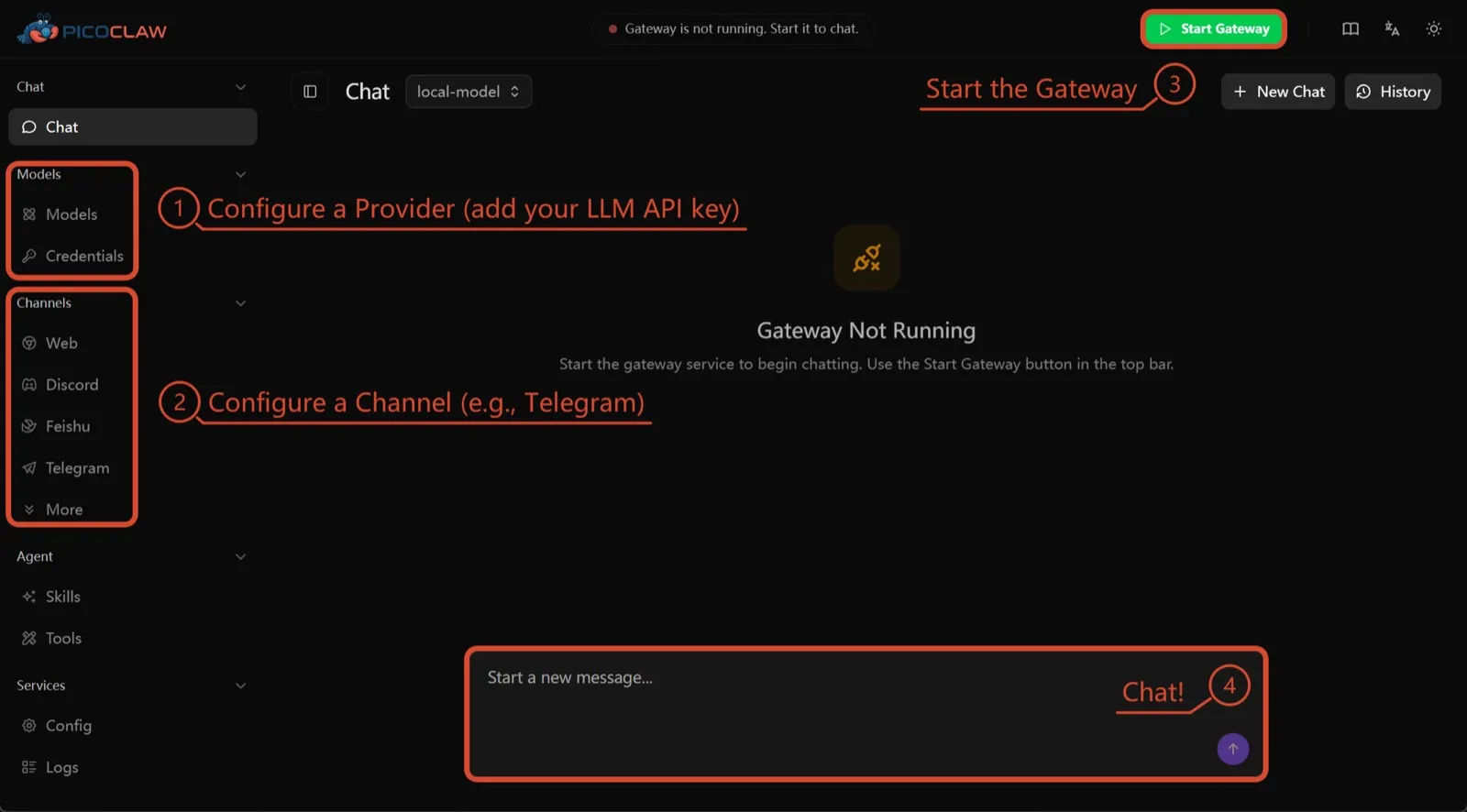
PicoClaw של Sipeed הוא קובץ binary יחיד ב-Go שצריך לפחות 10 MB RAM פנויים (מומלץ 32 MB+) ורץ על x86, ARM, RISC-V ו-MIPS, כולל לוחות ב-10 דולר, נתבים וטלפוני Android ישנים. לא מתועדת טלמטריה, ונתמכים כ-19 ערוצי צ’אט.
הוא כאן רק בזכות החומרה. בידוד תהליכים כבוי כברירת מחדל, והפרויקט עצמו אומר לא להשתמש בו ב-production לפני v1.0.
7. nanobot: Python קטן וקריא
nanobot מ-Data Intelligence Lab של אוניברסיטת הונג קונג הוא סוכן Python קומפקטי עם ממשק דפדפן מלוטש, ממשק טרמינל, אוטומציות מתוזמנות וערוצי צ’אט רבים. אין לו טלמטריה, והוא עובד עם Ollama, vLLM או LM Studio.
כמו ב-OpenClaw, פקודות ה-shell שלו לא רצות ב-sandbox עד שתפעילו bubblewrap או Seatbelt, וב-Windows אין sandbox בכלל. בחרו בו אם אתם רוצים קוד שאפשר לקרוא בצהריים אחד.

במה לבחור
- רוצים את מה ש-OpenClaw עושה, עם ברירות מחדל בטוחות ובלי טלמטריה: ZeroClaw.
- רוצים כל סוכן בקונטיינר ולא מפריע לכם Claude Code: NanoClaw.
- רוצים לשמור את ההגדרות שלכם מ-OpenClaw ולהפסיק את הטלמטריה: Hermes Agent.
- רוצים לשמור את OpenClaw עצמו, ב-sandbox, ויש לכם את ה-RAM: NemoClaw.
- מריצים על לוח או טלפון ישן: PicoClaw.
לרשימה רחבה יותר שלא ממוסגרת סביב OpenClaw, ראו את סוכני ה-AI הטובים ביותר לאירוח עצמי.
חלופות
Personal AI agent in one Rust binary, MIT or Apache-2.0, with local or cloud models, 30+ channels, approval gates and an OS sandbox on by default.
Meets every check: one Rust binary, approval gates and an OS sandbox on by default, no telemetry, local models.
מעבר ל-ZeroClawחוזקות
- Safe defaults: the recommended profile asks before medium-risk actions, blocks high-risk ones, keeps files in the workspace and runs tools in an OS sandbox
- One small Rust binary with one config file, running on macOS, Linux, Windows and boards like a Raspberry Pi
- More than 30 channels, plus a web dashboard for chat, memory, config and cron
- Provider fallback chains, local models through Ollama, and cryptographic receipts for tool calls
- States plainly that it sends no telemetry and needs no cloud account or license server
חולשות
- Slack, iMessage, Signal and several other channels are not in the standard release; you build from source with extra features to get them
- `zeroclaw quickstart` only sets up the model provider; channels and risk profiles mean editing the TOML config file
- The Docker sandbox backend isn't picked automatically under the default native runtime
- Model costs are on you
Small, MIT-licensed OpenClaw alternative that runs each agent in its own Docker container and chats with you on WhatsApp, Telegram, Slack, Discord and more.
Every agent in its own container and a tiny codebase, but tied to Claude Code and sends setup diagnostics by default.
מעבר ל-NanoClawחוזקות
- Every agent runs in its own Docker container and sees only the folders you mount, so shell access stays off your host
- Small codebase (one host process and a handful of files) that you customize by having Claude Code edit your fork
- Agents never hold raw API keys: outbound calls go through a credential gateway with per-agent policies and rate limits
- Many chat channels, including WhatsApp, Telegram, Slack, Discord, iMessage, Teams, Matrix and email, with one or several agents per channel
- Scheduled tasks with optional script gates that skip waking the agent when there's nothing to do
חולשות
- Built around Claude and Claude Code: customizing, debugging and adding channels all go through Claude Code
- Sends anonymous setup diagnostics unless you set NANOCLAW_NO_DIAGNOSTICS=1
- No config files by design, so every change means editing code in your own fork
- Needs Docker, and Windows only works through WSL2
Free, MIT-licensed AI agent from Nous Research that runs on your own machine or server, learns reusable skills, and chats with you on Telegram, Slack and more.
MIT licensed, no telemetry and lives in your chat apps, but commands aren't sandboxed by default.
מעבר ל-Hermes Agentחוזקות
- Free and MIT licensed, and runs on hardware you control
- Writes and refines its own skills from experience, on top of persistent memory and cross-session search
- One gateway for 20+ chat platforms, including Telegram, Discord, Slack, WhatsApp, Signal and email
- Run several separate agents as profiles, each with its own model, memory and skills, and let them talk in group chats
- Model-agnostic, with a one-command import from OpenClaw
חולשות
- Setup expects comfort with the command line and with running your own server
- Model costs are on you unless you use free models, and hosted web search, images and speech need a paid Nous Portal plan or your own keys
- iMessage needs a separate BlueBubbles server on a Mac
- No native mobile app; Android support is a command-line install through Termux
Open-source, self-hostable platform for persistent AI bots that each get a job, a computer, memory and routines, using the model you choose.
Our own product. Meets every check: Apache-2.0, sandboxed bot computers, no telemetry by default, any model you connect.
מעבר ל-Rakazoחוזקות
- Open source (Apache-2.0) and fully self-hostable, including with local models
- Choice of model per bot, including existing Claude or ChatGPT subscriptions
- Bots keep working on schedules and triggers with their own cloud computer
- Approval controls over which actions a bot may take on its own
חולשות
- Still in beta, with frequent releases
- You supply and pay for the model on the hosted plans, unless you buy Rakazo credits
- Telegram, WhatsApp and iMessage/SMS are only available when self-hosted
- More setup than a single chat app
NVIDIA's Apache-2.0 stack for running OpenClaw, Hermes or Deep Agents inside locked-down OpenShell sandboxes with managed inference. Alpha.
Puts OpenClaw or Hermes in a locked-down sandbox, but it's alpha, heavy to run and sends telemetry by default.
מעבר ל-NemoClawחוזקות
- Puts OpenClaw or Hermes Agent in a sandbox with network, filesystem and process controls instead of running it on your host
- Unapproved network destinations are blocked and surfaced for an operator to approve
- Inference, messaging and MCP credentials stay outside the sandbox
- Backed by NVIDIA, with local inference through Ollama, vLLM or NIM and a tested path on DGX Spark
חולשות
- Alpha: maintainers support it on a best-effort basis, and several channels are experimental
- A wrapper, not an agent: what the bot can do depends on the OpenClaw or Hermes version inside
- Heavier than running the agent alone: 8 GB RAM minimum, a 2.4 GB sandbox image and a container runtime
- The CLI sends operation telemetry to NVIDIA unless you set NEMOCLAW_DISABLE_TELEMETRY=1
Free, MIT-licensed personal AI agent written in Go that runs as one small binary on cheap boards, old phones and PCs, and chats on Telegram, Discord and more.
Runs on cheap boards in a few dozen MB of RAM with no telemetry, but it's pre-1.0 and commands aren't sandboxed by default.
מעבר ל-PicoClawחוזקות
- Tiny footprint: one Go binary that Sipeed says boots in under a second and needs only 10 to 20 MB of RAM
- Runs on hardware others can't, from $10 RISC-V boards and routers to old Android phones
- About 19 chat channels, including Telegram, Discord, Slack, WhatsApp, Matrix, LINE and Delta Chat
- Web search works without an API key through a built-in DuckDuckGo fallback
- Heartbeat check-ins, cron reminders, MCP tools and routing between several agents
חולשות
- The project warns it is in early rapid development, may have unresolved security issues, and should not be used in production before v1.0
- The default workspace restriction only checks paths; true process isolation is off by default and implemented only on Linux and Windows
- Native WhatsApp needs a custom build or a separate bridge
- No built-in image generation, and voice messages are only transcribed if you add a provider such as Groq
Free, MIT-licensed personal AI agent in Python with a browser UI and terminal app, scheduled tasks, memory, and chat on Telegram, Discord, Slack and more.
Small, readable Python with a good web UI and no telemetry, but shell commands aren't sandboxed by default.
מעבר ל-nanobotחוזקות
- Free and MIT licensed, with a small Python core that is meant to be read and modified
- Polished bundled WebUI with projects, file diffs, an MCP app catalog and an automations calendar, plus a terminal UI
- Many chat channels, including Telegram, Discord, Slack, WhatsApp, WeChat, Feishu, Teams, Matrix and email
- Scheduled automations, long-running goals and a heartbeat that reports only useful results to your last chat
- Works with local models through Ollama, vLLM or LM Studio
חולשות
- Shell commands are not sandboxed by default; the bubblewrap or macOS Seatbelt sandbox must be turned on, and Windows has none
- Model costs are on you, and voice messages need a separate transcription provider such as Groq or OpenAI
- No native mobile or desktop app; on a phone you use the WebUI in a browser or a chat app
- Missed scheduled runs are not replayed and interrupted subagent tasks are not relaunched after a restart
יכולות
| OpenClaw | ZeroClaw | NanoClaw | Hermes Agent | Rakazo | NemoClaw | PicoClaw | nanobot | |
|---|---|---|---|---|---|---|---|---|
| חיפוש באינטרנט | כן | כן | כן | כן | כן | כן | כן | כן |
| יצירת תמונות | כן | כן | לא ידוע | כן | כן | לא ידוע | לא | כן |
| מצב קולי | כן | כן | לא ידוע | כן | כן | לא ידוע | כן | כן |
| העלאת קבצים | כן | כן | כן | כן | כן | לא ידוע | כן | כן |
| זיכרון | כן | כן | כן | כן | כן | לא ידוע | כן | כן |
| מבצע משימות בשבילכם | כן | כן | כן | כן | כן | כן | כן | כן |
| חיבור לאפליקציות | כן | כן | כן | כן | כן | כן | כן | כן |
| עובד באופן עצמאי | כן | כן | כן | כן | כן | כן | כן | כן |
| פונה אליכם ראשון | כן | כן | כן | כן | כן | לא ידוע | כן | כן |
| כמה בוטים | כן | כן | כן | כן | כן | לא ידוע | כן | כן |
מקורות
OpenClaw
- OpenClaw homepage and Foundation section
- OpenClaw integrations: channels, providers and plugins
- openclaw/openclaw on GitHub (MIT, v2026.11.1)
- OpenClaw docs: Sandboxing (off by default)
- Wikipedia: OpenClaw
- Notebookcheck: OpenClaw can burn through hundreds of dollars per day
- OpenClaw docs: Memory overview
- OpenClaw docs: Automations
- OpenClaw docs: Chat channels
- OpenClaw docs: iMessage
- OpenClaw docs: Heartbeat, now a default Proactive check job
- OpenClaw docs: Multi-agent routing
- OpenClaw docs: Platforms (macOS, Windows, Linux, iOS and Android apps)
- OpenClaw docs: Tools (exec, browser, web search)
- OpenClaw docs: Audio and voice notes (inbound transcription)
- OpenClaw docs: Image and media support (inbound media)
- OpenClaw docs: Install (system requirements, installer script, npm, desktop apps, Docker)
- OpenClaw docs: One-click deploy on Railway
- OpenClaw docs: Usage telemetry and update checks (on by default, feature statistics opt-in)
- OpenClaw docs: Ollama provider (local models)
ZeroClaw
- zeroclaw-labs/zeroclaw on GitHub (MIT OR Apache-2.0, v0.8.7, README)
- ZeroClaw website
- ZeroClaw docs: Sandboxing
- ZeroClaw source: risk presets (Balanced, recommended, has the sandbox on)
- ZeroClaw docs: Channels overview (default and standard release bundles)
- ZeroClaw docs: You own it (no telemetry)
- ZeroClaw docs: Docker and containers
- ZeroClaw source: tools (image generation, screenshot, web)
NanoClaw
Hermes Agent
- NousResearch/hermes-agent on GitHub (MIT, v0.23.0)
- Hermes Agent homepage and Nous Portal pricing
- Hermes Agent documentation
- Hermes Agent docs: Profiles, running multiple agents
- Hermes Agent docs: Bot Mode
- Hermes Agent docs: Voice mode
- Hermes Agent docs: Vision and image paste
- Hermes Agent docs: iMessage via BlueBubbles
- Nous Research on X: Meet Hermes Agent (February 25, 2026)
- Hermes Agent docs: Session heartbeats and cron watchdogs
- Hermes Agent docs: FAQ (Is my data sent anywhere?)
- Hermes Agent docs: Installation (desktop packages, install script, Docker)
- Hermes Agent docs: Platform support (no Linux desktop package; PyPI installs unsupported)
- Hermes Agent docs: Docker setup
- Hermes Agent docs: Configuration (terminal backend defaults to local)
- Hermes Agent docs: Security (approval modes, optional container isolation)
- Hermes Agent docs: Local models
- Hermes Agent example config (shared metrics off by default)
Rakazo
- Rakazo homepage
- Rakazo pricing
- Rakazo privacy policy
- Rakazo on GitHub (README and license)
- Rakazo changelog
- Rakazo releases
- Rakazo docs: Image and video generation
- Rakazo docs: Memory
- Rakazo docs: Connect apps
- Rakazo docs: Routines
- Rakazo docs: Chat apps
- Rakazo docs: Messaging apps (self-hosting)
- Rakazo docs: Bots and chats (add another bot, bot templates)
- Rakazo docs: Groups (several bots in one chat)
- Rakazo docs: Mobile app (notifications)
- Rakazo privacy policy (updated Sep 14, 2026)
- Rakazo privacy policy source on GitHub
- Rakazo docs: Logs and monitoring (product analytics off by default)
- Rakazo docs: Desktop app (run locally in Docker, updates)
- Rakazo docs: Docker computers
- Rakazo docs: Self-hosted models (Ollama, LM Studio)
- Rakazo Railway template setup guide
NemoClaw
- NVIDIA/NemoClaw on GitHub (Apache-2.0, README: supported agents, alpha status)
- NemoClaw docs: Overview
- NemoClaw docs: Prerequisites and platforms
- NemoClaw docs: Choose an inference provider (Ollama, vLLM, NIM)
- NemoClaw docs index: messaging channels (WhatsApp, Teams, Google Chat, WeChat experimental)
- NemoClaw source: telemetry delivery and NEMOCLAW_DISABLE_TELEMETRY
PicoClaw
- sipeed/picoclaw on GitHub (MIT, README with security notice and channel list)
- PicoClaw releases (v0.0.1 on February 9, 2026; v0.3.1 on July 3, 2026)
- PicoClaw official website and downloads
- PicoClaw docs: Configuration (workspace restriction, heartbeat, voice, multi-agent routing)
- PicoClaw source: subprocess isolation, disabled by default
- PicoClaw docs: Tools configuration (web search, exec, cron, MCP, skills)
- PicoClaw docs: Chat apps (WhatsApp native build or bridge)
- PicoClaw docs: Hardware compatibility and minimum requirements
- PicoClaw docs: Docker
nanobot
- HKUDS/nanobot on GitHub (MIT, v0.4.1, README)
- nanobot documentation
- nanobot release archive (officially launched February 2, 2026)
- nanobot docs: Chat apps
- nanobot docs: Providers and models (Ollama, vLLM, LM Studio)
- nanobot docs: Configuration (security, exec sandbox off by default, transcription, Langfuse)
- nanobot docs: Automations and heartbeat
- nanobot docs: Concepts (heartbeat delivery, subagent recovery)
- nanobot docs: Memory and Dream
- nanobot docs: Multiple instances
- nanobot docs: Deployment (Docker, services, Render)
- nanobot source: skills installer runs with DISABLE_TELEMETRY