
IronClaw AI रिव्यू: NEAR AI का Rust एजेंट, self-hosted या TEE में
IronClaw रिव्यू: NEAR AI का Rust एजेंट credentials को मॉडल से कैसे दूर रखता है, इसका WASM sandbox क्या कवर करता है और 1.0 rewrite ने क्या हटाया।
IronClaw, NEAR AI का एक पर्सनल AI एजेंट है, जो Rust में लिखा गया है और OpenClaw के सुरक्षा-केंद्रित रूप के तौर पर पेश किया गया है। वर्ज़न 0.1.0 12 फ़रवरी 2026 को आया, और 27 जुलाई 2026 को दोबारा लिखा गया 1.0 आया (releases)। 8 नवंबर 2026 को जब हमने देखा, तब इसके 12,716 GitHub stars थे। यह रिव्यू nearai/ironclaw repo के एजेंट को कवर करता है।
दिलचस्प हिस्सा यह है कि यह secrets को कैसे संभालता है। पेच यह है कि इसका sandbox extensions को कवर करता है, उन shell कमांड को नहीं जो एजेंट आपकी मशीन पर चलाता है।
इसे इंस्टॉल करना
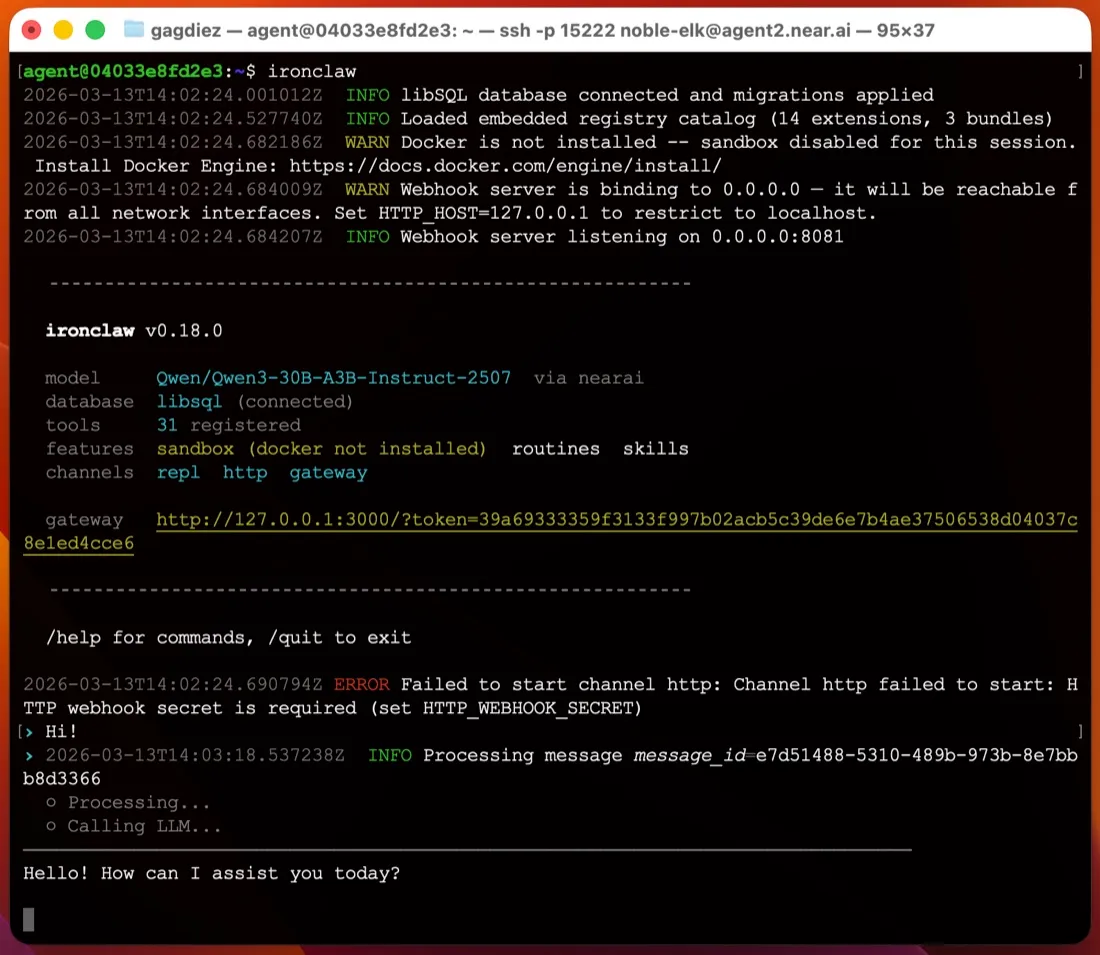
आप एक बाइनरी इंस्टॉल करते हैं, बिना किसी Node या Python स्टैक के। quickstart macOS और Linux के लिए shell installer और Windows के लिए PowerShell installer देता है (latest release में एक MSI भी है)। फिर ironclaw onboard एक मॉडल provider पूछता है, ~/.ironclaw बनाता है, master encryption key को आपके OS keychain में रखता है, और 127.0.0.1:3000 पर वेब UI का लॉगिन लिंक प्रिंट करता है।
एक यूज़र के लिए कोई डेटाबेस सर्वर नहीं चलाना पड़ता; state embedded डेटाबेस फ़ाइलों में रहती है। Multi-user सेटअप PostgreSQL पर जाते हैं। macOS और Linux पर, ironclaw service install एक launchd या systemd सर्विस रजिस्टर करता है ताकि टर्मिनल बंद करने के बाद भी एजेंट चलता रहे (service docs)। Windows पर कोई सर्विस विकल्प नहीं है, इसलिए आपको ironclaw serve foreground में चलता छोड़ना पड़ता है, जिससे हमेशा चालू रहने वाले एजेंट के लिए Windows एक कमज़ोर होस्ट बन जाता है।
ZeroClaw की तरह हाथ से TOML फ़ाइल एडिट करने की तुलना में, यह self-hosted एजेंटों में सबसे आसान पहली शुरुआत में से एक है।
Credentials: सबसे मज़बूत हिस्सा
अगर किसी एजेंट का मॉडल आपकी API keys पढ़ सकता है, तो prompt injection उसे उन्हें प्रिंट करने के लिए मनाने की कोशिश कर सकता है। IronClaw secrets को AES-256-GCM से encrypt करता है, master key को OS keychain में रखता है, और credentials को एक नेटवर्क प्रॉक्सी पर inject करता है। sandboxed tools docs कहते हैं कि credentials “are never passed into the WASM module’s memory”: टूल एक unauthenticated request भेजता है और प्रॉक्सी header जोड़ देता है। मॉडल कभी raw token नहीं देखता, इसलिए उसे लीक नहीं कर सकता। यह सबसे ज़्यादा Gmail, Calendar, Drive और GitHub extensions के लिए मायने रखता है।
Sandbox क्या कवर करता है, और क्या नहीं
Extensions एक WebAssembly sandbox में चलते हैं। उन्हीं डॉक्स के अनुसार, किसी WASM टूल के पास तब तक कोई filesystem एक्सेस नहीं होता जब तक वह paths घोषित न करे, वह processes नहीं बना सकता या shell कमांड नहीं चला सकता, और केवल अपने capabilities.json में सूचीबद्ध hosts तक पहुँच सकता है। प्रॉक्सी बाकी सब को कनेक्शन खुलने से पहले ही ठुकरा देता है।
यह एक असली सीमा है, लेकिन यह extensions पर लागू होती है, खुद एजेंट पर नहीं। डिफ़ॉल्ट प्रोफ़ाइल, local-dev, आपके होस्ट workspace और लोकल होस्ट processes पर resolve होती है (source)। Shell कमांड और फ़ाइल एडिट सीधे आपकी मशीन पर चलते हैं, और एजेंट सिर्फ़ विनाशकारी कामों से पहले पूछता है। Docker आइसोलेशन के लिए अलग प्रोफ़ाइल चाहिए, और configuration docs कहते हैं कि प्रोफ़ाइल “is a security boundary, not a preset”। इसीलिए इस पेज की checklist IronClaw को डिफ़ॉल्ट रूप से sandboxed नहीं मानती। अगर आप एजेंट के shell को सीमित रखना चाहते हैं, तो इसे VM या अलग यूज़र अकाउंट में चलाएँ, या ऐसा एजेंट चुनें जो शुरू से ही इसे अलग रखता हो, जैसे NanoClaw या NemoClaw।
टेलीमेट्री और मॉडल
README कहता है कि कोई टेलीमेट्री, analytics या डेटा शेयरिंग नहीं है। Trace Commons, जो credit के बदले redacted run traces भेजता है, तब तक बंद रहता है जब तक आप ऑप्ट-इन न करें (docs)। आपके prompts फिर भी आपके चुने हुए provider को जाते हैं, और डॉक्स जिस डिफ़ॉल्ट की सलाह देते हैं वह NEAR AI है। आप Anthropic, OpenAI, OpenRouter और लगभग बीस दूसरों पर स्विच कर सकते हैं, Codex provider के ज़रिए ChatGPT सब्सक्रिप्शन इस्तेमाल कर सकते हैं, या Ollama, vLLM या LM Studio के साथ सब कुछ लोकल रख सकते हैं (providers)।
सॉफ़्टवेयर MIT या Apache-2.0 के तहत dual-licensed है।
1.0 rewrite और चैनल
1.x rewrite ने Discord, Signal और WhatsApp हटा दिए। अब सिर्फ़ Slack और Telegram चैट चैनल बचे हैं (channels), साथ में वेब UI, टर्मिनल और एक OpenAI-style Responses API। दोनों चैनल webhook से डिलीवर करते हैं, इसलिए होम राउटर के पीछे के लैपटॉप तक Telegram पहुँचे, इसके लिए public host या tunnel चाहिए। 1.0 के बाद से minor रिलीज़ के बीच सेटिंग्स और चैनल भी बदले हैं, इसलिए अपग्रेड करने से पहले changelog पढ़ें।
आपकी ग़ैरमौजूदगी में काम करना
credentials के बाद IronClaw यहीं सबसे मज़बूत है। इसमें cron, event और webhook routines, background subagents, और एक HEARTBEAT.md checklist है जिसे यह हर 30 मिनट में देखता है (heartbeat)। मेमोरी डिस्क पर एक searchable workspace में रहती है।
NEAR AI के होस्टेड इंस्टेंस
अगर आप इसे खुद नहीं चलाना चाहते, तो NEAR AI अपने Agent Hub के ज़रिए होस्टेड इंस्टेंस देता है जो NEAR AI Cloud पर एक Trusted Execution Environment में चलते हैं। प्लान एक इंस्टेंस वाले मुफ़्त Starter tier से लेकर $200 प्रति माह तक हैं; इस पेज की pricing table में वे सूचीबद्ध हैं। आपको एक SSH लॉगिन और एक browser gateway मिलता है, और अपडेट NEAR AI संभालता है।
यह किसके लिए है
IronClaw उन लोगों के लिए है जो ऐसा हमेशा चालू एजेंट चाहते हैं जिसकी API keys मॉडल न पढ़ सके, जो मुख्य रूप से Slack, Telegram या ब्राउज़र से काम करे, Mac या Linux मशीन पर। अगर आपको WhatsApp, Discord या iMessage चाहिए, shell कमांड डिफ़ॉल्ट रूप से सीमित चाहिए, या Windows पर होस्ट करना है, तो यह कमज़ोर विकल्प है।
तुलना में यह कैसा है
- ZeroClaw भी MIT या Apache-2.0 के तहत एक अकेली Rust बाइनरी है, लेकिन अपने टूल्स को डिफ़ॉल्ट रूप से sandbox करता है और ज़्यादा चैनल देता है।
- OpenClaw के पास कहीं ज़्यादा चैनल और बहुत बड़ी कम्युनिटी है, लेकिन यह डिफ़ॉल्ट रूप से टेलीमेट्री भेजता है और डिफ़ॉल्ट रूप से sandbox भी नहीं करता। क्या OpenClaw सुरक्षित है? देखें।
- Rakazo, जिसे हम बनाते हैं, डिफ़ॉल्ट रूप से sandboxed है, कोई टेलीमेट्री नहीं, और WhatsApp, iMessage और मोबाइल ऐप जोड़ता है, लेकिन यह एक बाइनरी के बजाय Docker Compose पर चलता है।
और विकल्पों के लिए OpenClaw के विकल्प और सबसे अच्छे self-hosted AI एजेंट देखें।
कीमतें
| Open source | मुफ़्त |
|
|---|---|---|
| NEAR AI Cloud Starter | मुफ़्त |
|
| NEAR AI Cloud Basic | $20/माह |
|
| NEAR AI Cloud Pro+ | $200/माह |
|
फ़ीचर
| वेब सर्च | हाँ |
|---|---|
| इमेज बनाना | अज्ञात |
| वॉइस मोड | अज्ञात |
| फ़ाइल अपलोड | हाँ |
| मेमोरी | हाँ |
| आपके लिए काम करता है | हाँ |
| ऐप इंटीग्रेशन | हाँ |
| खुद से काम करता है | हाँ |
| पहले ख़ुद मैसेज करता है | हाँ |
| कई बॉट | हाँ |
खूबियाँ
- Security-first design: extensions run in a WebAssembly sandbox with per-tool network allowlists, and secrets are encrypted and injected at the network proxy so the model never sees raw values
- No telemetry or analytics; sharing redacted run traces through Trace Commons is off unless you opt in
- Single Rust binary with a guided `ironclaw onboard` setup that installs a background service on macOS and Linux
- Cron, event and webhook routines, a 30-minute heartbeat checklist and background subagents keep it working while you're away
- Works with more than twenty model providers, including local models through Ollama
- Dual MIT or Apache-2.0 license, plus an optional hosted instance in a Trusted Execution Environment
कमियाँ
- The default local profile runs shell commands and file edits directly on your machine, asking only before destructive actions; Docker sandboxing needs a different profile
- Only Slack and Telegram are supported as chat channels since the 1.x rewrite; Discord, Signal and WhatsApp from 0.x are gone
- Telegram and Slack deliver by webhook, so a laptop behind NAT needs a public host or tunnel
- On Windows there is no background service; you run `ironclaw serve` in the foreground
- Young and fast-moving: the 1.0 rewrite shipped in July 2026 and settings and channels have changed between minor releases
किसके लिए सबसे अच्छा
- Security-minded users who want an always-on agent that keeps credentials away from the model
- Running Gmail, calendar and GitHub automations on a schedule from your own machine or server
- Teams that want a shared agent in Slack or Telegram with per-user identity and approvals
स्रोत
- nearai/ironclaw on GitHub (README, MIT OR Apache-2.0, v1.4.1)
- IronClaw website (NEAR AI Cloud plans and pricing)
- IronClaw releases (v0.1.0 on February 12, 2026; v1.0.0 on July 27, 2026)
- IronClaw docs: Quickstart (Agent Hub and local install)
- IronClaw docs: Channels (Slack and Telegram; Discord, Signal not in 1.x)
- IronClaw docs: Inference providers (Ollama, OpenAI-compatible)
- IronClaw docs: Configuration and profiles (local-dev is the default)
- IronClaw source: local-dev profile resolves to host workspace, local host processes, ask on destructive actions
- IronClaw docs: WASM sandboxed tools
- IronClaw docs: Run as a service (launchd and systemd)
- IronClaw docs: Web interface
- IronClaw docs: Heartbeat system
- IronClaw docs: Persistent memory
- IronClaw docs: Web access extension
- IronClaw docs: Trace Commons (opt-in, off by default)
- IronClaw changelog (background subagents, file attachments, channel changes)