
IronClaw AI 评测:NEAR AI 的 Rust 智能体,自托管或运行在 TEE 中
IronClaw 评测:NEAR AI 的 Rust 智能体如何不让模型接触凭据、其 WASM 沙箱覆盖与不覆盖的范围,以及 1.0 重写砍掉了什么。
IronClaw 是 NEAR AI 推出的个人 AI 智能体,用 Rust 编写,定位为注重安全的 OpenClaw。0.1.0 版本于 2026 年 2 月 12 日发布,重写后的 1.0 于 2026 年 7 月 27 日推出(releases)。截至我们 2026 年 11 月 8 日查看时,它有 12,716 颗 GitHub 星。本评测针对的是 nearai/ironclaw 仓库中的智能体。
它有意思的地方在于处理密钥的方式。问题在于,它的沙箱覆盖的是扩展,而不是智能体在你机器上运行的 shell 命令。
安装
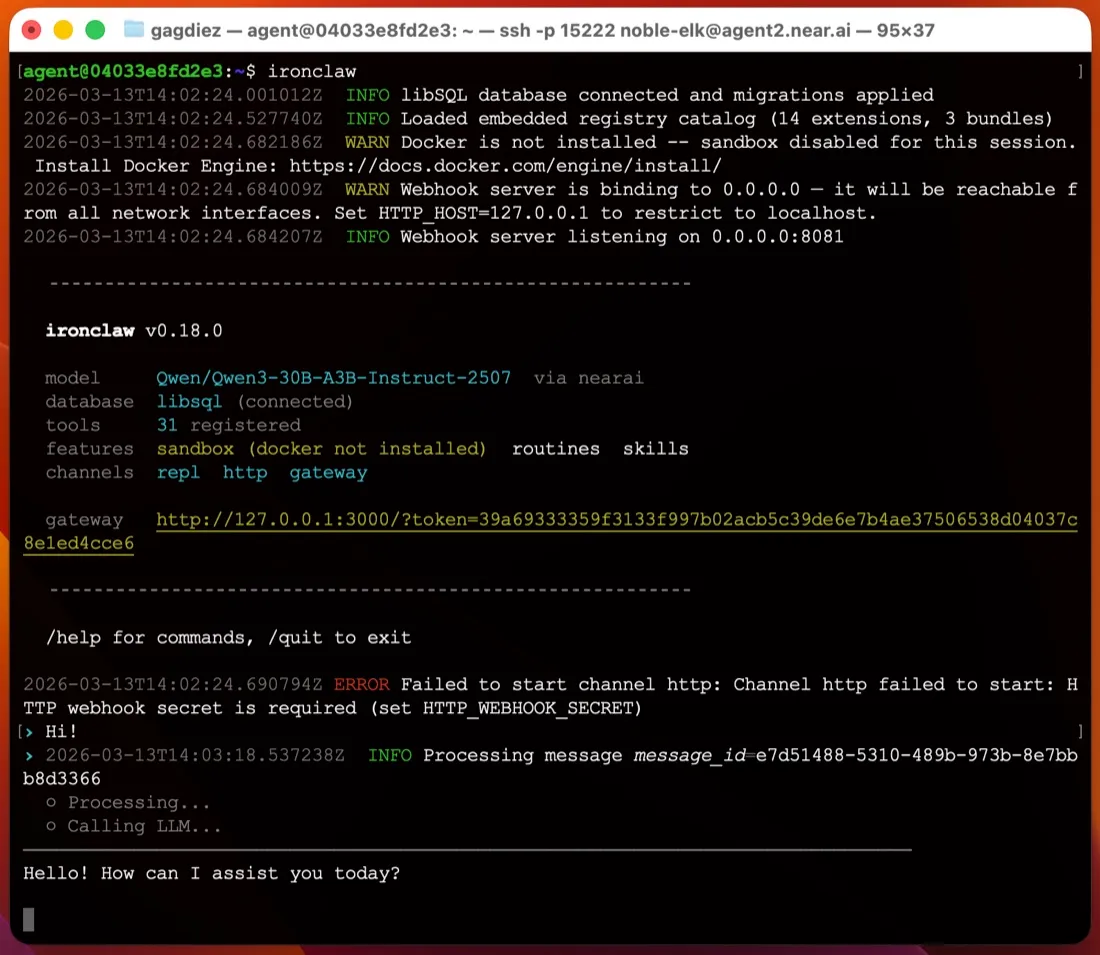
你只需安装一个二进制文件,不需要 Node 或 Python 环境。快速入门为 macOS 和 Linux 提供了 shell 安装脚本,为 Windows 提供了 PowerShell 安装脚本(最新版本还提供 MSI)。然后 ironclaw onboard 会询问模型提供商,创建 ~/.ironclaw,把主加密密钥放进系统钥匙串,并输出一个登录链接,用于访问 127.0.0.1:3000 上的 Web UI。
单用户使用时无需运行数据库服务器;状态保存在嵌入式数据库文件中。多用户部署则改用 PostgreSQL。在 macOS 和 Linux 上,ironclaw service install 会注册一个 launchd 或 systemd 服务,这样关闭终端后智能体也能继续运行(服务文档)。Windows 没有服务选项,你只能让 ironclaw serve 在前台一直运行,所以 Windows 不太适合托管一个常驻智能体。
与 ZeroClaw 那样需要手动编辑 TOML 文件相比,这是自托管智能体中首次运行最简单的之一。
凭据:最强的部分
如果智能体的模型能读取你的 API 密钥,提示词注入就可能设法诱导它把密钥打印出来。IronClaw 使用 AES-256-GCM 加密密钥,把主密钥保存在系统钥匙串中,并在网络代理处注入凭据。沙箱工具文档称凭据 “are never passed into the WASM module’s memory”(永远不会传入 WASM 模块的内存):工具发送未经认证的请求,由代理添加请求头。模型从未见过原始令牌,因此无法泄露它。这一点对 Gmail、Calendar、Drive 和 GitHub 扩展最为重要。
沙箱覆盖什么,不覆盖什么
扩展运行在 WebAssembly 沙箱中。根据同一份文档,WASM 工具除非声明路径,否则无法访问文件系统,不能派生进程或运行 shell 命令,并且只能访问其 capabilities.json 中列出的主机。其他任何请求都会在连接建立前被代理拒绝。
这是一道真正的边界,但它只适用于扩展,而不是智能体本身。默认配置 local-dev 解析为你宿主机的工作区和本地宿主进程(源码)。shell 命令和文件编辑直接在你的机器上运行,智能体只会在执行破坏性操作前询问。Docker 隔离需要使用另一个配置,配置文档称配置 “is a security boundary, not a preset”(是安全边界,而不是预设)。这就是本页清单把 IronClaw 标为默认无沙箱的原因。如果你希望隔离智能体的 shell,请在虚拟机或单独的用户账户中运行它,或者选择开箱即隔离的智能体,例如 NanoClaw 或 NemoClaw。
遥测与模型
README 称没有遥测、分析或数据共享。Trace Commons 会发送脱敏后的运行轨迹以换取额度,它默认关闭,除非你主动开启(文档)。你的提示词仍会发送给你选择的提供商,而 NEAR AI 是文档推荐的默认选项。你可以切换到 Anthropic、OpenAI、OpenRouter 等约二十家提供商,通过 Codex 提供商使用 ChatGPT 订阅,或者用 Ollama、vLLM 或 LM Studio 让一切保持在本地(提供商)。
该软件采用 MIT 或 Apache-2.0 双许可证。
1.0 重写与渠道
1.x 重写砍掉了 Discord、Signal 和 WhatsApp。Slack 和 Telegram 是仅剩的聊天渠道(渠道),此外还有 Web UI、终端和一个 OpenAI 风格的 Responses API。两个渠道都通过 webhook 投递,因此家用路由器后面的笔记本电脑需要一个公网主机或隧道,Telegram 才能访问到它。自 1.0 以来,设置和渠道在小版本之间也有变化,所以升级前请阅读更新日志。
在你离开时工作
这是 IronClaw 继凭据之后最强的方面。它有 cron、事件和 webhook 例程、后台子智能体,以及一份每 30 分钟检查一次的 HEARTBEAT.md 清单(heartbeat)。记忆保存在磁盘上一个可搜索的工作区中。
NEAR AI 的托管实例
如果你不想自己运行,NEAR AI 通过其 Agent Hub 提供托管实例,运行在 NEAR AI Cloud 的可信执行环境(TEE)中。套餐从包含一个实例的免费 Starter 档到每月 200 美元不等;本页的价格表列出了这些套餐。你会获得 SSH 登录和浏览器网关,更新由 NEAR AI 负责。
适合谁
IronClaw 适合想在 Mac 或 Linux 机器上运行一个常驻智能体、希望 API 密钥不被模型读取、主要通过 Slack、Telegram 或浏览器使用的人。如果你需要 WhatsApp、Discord 或 iMessage,希望 shell 命令默认被隔离,或者想在 Windows 上托管,它就不太合适。
横向对比
- ZeroClaw 同样是采用 MIT 或 Apache-2.0 许可证的单个 Rust 二进制文件,但默认对工具进行沙箱隔离,并提供更多渠道。
- OpenClaw 的渠道多得多,社区也大得多,但它默认发送遥测,同样默认不启用沙箱。请看 OpenClaw 安全吗?
- Rakazo(我们开发的产品)默认沙箱、无遥测,并增加了 WhatsApp、iMessage 和移动应用,但它运行在 Docker Compose 上,而不是单个二进制文件。
更多选择请看 OpenClaw 替代品和最佳自托管 AI 智能体。
价格
| Open source | 免费 |
|
|---|---|---|
| NEAR AI Cloud Starter | 免费 |
|
| NEAR AI Cloud Basic | US$20/月 |
|
| NEAR AI Cloud Pro+ | US$200/月 |
|
功能
| 联网搜索 | 是 |
|---|---|
| 图像生成 | 未知 |
| 语音模式 | 未知 |
| 文件上传 | 是 |
| 记忆 | 是 |
| 代你执行操作 | 是 |
| 应用集成 | 是 |
| 自主运行 | 是 |
| 主动给你发消息 | 是 |
| 可运行多个机器人 | 是 |
优点
- Security-first design: extensions run in a WebAssembly sandbox with per-tool network allowlists, and secrets are encrypted and injected at the network proxy so the model never sees raw values
- No telemetry or analytics; sharing redacted run traces through Trace Commons is off unless you opt in
- Single Rust binary with a guided `ironclaw onboard` setup that installs a background service on macOS and Linux
- Cron, event and webhook routines, a 30-minute heartbeat checklist and background subagents keep it working while you're away
- Works with more than twenty model providers, including local models through Ollama
- Dual MIT or Apache-2.0 license, plus an optional hosted instance in a Trusted Execution Environment
缺点
- The default local profile runs shell commands and file edits directly on your machine, asking only before destructive actions; Docker sandboxing needs a different profile
- Only Slack and Telegram are supported as chat channels since the 1.x rewrite; Discord, Signal and WhatsApp from 0.x are gone
- Telegram and Slack deliver by webhook, so a laptop behind NAT needs a public host or tunnel
- On Windows there is no background service; you run `ironclaw serve` in the foreground
- Young and fast-moving: the 1.0 rewrite shipped in July 2026 and settings and channels have changed between minor releases
适合人群
- Security-minded users who want an always-on agent that keeps credentials away from the model
- Running Gmail, calendar and GitHub automations on a schedule from your own machine or server
- Teams that want a shared agent in Slack or Telegram with per-user identity and approvals
来源
- nearai/ironclaw on GitHub (README, MIT OR Apache-2.0, v1.4.1)
- IronClaw website (NEAR AI Cloud plans and pricing)
- IronClaw releases (v0.1.0 on February 12, 2026; v1.0.0 on July 27, 2026)
- IronClaw docs: Quickstart (Agent Hub and local install)
- IronClaw docs: Channels (Slack and Telegram; Discord, Signal not in 1.x)
- IronClaw docs: Inference providers (Ollama, OpenAI-compatible)
- IronClaw docs: Configuration and profiles (local-dev is the default)
- IronClaw source: local-dev profile resolves to host workspace, local host processes, ask on destructive actions
- IronClaw docs: WASM sandboxed tools
- IronClaw docs: Run as a service (launchd and systemd)
- IronClaw docs: Web interface
- IronClaw docs: Heartbeat system
- IronClaw docs: Persistent memory
- IronClaw docs: Web access extension
- IronClaw docs: Trace Commons (opt-in, off by default)
- IronClaw changelog (background subagents, file attachments, channel changes)