सबसे अच्छे लोकल AI एजेंट: अपने हार्डवेयर पर AI असिस्टेंट चलाएँ
सात लोकल AI एजेंट, इस आधार पर रैंक किए गए कि वे Ollama, vLLM, LM Studio या llama.cpp के साथ कितना अच्छा चलते हैं और आपका कितना डेटा आपकी मशीन पर रहता है।
एक नज़र में
| बॉट | लाइसेंस | चैट ऐप्स | |||||
|---|---|---|---|---|---|---|---|
| Agent Zero | MIT | 19.8 हज़ार | हाँ | हाँ | Telegram, WhatsApp | मुफ़्त | |
| QwenPaw | Apache-2.0 | 37.5 हज़ार | हाँ | नहीं | Telegram, iMessage, Discord, Slack | मुफ़्त | |
| ZeroClaw | MIT OR Apache-2.0 | 33.3 हज़ार | हाँ | हाँ | Telegram, WhatsApp, Discord | मुफ़्त | |
| nanobot | MIT | 49.9 हज़ार | हाँ | नहीं | Telegram, WhatsApp, Discord, Slack | मुफ़्त | |
| Khoj | AGPL-3.0 | 38.1 हज़ार | हाँ | हाँ | कोई नहीं | मुफ़्त | |
| Rakazo | Apache-2.0 | 7.5 हज़ार | हाँ | हाँ | Telegram, WhatsApp, iMessage, Slack | $10/माह से | |
| OpenClaw | MIT | 3.9 लाख | हाँ | नहीं | Telegram, WhatsApp, iMessage, Discord, Slack | मुफ़्त |


चेकलिस्ट
| Agent Zero | QwenPaw | ZeroClaw | nanobot | Khoj | Rakazo | OpenClaw | |
|---|---|---|---|---|---|---|---|
| ओपन-सोर्स लाइसेंस | हाँ | हाँ | हाँ | हाँ | हाँ | हाँ | हाँ |
| लोकल मॉडल चलाता है | हाँ | हाँ | हाँ | हाँ | हाँ | हाँ | हाँ |
| डिफ़ॉल्ट रूप से सैंडबॉक्स | हाँ | नहीं | हाँ | नहीं | हाँ | हाँ | नहीं |
| डिफ़ॉल्ट रूप से कोई टेलीमेट्री नहीं | नहीं | नहीं | हाँ | हाँ | नहीं | हाँ | नहीं |
| आपके चैट ऐप्स में रहता है | हाँ | हाँ | हाँ | हाँ | नहीं | हाँ | हाँ |
| आपकी ग़ैरमौजूदगी में भी काम करता है | हाँ | हाँ | हाँ | हाँ | हाँ | हाँ | हाँ |
हमारी सूची का हर एजेंट लोकल मॉडल से बात कर सकता है। लेकिन यह एक अच्छा लोकल AI एजेंट होने जैसा नहीं है। होस्टेड मॉडल के साथ, आपके prompts, फ़ाइलें और मेमोरी के टुकड़े हर बार आपकी मशीन से बाहर जाते हैं। पूरी तरह लोकल होने का मतलब है कि मॉडल, सर्च, स्पीच और मेमोरी सब आपके अपने हार्डवेयर पर चलें, और बहुत कम एजेंट आपको वहाँ तक पूरा पहुँचाते हैं।
हमने इन्हें कैसे रैंक किया
यह सूची बाकी सब से ऊपर लोकल ऑपरेशन को महत्व देती है:
- सपोर्टेड लोकल runtimes। Ollama, vLLM, LM Studio, llama.cpp। ज़्यादा विकल्प का मतलब है कि यह आपके पास पहले से मौजूद हार्डवेयर में फ़िट हो जाता है।
- और क्या लोकल रहता है। वेब सर्च, speech-to-text, text-to-speech और embeddings। जो एजेंट मॉडल को लोकल चलाता है लेकिन हर सर्च क्लाउड API को भेजता है, वह फिर भी बता देता है कि आप किस पर काम कर रहे हैं।
- कोई टेलीमेट्री नहीं और एक sandbox, ऊपर की table वाली checklist से, क्योंकि local-first यूज़र्स को आमतौर पर दोनों की परवाह होती है।
- सेटअप की मेहनत और परिपक्वता।
हार्डवेयर पर एक बात: एजेंट खुद हल्के होते हैं। RAM और GPU मॉडल को चाहिए, और एक सक्षम लोकल मॉडल इस सूची के किसी भी एजेंट से कहीं बड़ी ज़रूरत है। पहले जाँचें कि आपकी मशीन कौन सा मॉडल चला सकती है, फिर एजेंट चुनें।
1. Agent Zero
Agent Zero पूरी तरह लोकल सेटअप की ओर सबसे आगे जाता है। यह Ollama, LM Studio, llama.cpp, vLLM और oMLX को सपोर्ट करता है (installation docs), वेब सर्च किसी सर्च API के बजाय एक बंडल किए गए SearXNG इंस्टेंस से चलती है, और speech-to-text व text-to-speech बिल्ट-इन Whisper और Kokoro प्लगइन के ज़रिए लोकल चल सकते हैं (plugins)। एजेंट अपने Docker कंटेनर के अंदर काम करता है, आपके कंप्यूटर से अलग, जब तक आप एक्सेस न दें।
इसकी इकलौती टेलीमेट्री एक अपडेट चेक है जो आपका वर्ज़न और एक hashed instance ID भेजता है; आप इसे सेटिंग्स में बंद कर सकते हैं। मॉडल से पहले, सिर्फ़ Agent Zero के लिए कम से कम 2 GB RAM की योजना बनाएँ।

2. QwenPaw
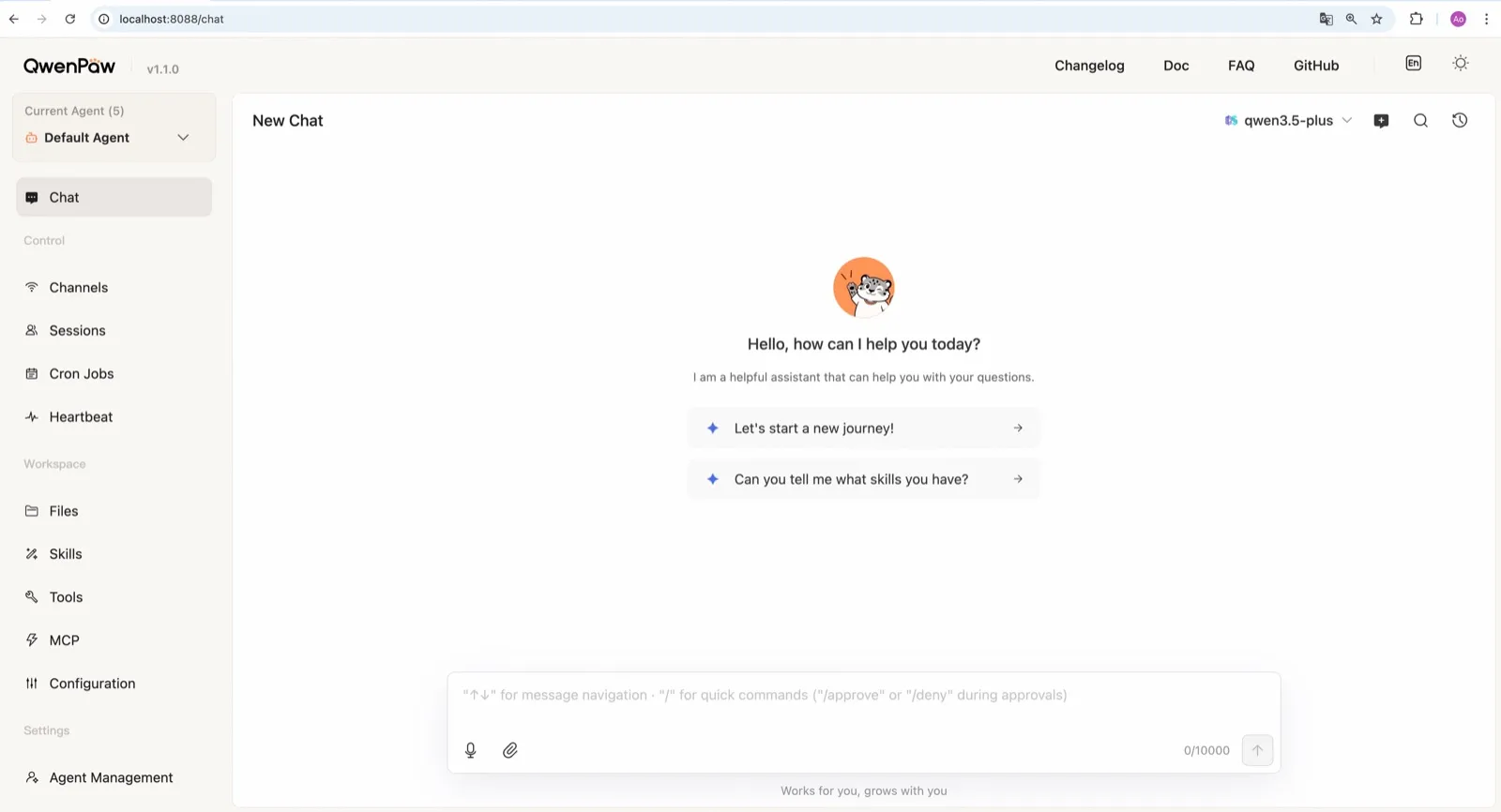
Alibaba की AgentScope टीम का QwenPaw अपना llama.cpp runtime साथ लाता है, इसलिए यह बिना API key और बिना अलग Ollama इंस्टॉल के पूरी तरह ऑफ़लाइन चल सकता है (models docs)। टीम एजेंट टास्क के लिए ट्रेन किए गए छोटे QwenPaw-Flash मॉडल भी प्रकाशित करती है। Ollama और LM Studio भी काम करते हैं।
सुरक्षा डिफ़ॉल्ट में यह Agent Zero से नीचे है: कमांड sandbox बंद है, और डॉक्यूमेंटेड quick-start कमांड qwenpaw init --defaults anonymous install टेलीमेट्री को अपने आप स्वीकार कर लेता है। ऑप्ट-आउट करने के लिए इसके बजाय interactive qwenpaw init चलाएँ।
3. ZeroClaw
अगर आप पहले से Ollama या कोई दूसरा OpenAI-compatible मॉडल सर्वर चलाते हैं, तो ZeroClaw सबसे साफ़ विकल्प है। इसमें कोई टेलीमेट्री नहीं, डिफ़ॉल्ट रूप से चालू OS sandbox, और provider fallback chains हैं, ताकि लोकल मॉडल सबसे पहले हो और उसके पीछे कोई होस्टेड मॉडल हो, या पीछे कुछ भी न हो। एक Rust बाइनरी के रूप में यह Raspberry Pi जैसे छोटे बोर्ड्स पर चलता है, किसी बड़ी मशीन के मॉडल सर्वर के साथ।

4. nanobot
nanobot शुरू से ही Ollama, vLLM और LM Studio को सपोर्ट करता है (providers), कोई टेलीमेट्री नहीं भेजता, और मेमोरी को ~/.nanobot में सादी Markdown फ़ाइलों के रूप में रखता है, जिन्हें जाँचना और बैकअप करना आसान है। इसका WebUI लोकल सेटअप को इस्तेमाल में सुखद बनाता है। किसी लोकल मॉडल को shell कमांड चलाने देने से पहले इसका bubblewrap या Seatbelt sandbox चालू करें; यह डिफ़ॉल्ट रूप से बंद है।

5. Khoj
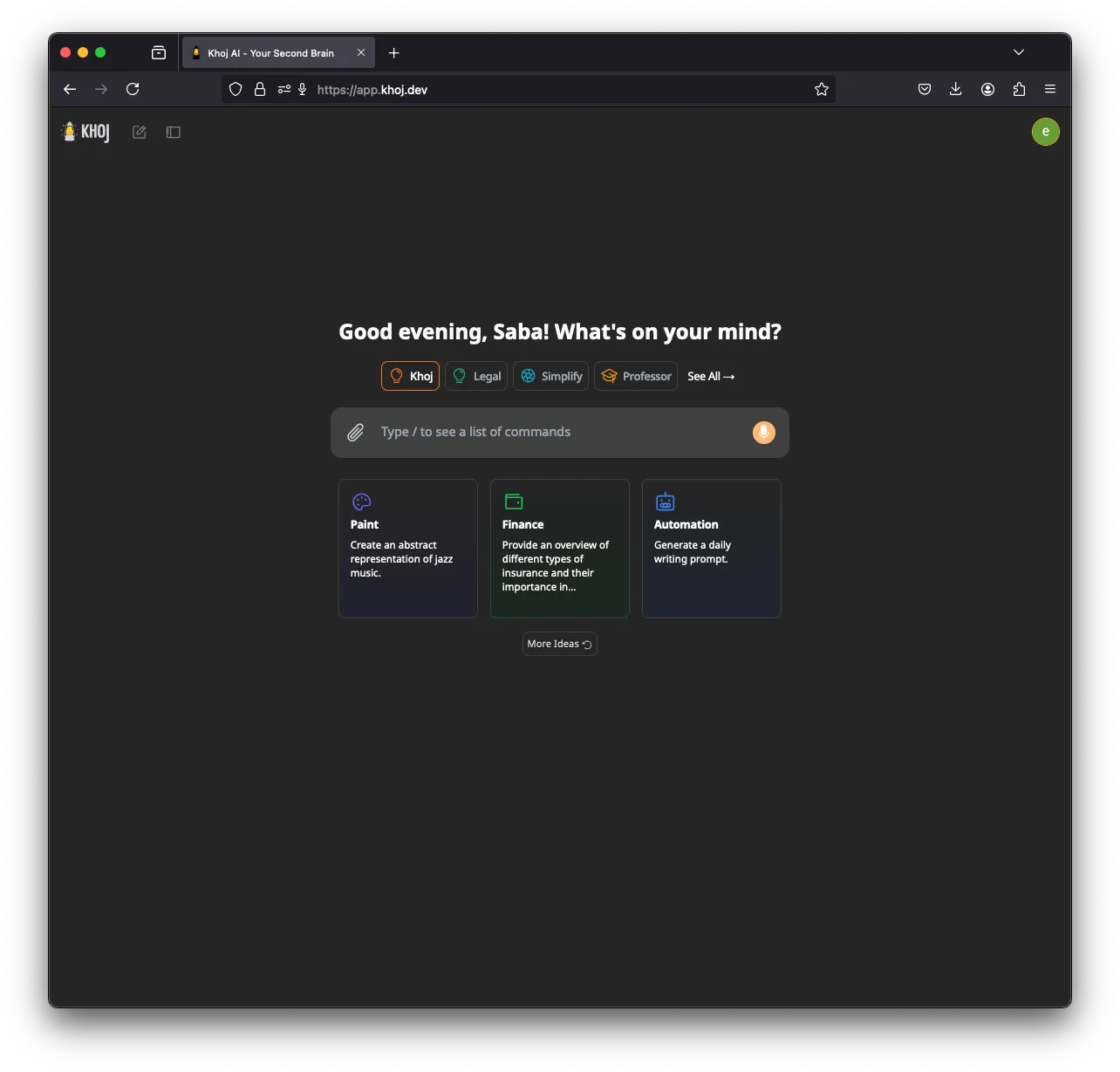
Khoj विशेषज्ञ है: एक AI सेकंड ब्रेन जो आपके नोट्स और डॉक्यूमेंट्स इंडेक्स करता है और उनसे जवाब देता है। यह पूरी तरह ऑफ़लाइन चल सकता है, llama.cpp के ज़रिए GGUF मॉडल और आपकी मशीन पर बनी embeddings के साथ, और यह Ollama, LM Studio और vLLM को भी सपोर्ट करता है (setup)। एक GPU (CUDA, ROCm, Vulkan या Apple Metal) मदद करता है।
यह पाँचवें स्थान पर है क्योंकि डेवलपमेंट धीमा हो गया है (मार्च 2026 के बाद कोई रिलीज़ नहीं), इसमें कोई चैट-ऐप चैनल नहीं है, और यह anonymized usage टेलीमेट्री भेजता है जब तक आप KHOJ_TELEMETRY_DISABLE=True सेट न करें।
6. Rakazo
Rakazo, जिसे हम बनाते हैं, Ollama या LM Studio के ज़रिए लोकल मॉडल चलाता है (self-hosted models), self-hosted इंस्टॉल से कोई product analytics नहीं भेजता, और हर बॉट को एक sandboxed कंप्यूटर देता है। यह इस स्थान पर है क्योंकि इसका लोकल सपोर्ट Agent Zero या QwenPaw से सीमित है: दो लोकल runtimes, और कोई बिल्ट-इन नहीं। यह अभी beta में भी है। Rakazo रिव्यू देखें।


7. OpenClaw
OpenClaw Ollama, LM Studio और vLLM के साथ काम करता है (Ollama provider), इसलिए यह किसी भी लोकल सूची में आता है, और इसका विशाल प्लगइन ecosystem इसे चुनने की एक वजह है। लेकिन local-first यूज़र्स के लिए इसके डिफ़ॉल्ट उल्टी दिशा में खींचते हैं: रोज़ का अपडेट चेक चालू है (update.checkOnStart: false इसे रोकता है) और जब तक आप sandboxing चालू न करें, कमांड आपके होस्ट पर चलते हैं। अगर आप लोकल inference और लॉक किए गए sandbox के साथ OpenClaw चाहते हैं, तो NemoClaw इसे Ollama, vLLM या NVIDIA NIM routing के साथ लपेटता है, 8 GB RAM और alpha लेबल की कीमत पर।

एजेंट और मॉडल को अलग-अलग मशीनों पर चलाना
PicoClaw एक उपयोगी पैटर्न दिखाता है। इसके एजेंट को सिर्फ़ 10 MB ख़ाली RAM चाहिए और यह $10 के बोर्ड्स और पुराने फ़ोन पर चलता है, लेकिन मॉडल तक पहुँचने के लिए इसे फिर भी नेटवर्क एक्सेस चाहिए (hardware docs)। इसे, या ZeroClaw को, GPU वाले डेस्कटॉप पर चल रहे Ollama या vLLM सर्वर की ओर इशारा करें, और आपको एक छोटे डिवाइस पर हमेशा चालू एजेंट मिलता है, सारा inference आपके अपने नेटवर्क पर। PicoClaw रैंकिंग में नहीं आया क्योंकि प्रोजेक्ट खुद कहता है कि v1.0 से पहले इसे production में इस्तेमाल न करें।
व्यापक नज़रिए के लिए सबसे अच्छे self-hosted AI एजेंट देखें।
सबसे अच्छे विकल्प
Free, MIT-licensed AI agent that runs in its own Docker Linux workspace with a terminal, browser and desktop apps, and chats on Telegram and WhatsApp.
Runs in its own Docker container with local models, but sends telemetry by default.
Agent Zero पर जाएँखूबियाँ
- Free and MIT licensed, with frequent releases (v2.11 to v2.15 between late August and early November 2026)
- The agent works in its own Linux workspace with a terminal, browser, desktop apps and LibreOffice, isolated from your computer unless you grant host access
- Web search runs through a local SearXNG instance, and speech-to-text and text-to-speech can run locally
- Projects keep memory, files, secrets, instructions and model choices separate per job, with workspace snapshots you can roll back
- Built-in Telegram, WhatsApp and email channels, a scheduler, MCP and a community Plugin Hub with 200+ plugins
कमियाँ
- Needs Docker, and the container image is a full Linux desktop environment rather than a small service
- No built-in image generation; the docs show teaching it an image API yourself
- By default it checks for updates with Agent Zero's server, sending your version and a hashed instance ID
- Code runs in the same container as Agent Zero itself today; per-task sandboxes are only a v3 prototype
- WhatsApp works by linking a phone account through a Baileys bridge, which needs Node.js, rather than the official WhatsApp Business API
Free, Apache-licensed personal AI agent from Alibaba's AgentScope team, formerly CoPaw, with a web console, memory, multiple agents and many chat apps.
Many chat apps and local models, but no sandbox and telemetry on by default.
QwenPaw पर जाएँखूबियाँ
- Runs fully offline with a built-in llama.cpp runtime and purpose-trained QwenPaw-Flash models, no API key needed
- Several independent agents, each with its own memory, skills and heartbeat, that can work together
- Layered security: Tool Guard, File Guard, skill scanning, access policies and an optional kernel-level sandbox
- Broad chat coverage, especially for Chinese platforms such as DingTalk, Feishu, WeChat and QQ, alongside Telegram, Discord, Slack and iMessage
- Well-documented web console for channels, cron jobs, heartbeat, skills, MCP and files
कमियाँ
- The command sandbox is off by default, and inside Docker it falls back to no isolation
- The recommended setup command accepts anonymous install telemetry automatically
- No WhatsApp channel, and iMessage works only on a Mac with a third-party helper and Full Disk Access
- Desktop apps are still in beta, and the project moves fast, with frequent beta releases
Personal AI agent in one Rust binary, MIT or Apache-2.0, with local or cloud models, 30+ channels, approval gates and an OS sandbox on by default.
Meets every check: one Rust binary, approval gates and an OS sandbox on by default, no telemetry, local models.
ZeroClaw पर जाएँखूबियाँ
- Safe defaults: the recommended profile asks before medium-risk actions, blocks high-risk ones, keeps files in the workspace and runs tools in an OS sandbox
- One small Rust binary with one config file, running on macOS, Linux, Windows and boards like a Raspberry Pi
- More than 30 channels, plus a web dashboard for chat, memory, config and cron
- Provider fallback chains, local models through Ollama, and cryptographic receipts for tool calls
- States plainly that it sends no telemetry and needs no cloud account or license server
कमियाँ
- Slack, iMessage, Signal and several other channels are not in the standard release; you build from source with extra features to get them
- `zeroclaw quickstart` only sets up the model provider; channels and risk profiles mean editing the TOML config file
- The Docker sandbox backend isn't picked automatically under the default native runtime
- Model costs are on you
Free, MIT-licensed personal AI agent in Python with a browser UI and terminal app, scheduled tasks, memory, and chat on Telegram, Discord, Slack and more.
Small, readable Python with a good web UI and no telemetry, but shell commands aren't sandboxed by default.
nanobot पर जाएँखूबियाँ
- Free and MIT licensed, with a small Python core that is meant to be read and modified
- Polished bundled WebUI with projects, file diffs, an MCP app catalog and an automations calendar, plus a terminal UI
- Many chat channels, including Telegram, Discord, Slack, WhatsApp, WeChat, Feishu, Teams, Matrix and email
- Scheduled automations, long-running goals and a heartbeat that reports only useful results to your last chat
- Works with local models through Ollama, vLLM or LM Studio
कमियाँ
- Shell commands are not sandboxed by default; the bubblewrap or macOS Seatbelt sandbox must be turned on, and Windows has none
- Model costs are on you, and voice messages need a separate transcription provider such as Groq or OpenAI
- No native mobile or desktop app; on a phone you use the WebUI in a browser or a chat app
- Missed scheduled runs are not replayed and interrupted subagent tasks are not relaunched after a restart
AGPL-licensed, self-hosted AI second brain that chats over your notes and documents with web search, custom agents and scheduled research emails.
Good at chatting over your own notes and documents, but development has slowed, it has no chat-app channels and telemetry is on by default.
Khoj पर जाएँखूबियाँ
- Searches and chats over your own notes and documents, including Markdown, Org-mode, PDF, Word, Notion and GitHub
- Works with local models through Ollama, LM Studio, vLLM or offline llama.cpp, and generates embeddings on your machine
- Custom agents with their own persona, knowledge, chat model and tools
- Automations run a query on a schedule and email you the result
- Generated code runs in a local Terrarium sandbox that the Docker Compose setup starts for you
कमियाँ
- Development has slowed: no release since March 26, 2026, the last commit was on August 2, 2026, and the team now focuses on other products
- The hosted Khoj Cloud, and with it the WhatsApp bot, shut down on April 15, 2026, so self-hosting is the only way to use it
- AGPL-3.0 requires you to share your changes if you offer a modified version to others over a network
- Sends anonymized usage telemetry by default until you set KHOJ_TELEMETRY_DISABLE
- Scheduled emails need Resend and authentication set up when self-hosting, and no chat apps such as Telegram or Slack are supported
Open-source, self-hostable platform for persistent AI bots that each get a job, a computer, memory and routines, using the model you choose.
Our own product. Meets every check: Apache-2.0, sandboxed bot computers, no telemetry by default, any model you connect.
Rakazo पर जाएँखूबियाँ
- Open source (Apache-2.0) and fully self-hostable, including with local models
- Choice of model per bot, including existing Claude or ChatGPT subscriptions
- Bots keep working on schedules and triggers with their own cloud computer
- Approval controls over which actions a bot may take on its own
कमियाँ
- Still in beta, with frequent releases
- You supply and pay for the model on the hosted plans, unless you buy Rakazo credits
- Telegram, WhatsApp and iMessage/SMS are only available when self-hosted
- More setup than a single chat app
Free, MIT-licensed personal AI agent that runs on your own computer and takes orders from WhatsApp, Telegram, iMessage, Slack and 20+ other chat apps.
The biggest ecosystem and every chat app, but sandboxing is off and telemetry is on by default.
OpenClaw पर जाएँखूबियाँ
- Free and MIT licensed, with no paid tier
- Runs on your own hardware, and state, memory and credentials stay there
- Works in 29 chat channels, including WhatsApp, Telegram, iMessage, Slack, Discord and Microsoft Teams
- Model-agnostic: 64 model and media providers, plus local models
- Large ecosystem of skills and 142 official plugins, and very active development
कमियाँ
- Model costs are on you and can run high: testers and users have reported spending over $100 in a day with expensive models
- Sandboxing is off by default and the agent can run commands on the host unless you turn on approvals
- Setup and upkeep expect comfort with the command line; maintainers warn it is risky for non-technical users
- Broad access to email, messages and the system makes prompt injection and malicious third-party skills a real risk
फ़ीचर
| Agent Zero | QwenPaw | ZeroClaw | nanobot | Khoj | Rakazo | OpenClaw | |
|---|---|---|---|---|---|---|---|
| वेब सर्च | हाँ | हाँ | हाँ | हाँ | हाँ | हाँ | हाँ |
| इमेज बनाना | नहीं | हाँ | हाँ | हाँ | हाँ | हाँ | हाँ |
| वॉइस मोड | हाँ | हाँ | हाँ | हाँ | हाँ | हाँ | हाँ |
| फ़ाइल अपलोड | हाँ | हाँ | हाँ | हाँ | हाँ | हाँ | हाँ |
| मेमोरी | हाँ | हाँ | हाँ | हाँ | हाँ | हाँ | हाँ |
| आपके लिए काम करता है | हाँ | हाँ | हाँ | हाँ | हाँ | हाँ | हाँ |
| ऐप इंटीग्रेशन | हाँ | हाँ | हाँ | हाँ | हाँ | हाँ | हाँ |
| खुद से काम करता है | हाँ | हाँ | हाँ | हाँ | हाँ | हाँ | हाँ |
| पहले ख़ुद मैसेज करता है | हाँ | हाँ | हाँ | हाँ | हाँ | हाँ | हाँ |
| कई बॉट | हाँ | हाँ | हाँ | हाँ | हाँ | हाँ | हाँ |
स्रोत
Agent Zero
- agent0ai/agent-zero on GitHub (MIT, README, safety model)
- Agent Zero releases (v0.2 in June 2024 to v2.15 on November 1, 2026)
- Agent Zero homepage
- Agent Zero docs: Installation (Launcher, A0 Install, Docker, local models)
- Agent Zero docs: VPS deployment (hardware requirements)
- Agent Zero model provider list
- Agent Zero update check code (version and hashed ID sent to api.agent-zero.ai)
- Agent Zero built-in Telegram integration plugin
- Agent Zero built-in WhatsApp integration plugin
- Agent Zero built-in plugins (scheduler, notify user, email, SearXNG search, Whisper STT, Kokoro TTS)
- Agent Zero docs: Memory guide
- Agent Zero docs: Agent Profiles
- Agent Zero docs: API integration (adding image generation yourself)
- Agent Zero v3: A Sneak Peek Inside the Sandbox (August 17, 2026)
- Agent Zero LLM API (Venice.ai proxy for A0T token stakers)
QwenPaw
- agentscope-ai/QwenPaw on GitHub (Apache-2.0, README with install options and telemetry)
- QwenPaw documentation
- QwenPaw v1.1.0 release notes: CoPaw rebrands to QwenPaw
- copaw on PyPI (first release February 2026)
- QwenPaw docs: Channels
- QwenPaw docs: Models (cloud providers, llama.cpp, Ollama, LM Studio)
- QwenPaw docs: Security (Tool Guard, File Guard, sandbox)
- QwenPaw source: security.sandbox_enabled defaults to off
- QwenPaw docs: Heartbeat
- QwenPaw docs: Multi-agent
- QwenPaw docs: Comparison (voice and video interaction)
- QwenPaw docs: Desktop application (beta)
- QwenPaw docs: Plugins (GPT Image 2 image generation plugin)
- QwenPaw Qwen-Image tool plugin (image generation and editing)
ZeroClaw
- zeroclaw-labs/zeroclaw on GitHub (MIT OR Apache-2.0, v0.8.7, README)
- ZeroClaw website
- ZeroClaw docs: Sandboxing
- ZeroClaw source: risk presets (Balanced, recommended, has the sandbox on)
- ZeroClaw docs: Channels overview (default and standard release bundles)
- ZeroClaw docs: You own it (no telemetry)
- ZeroClaw docs: Docker and containers
- ZeroClaw source: tools (image generation, screenshot, web)
nanobot
- HKUDS/nanobot on GitHub (MIT, v0.4.1, README)
- nanobot documentation
- nanobot release archive (officially launched February 2, 2026)
- nanobot docs: Chat apps
- nanobot docs: Providers and models (Ollama, vLLM, LM Studio)
- nanobot docs: Configuration (security, exec sandbox off by default, transcription, Langfuse)
- nanobot docs: Automations and heartbeat
- nanobot docs: Concepts (heartbeat delivery, subagent recovery)
- nanobot docs: Memory and Dream
- nanobot docs: Multiple instances
- nanobot docs: Deployment (Docker, services, Render)
- nanobot source: skills installer runs with DISABLE_TELEMETRY
Khoj
- khoj-ai/khoj on GitHub (AGPL-3.0, README)
- Khoj releases (latest 2.0.0-beta.28, March 26, 2026)
- Khoj commit history (last commit August 2, 2026)
- Khoj Cloud Has Been Sunset (April 15, 2026)
- Khoj homepage (Open Paper, Pipali and the Khoj app)
- khoj-assistant on PyPI (first release 0.1.0, August 2, 2022)
- Khoj docs: Self-host setup (Docker, pip, model providers)
- Khoj docs: Ollama
- Khoj docs: Telemetry
- Khoj docs: Privacy
- Stop sending client IP in telemetry so it matches the privacy docs (#1382)
- Khoj docs: Automations
- Khoj docs: Code execution (Terrarium sandbox)
- Khoj docs: Agents
- Khoj docs: Image generation
- Khoj docs: Voice
- Khoj docs: WhatsApp (bot tied to Khoj Cloud)
- Khoj server settings (memory feature enabled and on by default)
Rakazo
- Rakazo homepage
- Rakazo pricing
- Rakazo privacy policy
- Rakazo on GitHub (README and license)
- Rakazo changelog
- Rakazo releases
- Rakazo docs: Image and video generation
- Rakazo docs: Memory
- Rakazo docs: Connect apps
- Rakazo docs: Routines
- Rakazo docs: Chat apps
- Rakazo docs: Messaging apps (self-hosting)
- Rakazo docs: Bots and chats (add another bot, bot templates)
- Rakazo docs: Groups (several bots in one chat)
- Rakazo docs: Mobile app (notifications)
- Rakazo privacy policy (updated Sep 14, 2026)
- Rakazo privacy policy source on GitHub
- Rakazo docs: Logs and monitoring (product analytics off by default)
- Rakazo docs: Desktop app (run locally in Docker, updates)
- Rakazo docs: Docker computers
- Rakazo docs: Self-hosted models (Ollama, LM Studio)
- Rakazo Railway template setup guide
OpenClaw
- OpenClaw homepage and Foundation section
- OpenClaw integrations: channels, providers and plugins
- openclaw/openclaw on GitHub (MIT, v2026.11.1)
- OpenClaw docs: Sandboxing (off by default)
- Wikipedia: OpenClaw
- Notebookcheck: OpenClaw can burn through hundreds of dollars per day
- OpenClaw docs: Memory overview
- OpenClaw docs: Automations
- OpenClaw docs: Chat channels
- OpenClaw docs: iMessage
- OpenClaw docs: Heartbeat, now a default Proactive check job
- OpenClaw docs: Multi-agent routing
- OpenClaw docs: Platforms (macOS, Windows, Linux, iOS and Android apps)
- OpenClaw docs: Tools (exec, browser, web search)
- OpenClaw docs: Audio and voice notes (inbound transcription)
- OpenClaw docs: Image and media support (inbound media)
- OpenClaw docs: Install (system requirements, installer script, npm, desktop apps, Docker)
- OpenClaw docs: One-click deploy on Railway
- OpenClaw docs: Usage telemetry and update checks (on by default, feature statistics opt-in)
- OpenClaw docs: Ollama provider (local models)