סוכני ה-AI המקומיים הטובים ביותר: עוזר AI שרץ על החומרה שלכם
שבעה סוכני AI מקומיים מדורגים לפי כמה טוב הם רצים עם Ollama, vLLM, LM Studio או llama.cpp, וכמה מהנתונים שלכם נשארים על המחשב שלכם.
במבט מהיר
| בוט | רישיון | אפליקציות צ׳אט | |||||
|---|---|---|---|---|---|---|---|
| Agent Zero | MIT | 19.8K | כן | כן | Telegram, WhatsApp | חינם | |
| QwenPaw | Apache-2.0 | 37.5K | כן | לא | Telegram, iMessage, Discord, Slack | חינם | |
| ZeroClaw | MIT OR Apache-2.0 | 33.3K | כן | כן | Telegram, WhatsApp, Discord | חינם | |
| nanobot | MIT | 49.9K | כן | לא | Telegram, WhatsApp, Discord, Slack | חינם | |
| Khoj | AGPL-3.0 | 38.1K | כן | כן | אין | חינם | |
| Rakazo | Apache-2.0 | 7.5K | כן | כן | Telegram, WhatsApp, iMessage, Slack | החל מ-10 $ לחודש | |
| OpenClaw | MIT | 394.2K | כן | לא | Telegram, WhatsApp, iMessage, Discord, Slack | חינם |


רשימת בדיקה
כל סוכן ברשימה שלנו יכול לדבר עם מודל מקומי. זה לא אותו דבר כמו להיות סוכן AI מקומי טוב. עם מודל מתארח, הפרומפטים, הקבצים וקטעי הזיכרון שלכם יוצאים מהמחשב בכל סבב. מעבר מלא למקומי אומר שהמודל, החיפוש, הדיבור והזיכרון רצים כולם על חומרה שבבעלותכם, ומעט מאוד סוכנים מביאים אתכם עד הסוף.
איך דירגנו
הרשימה הזו נותנת להרצה מקומית משקל רב יותר מכל דבר אחר:
- סביבות ריצה מקומיות נתמכות. Ollama, vLLM, LM Studio, llama.cpp. יותר אפשרויות פירושן התאמה לחומרה שכבר יש לכם.
- מה עוד נשאר מקומי. חיפוש אינטרנט, המרת דיבור לטקסט, טקסט לדיבור ו-embeddings. סוכן שמריץ את המודל מקומית אבל שולח כל חיפוש ל-API בענן עדיין מדליף על מה אתם עובדים.
- בלי טלמטריה ועם sandbox, מתוך רשימת הבדיקה בטבלה שלמעלה, כי למשתמשים שמעדיפים מקומי בדרך כלל אכפת משניהם.
- מאמץ התקנה ובשלות.
הערה על חומרה: הסוכנים עצמם קלים. המודל הוא מה שצריך RAM ו-GPU, ומודל מקומי מוכשר הוא דרישה גדולה בהרבה מכל סוכן ברשימה. התחילו בבדיקה איזה מודל המחשב שלכם יכול להריץ, ורק אז בחרו סוכן.
1. Agent Zero
Agent Zero מגיע הכי רחוק להתקנה מקומית מלאה. הוא תומך ב-Ollama, LM Studio, llama.cpp, vLLM ו-oMLX (תיעוד ההתקנה), חיפוש אינטרנט רץ דרך מופע SearXNG מצורף במקום API של חיפוש, והמרת דיבור לטקסט וטקסט לדיבור יכולות לרוץ מקומית דרך תוספי Whisper ו-Kokoro מובנים (תוספים). הסוכן עובד בתוך קונטיינר Docker משלו, מבודד מהמחשב שלכם אלא אם תעניקו גישה.
הטלמטריה היחידה שלו היא בדיקת עדכונים ששולחת את הגרסה שלכם ומזהה מופע מגובב (hashed); אפשר לכבות אותה בהגדרות. תכננו לפחות 2 GB RAM ל-Agent Zero עצמו, לפני המודל.

2. QwenPaw
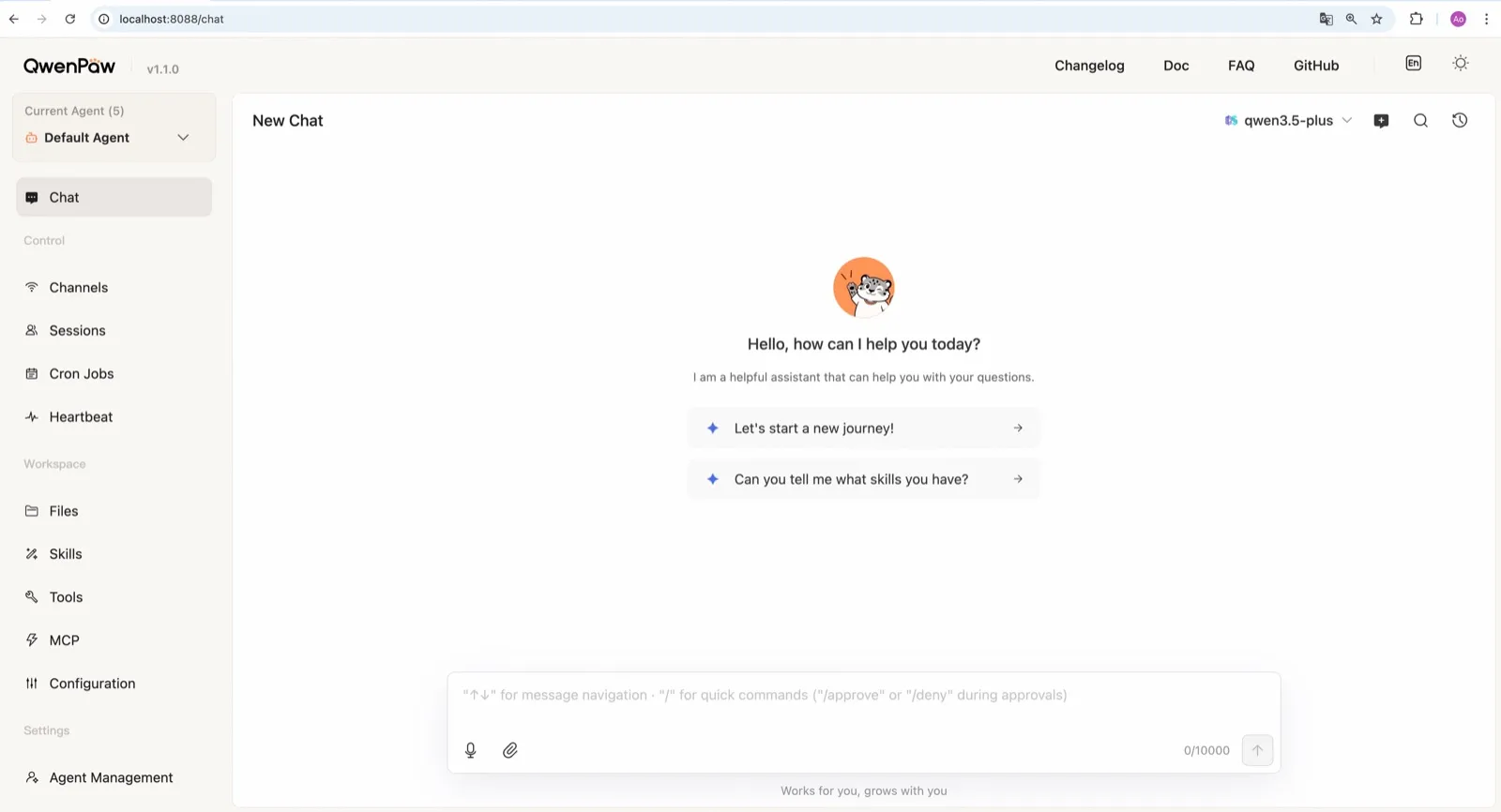
QwenPaw, מצוות AgentScope של Alibaba, מגיע עם סביבת ריצה משלו של llama.cpp, כך שהוא יכול לרוץ לגמרי אופליין בלי מפתח API ובלי התקנה נפרדת של Ollama (תיעוד המודלים). הצוות גם מפרסם מודלים קטנים בשם QwenPaw-Flash שאומנו למשימות סוכן. גם Ollama ו-LM Studio עובדים.
הוא מדורג מתחת ל-Agent Zero בברירות המחדל של בטיחות: ה-sandbox לפקודות כבוי, ופקודת ההתחלה המהירה המתועדת qwenpaw init --defaults מקבלת אוטומטית טלמטריית התקנה אנונימית. הריצו במקום זאת את qwenpaw init האינטראקטיבי כדי לסרב.
3. ZeroClaw
ZeroClaw הוא הבחירה הנקייה ביותר אם אתם כבר מריצים Ollama או שרת מודלים אחר תואם OpenAI. אין לו טלמטריה, יש לו sandbox של מערכת ההפעלה שפעיל כברירת מחדל ושרשראות גיבוי בין ספקים, כך שמודל מקומי יכול להיות ראשון בתור עם מודל מתארח מאחוריו, או בלי שום דבר מאחוריו. כקובץ binary יחיד ב-Rust הוא רץ על לוחות קטנים כמו Raspberry Pi, לצד שרת מודלים על מכונה גדולה יותר.

4. nanobot
nanobot תומך ב-Ollama, vLLM ו-LM Studio מהקופסה (ספקים), לא שולח טלמטריה, ושומר זיכרון כקובצי Markdown פשוטים ב-~/.nanobot, שקל לבדוק ולגבות. ה-WebUI שלו הופך התקנה מקומית לנעימה לשימוש. הפעילו את ה-sandbox של bubblewrap או Seatbelt שלו לפני שאתם נותנים למודל מקומי להריץ פקודות shell; הוא כבוי כברירת מחדל.

5. Khoj
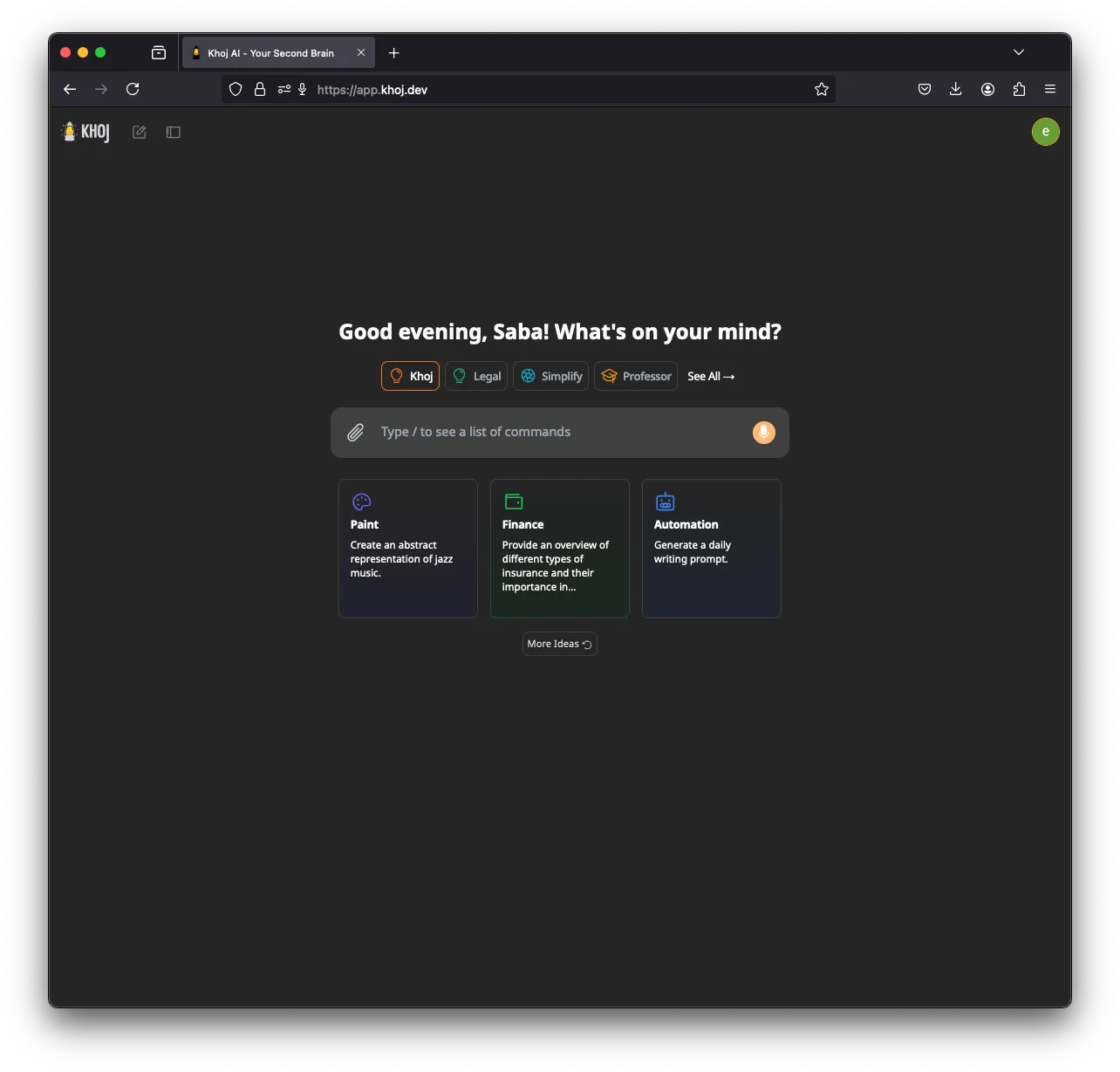
Khoj הוא המומחה: מוח שני מבוסס AI שמאנדקס את הפתקים והמסמכים שלכם ועונה מתוכם. הוא יכול לרוץ לגמרי אופליין, עם מודלי GGUF דרך llama.cpp ו-embeddings שנוצרים על המחשב שלכם, והוא תומך גם ב-Ollama, LM Studio ו-vLLM (התקנה). GPU (CUDA, ROCm, Vulkan או Apple Metal) עוזר.
הוא חמישי כי הפיתוח האט (אין שחרור מאז מרץ 2026), אין לו ערוצי אפליקציות צ’אט, והוא שולח טלמטריית שימוש אנונימית עד שתגדירו KHOJ_TELEMETRY_DISABLE=True.
6. Rakazo
Rakazo, שאנחנו מפתחים, מריץ מודלים מקומיים דרך Ollama או LM Studio (מודלים באירוח עצמי), לא שולח אנליטיקת מוצר מהתקנה באירוח עצמי, ונותן לכל בוט מחשב ב-sandbox. הוא מדורג כאן כי התמיכה המקומית שלו צרה יותר משל Agent Zero או QwenPaw: שתי סביבות ריצה מקומיות, ואף אחת לא מובנית. הוא גם ב-beta. ראו את הסקירה של Rakazo.


7. OpenClaw
OpenClaw עובד עם Ollama, LM Studio ו-vLLM (ספק Ollama), אז הוא שייך לכל רשימה מקומית, ומערכת התוספים העצומה שלו היא סיבה לבחור בו. אבל עבור משתמשים שמעדיפים מקומי, ברירות המחדל מושכות לכיוון הלא נכון: בדיקת עדכונים יומית פעילה (update.checkOnStart: false עוצר אותה) ופקודות רצות על המחשב המארח עד שמפעילים sandbox. אם אתם רוצים את OpenClaw עם הסקה מקומית ו-sandbox נעול, NemoClaw עוטף אותו עם ניתוב ל-Ollama, vLLM או NVIDIA NIM, במחיר של 8 GB RAM ותווית alpha.

הרצת הסוכן והמודל על מכונות שונות
PicoClaw מדגים תבנית שימושית. הסוכן שלו צריך רק 10 MB RAM פנויים ורץ על לוחות ב-10 דולר ועל טלפונים ישנים, אבל הוא עדיין צריך גישת רשת כדי להגיע למודל (תיעוד חומרה). כוונו אותו, או את ZeroClaw, לשרת Ollama או vLLM על מחשב שולחני עם GPU, ותקבלו סוכן שפועל תמיד על מכשיר זעיר כשכל ההסקה נשארת ברשת שלכם. PicoClaw לא נכנס לדירוג כי הפרויקט אומר לא להשתמש בו ב-production לפני v1.0.
למבט רחב יותר, ראו את סוכני ה-AI הטובים ביותר לאירוח עצמי.
הבחירות המובילות
Free, MIT-licensed AI agent that runs in its own Docker Linux workspace with a terminal, browser and desktop apps, and chats on Telegram and WhatsApp.
Runs in its own Docker container with local models, but sends telemetry by default.
מעבר ל-Agent Zeroחוזקות
- Free and MIT licensed, with frequent releases (v2.11 to v2.15 between late August and early November 2026)
- The agent works in its own Linux workspace with a terminal, browser, desktop apps and LibreOffice, isolated from your computer unless you grant host access
- Web search runs through a local SearXNG instance, and speech-to-text and text-to-speech can run locally
- Projects keep memory, files, secrets, instructions and model choices separate per job, with workspace snapshots you can roll back
- Built-in Telegram, WhatsApp and email channels, a scheduler, MCP and a community Plugin Hub with 200+ plugins
חולשות
- Needs Docker, and the container image is a full Linux desktop environment rather than a small service
- No built-in image generation; the docs show teaching it an image API yourself
- By default it checks for updates with Agent Zero's server, sending your version and a hashed instance ID
- Code runs in the same container as Agent Zero itself today; per-task sandboxes are only a v3 prototype
- WhatsApp works by linking a phone account through a Baileys bridge, which needs Node.js, rather than the official WhatsApp Business API
Free, Apache-licensed personal AI agent from Alibaba's AgentScope team, formerly CoPaw, with a web console, memory, multiple agents and many chat apps.
Many chat apps and local models, but no sandbox and telemetry on by default.
מעבר ל-QwenPawחוזקות
- Runs fully offline with a built-in llama.cpp runtime and purpose-trained QwenPaw-Flash models, no API key needed
- Several independent agents, each with its own memory, skills and heartbeat, that can work together
- Layered security: Tool Guard, File Guard, skill scanning, access policies and an optional kernel-level sandbox
- Broad chat coverage, especially for Chinese platforms such as DingTalk, Feishu, WeChat and QQ, alongside Telegram, Discord, Slack and iMessage
- Well-documented web console for channels, cron jobs, heartbeat, skills, MCP and files
חולשות
- The command sandbox is off by default, and inside Docker it falls back to no isolation
- The recommended setup command accepts anonymous install telemetry automatically
- No WhatsApp channel, and iMessage works only on a Mac with a third-party helper and Full Disk Access
- Desktop apps are still in beta, and the project moves fast, with frequent beta releases
Personal AI agent in one Rust binary, MIT or Apache-2.0, with local or cloud models, 30+ channels, approval gates and an OS sandbox on by default.
Meets every check: one Rust binary, approval gates and an OS sandbox on by default, no telemetry, local models.
מעבר ל-ZeroClawחוזקות
- Safe defaults: the recommended profile asks before medium-risk actions, blocks high-risk ones, keeps files in the workspace and runs tools in an OS sandbox
- One small Rust binary with one config file, running on macOS, Linux, Windows and boards like a Raspberry Pi
- More than 30 channels, plus a web dashboard for chat, memory, config and cron
- Provider fallback chains, local models through Ollama, and cryptographic receipts for tool calls
- States plainly that it sends no telemetry and needs no cloud account or license server
חולשות
- Slack, iMessage, Signal and several other channels are not in the standard release; you build from source with extra features to get them
- `zeroclaw quickstart` only sets up the model provider; channels and risk profiles mean editing the TOML config file
- The Docker sandbox backend isn't picked automatically under the default native runtime
- Model costs are on you
Free, MIT-licensed personal AI agent in Python with a browser UI and terminal app, scheduled tasks, memory, and chat on Telegram, Discord, Slack and more.
Small, readable Python with a good web UI and no telemetry, but shell commands aren't sandboxed by default.
מעבר ל-nanobotחוזקות
- Free and MIT licensed, with a small Python core that is meant to be read and modified
- Polished bundled WebUI with projects, file diffs, an MCP app catalog and an automations calendar, plus a terminal UI
- Many chat channels, including Telegram, Discord, Slack, WhatsApp, WeChat, Feishu, Teams, Matrix and email
- Scheduled automations, long-running goals and a heartbeat that reports only useful results to your last chat
- Works with local models through Ollama, vLLM or LM Studio
חולשות
- Shell commands are not sandboxed by default; the bubblewrap or macOS Seatbelt sandbox must be turned on, and Windows has none
- Model costs are on you, and voice messages need a separate transcription provider such as Groq or OpenAI
- No native mobile or desktop app; on a phone you use the WebUI in a browser or a chat app
- Missed scheduled runs are not replayed and interrupted subagent tasks are not relaunched after a restart
AGPL-licensed, self-hosted AI second brain that chats over your notes and documents with web search, custom agents and scheduled research emails.
Good at chatting over your own notes and documents, but development has slowed, it has no chat-app channels and telemetry is on by default.
מעבר ל-Khojחוזקות
- Searches and chats over your own notes and documents, including Markdown, Org-mode, PDF, Word, Notion and GitHub
- Works with local models through Ollama, LM Studio, vLLM or offline llama.cpp, and generates embeddings on your machine
- Custom agents with their own persona, knowledge, chat model and tools
- Automations run a query on a schedule and email you the result
- Generated code runs in a local Terrarium sandbox that the Docker Compose setup starts for you
חולשות
- Development has slowed: no release since March 26, 2026, the last commit was on August 2, 2026, and the team now focuses on other products
- The hosted Khoj Cloud, and with it the WhatsApp bot, shut down on April 15, 2026, so self-hosting is the only way to use it
- AGPL-3.0 requires you to share your changes if you offer a modified version to others over a network
- Sends anonymized usage telemetry by default until you set KHOJ_TELEMETRY_DISABLE
- Scheduled emails need Resend and authentication set up when self-hosting, and no chat apps such as Telegram or Slack are supported
Open-source, self-hostable platform for persistent AI bots that each get a job, a computer, memory and routines, using the model you choose.
Our own product. Meets every check: Apache-2.0, sandboxed bot computers, no telemetry by default, any model you connect.
מעבר ל-Rakazoחוזקות
- Open source (Apache-2.0) and fully self-hostable, including with local models
- Choice of model per bot, including existing Claude or ChatGPT subscriptions
- Bots keep working on schedules and triggers with their own cloud computer
- Approval controls over which actions a bot may take on its own
חולשות
- Still in beta, with frequent releases
- You supply and pay for the model on the hosted plans, unless you buy Rakazo credits
- Telegram, WhatsApp and iMessage/SMS are only available when self-hosted
- More setup than a single chat app
Free, MIT-licensed personal AI agent that runs on your own computer and takes orders from WhatsApp, Telegram, iMessage, Slack and 20+ other chat apps.
The biggest ecosystem and every chat app, but sandboxing is off and telemetry is on by default.
מעבר ל-OpenClawחוזקות
- Free and MIT licensed, with no paid tier
- Runs on your own hardware, and state, memory and credentials stay there
- Works in 29 chat channels, including WhatsApp, Telegram, iMessage, Slack, Discord and Microsoft Teams
- Model-agnostic: 64 model and media providers, plus local models
- Large ecosystem of skills and 142 official plugins, and very active development
חולשות
- Model costs are on you and can run high: testers and users have reported spending over $100 in a day with expensive models
- Sandboxing is off by default and the agent can run commands on the host unless you turn on approvals
- Setup and upkeep expect comfort with the command line; maintainers warn it is risky for non-technical users
- Broad access to email, messages and the system makes prompt injection and malicious third-party skills a real risk
יכולות
| Agent Zero | QwenPaw | ZeroClaw | nanobot | Khoj | Rakazo | OpenClaw | |
|---|---|---|---|---|---|---|---|
| חיפוש באינטרנט | כן | כן | כן | כן | כן | כן | כן |
| יצירת תמונות | לא | כן | כן | כן | כן | כן | כן |
| מצב קולי | כן | כן | כן | כן | כן | כן | כן |
| העלאת קבצים | כן | כן | כן | כן | כן | כן | כן |
| זיכרון | כן | כן | כן | כן | כן | כן | כן |
| מבצע משימות בשבילכם | כן | כן | כן | כן | כן | כן | כן |
| חיבור לאפליקציות | כן | כן | כן | כן | כן | כן | כן |
| עובד באופן עצמאי | כן | כן | כן | כן | כן | כן | כן |
| פונה אליכם ראשון | כן | כן | כן | כן | כן | כן | כן |
| כמה בוטים | כן | כן | כן | כן | כן | כן | כן |
מקורות
Agent Zero
- agent0ai/agent-zero on GitHub (MIT, README, safety model)
- Agent Zero releases (v0.2 in June 2024 to v2.15 on November 1, 2026)
- Agent Zero homepage
- Agent Zero docs: Installation (Launcher, A0 Install, Docker, local models)
- Agent Zero docs: VPS deployment (hardware requirements)
- Agent Zero model provider list
- Agent Zero update check code (version and hashed ID sent to api.agent-zero.ai)
- Agent Zero built-in Telegram integration plugin
- Agent Zero built-in WhatsApp integration plugin
- Agent Zero built-in plugins (scheduler, notify user, email, SearXNG search, Whisper STT, Kokoro TTS)
- Agent Zero docs: Memory guide
- Agent Zero docs: Agent Profiles
- Agent Zero docs: API integration (adding image generation yourself)
- Agent Zero v3: A Sneak Peek Inside the Sandbox (August 17, 2026)
- Agent Zero LLM API (Venice.ai proxy for A0T token stakers)
QwenPaw
- agentscope-ai/QwenPaw on GitHub (Apache-2.0, README with install options and telemetry)
- QwenPaw documentation
- QwenPaw v1.1.0 release notes: CoPaw rebrands to QwenPaw
- copaw on PyPI (first release February 2026)
- QwenPaw docs: Channels
- QwenPaw docs: Models (cloud providers, llama.cpp, Ollama, LM Studio)
- QwenPaw docs: Security (Tool Guard, File Guard, sandbox)
- QwenPaw source: security.sandbox_enabled defaults to off
- QwenPaw docs: Heartbeat
- QwenPaw docs: Multi-agent
- QwenPaw docs: Comparison (voice and video interaction)
- QwenPaw docs: Desktop application (beta)
- QwenPaw docs: Plugins (GPT Image 2 image generation plugin)
- QwenPaw Qwen-Image tool plugin (image generation and editing)
ZeroClaw
- zeroclaw-labs/zeroclaw on GitHub (MIT OR Apache-2.0, v0.8.7, README)
- ZeroClaw website
- ZeroClaw docs: Sandboxing
- ZeroClaw source: risk presets (Balanced, recommended, has the sandbox on)
- ZeroClaw docs: Channels overview (default and standard release bundles)
- ZeroClaw docs: You own it (no telemetry)
- ZeroClaw docs: Docker and containers
- ZeroClaw source: tools (image generation, screenshot, web)
nanobot
- HKUDS/nanobot on GitHub (MIT, v0.4.1, README)
- nanobot documentation
- nanobot release archive (officially launched February 2, 2026)
- nanobot docs: Chat apps
- nanobot docs: Providers and models (Ollama, vLLM, LM Studio)
- nanobot docs: Configuration (security, exec sandbox off by default, transcription, Langfuse)
- nanobot docs: Automations and heartbeat
- nanobot docs: Concepts (heartbeat delivery, subagent recovery)
- nanobot docs: Memory and Dream
- nanobot docs: Multiple instances
- nanobot docs: Deployment (Docker, services, Render)
- nanobot source: skills installer runs with DISABLE_TELEMETRY
Khoj
- khoj-ai/khoj on GitHub (AGPL-3.0, README)
- Khoj releases (latest 2.0.0-beta.28, March 26, 2026)
- Khoj commit history (last commit August 2, 2026)
- Khoj Cloud Has Been Sunset (April 15, 2026)
- Khoj homepage (Open Paper, Pipali and the Khoj app)
- khoj-assistant on PyPI (first release 0.1.0, August 2, 2022)
- Khoj docs: Self-host setup (Docker, pip, model providers)
- Khoj docs: Ollama
- Khoj docs: Telemetry
- Khoj docs: Privacy
- Stop sending client IP in telemetry so it matches the privacy docs (#1382)
- Khoj docs: Automations
- Khoj docs: Code execution (Terrarium sandbox)
- Khoj docs: Agents
- Khoj docs: Image generation
- Khoj docs: Voice
- Khoj docs: WhatsApp (bot tied to Khoj Cloud)
- Khoj server settings (memory feature enabled and on by default)
Rakazo
- Rakazo homepage
- Rakazo pricing
- Rakazo privacy policy
- Rakazo on GitHub (README and license)
- Rakazo changelog
- Rakazo releases
- Rakazo docs: Image and video generation
- Rakazo docs: Memory
- Rakazo docs: Connect apps
- Rakazo docs: Routines
- Rakazo docs: Chat apps
- Rakazo docs: Messaging apps (self-hosting)
- Rakazo docs: Bots and chats (add another bot, bot templates)
- Rakazo docs: Groups (several bots in one chat)
- Rakazo docs: Mobile app (notifications)
- Rakazo privacy policy (updated Sep 14, 2026)
- Rakazo privacy policy source on GitHub
- Rakazo docs: Logs and monitoring (product analytics off by default)
- Rakazo docs: Desktop app (run locally in Docker, updates)
- Rakazo docs: Docker computers
- Rakazo docs: Self-hosted models (Ollama, LM Studio)
- Rakazo Railway template setup guide
OpenClaw
- OpenClaw homepage and Foundation section
- OpenClaw integrations: channels, providers and plugins
- openclaw/openclaw on GitHub (MIT, v2026.11.1)
- OpenClaw docs: Sandboxing (off by default)
- Wikipedia: OpenClaw
- Notebookcheck: OpenClaw can burn through hundreds of dollars per day
- OpenClaw docs: Memory overview
- OpenClaw docs: Automations
- OpenClaw docs: Chat channels
- OpenClaw docs: iMessage
- OpenClaw docs: Heartbeat, now a default Proactive check job
- OpenClaw docs: Multi-agent routing
- OpenClaw docs: Platforms (macOS, Windows, Linux, iOS and Android apps)
- OpenClaw docs: Tools (exec, browser, web search)
- OpenClaw docs: Audio and voice notes (inbound transcription)
- OpenClaw docs: Image and media support (inbound media)
- OpenClaw docs: Install (system requirements, installer script, npm, desktop apps, Docker)
- OpenClaw docs: One-click deploy on Railway
- OpenClaw docs: Usage telemetry and update checks (on by default, feature statistics opt-in)
- OpenClaw docs: Ollama provider (local models)