Os melhores agentes de IA locais: um assistente de IA no seu próprio hardware
Sete agentes de IA locais classificados por quão bem rodam com Ollama, vLLM, LM Studio ou llama.cpp, e quanto dos seus dados fica na sua própria máquina.
Resumo
| Bot | Licença | Apps de chat | |||||
|---|---|---|---|---|---|---|---|
| Agent Zero | MIT | 19,8 mil | Sim | Sim | Telegram, WhatsApp | Grátis | |
| QwenPaw | Apache-2.0 | 37,5 mil | Sim | Não | Telegram, iMessage, Discord, Slack | Grátis | |
| ZeroClaw | MIT OR Apache-2.0 | 33,3 mil | Sim | Sim | Telegram, WhatsApp, Discord | Grátis | |
| nanobot | MIT | 49,9 mil | Sim | Não | Telegram, WhatsApp, Discord, Slack | Grátis | |
| Khoj | AGPL-3.0 | 38,1 mil | Sim | Sim | Nenhum | Grátis | |
| Rakazo | Apache-2.0 | 7,5 mil | Sim | Sim | Telegram, WhatsApp, iMessage, Slack | A partir de US$ 10/mês | |
| OpenClaw | MIT | 394,2 mil | Sim | Não | Telegram, WhatsApp, iMessage, Discord, Slack | Grátis |


Checklist
| Agent Zero | QwenPaw | ZeroClaw | nanobot | Khoj | Rakazo | OpenClaw | |
|---|---|---|---|---|---|---|---|
| Licença open source | Sim | Sim | Sim | Sim | Sim | Sim | Sim |
| Roda modelos locais | Sim | Sim | Sim | Sim | Sim | Sim | Sim |
| Sandbox por padrão | Sim | Não | Sim | Não | Sim | Sim | Não |
| Sem telemetria por padrão | Não | Não | Sim | Sim | Não | Sim | Não |
| Vive nos seus apps de chat | Sim | Sim | Sim | Sim | Não | Sim | Sim |
| Trabalha enquanto você está fora | Sim | Sim | Sim | Sim | Sim | Sim | Sim |
Todos os agentes da nossa lista conseguem conversar com um modelo local. Isso não é o mesmo que ser um bom agente de IA local. Com um modelo hospedado, seus prompts, arquivos e trechos de memória saem da sua máquina a cada interação. Ser totalmente local significa que o modelo, a busca, a voz e a memória rodam em hardware seu, e pouquíssimos agentes levam você até lá.
Como classificamos
Esta lista prioriza o funcionamento local acima de tudo:
- Runtimes locais suportados. Ollama, vLLM, LM Studio, llama.cpp. Mais opções significam que ele se adapta ao hardware que você já tem.
- O que mais fica local. Busca na web, fala para texto, texto para fala e embeddings. Um agente que roda o modelo localmente, mas manda cada busca para uma API na nuvem, ainda vaza aquilo em que você está trabalhando.
- Sem telemetria e com sandbox, de acordo com a checklist da tabela acima, porque quem prioriza o local costuma se importar com as duas coisas.
- Esforço de instalação e maturidade.
Uma observação sobre hardware: os agentes em si são leves. O que precisa de RAM e GPU é o modelo, e um modelo local capaz é um requisito muito maior do que qualquer agente desta lista. Comece verificando qual modelo a sua máquina consegue rodar e depois escolha o agente.
1. Agent Zero
O Agent Zero é o que vai mais longe rumo a uma configuração totalmente local. Ele suporta Ollama, LM Studio, llama.cpp, vLLM e oMLX (documentação de instalação), a busca na web passa por uma instância do SearXNG incluída em vez de uma API de busca, e fala para texto e texto para fala podem rodar localmente pelos plugins integrados Whisper e Kokoro (plugins). O agente trabalha dentro do próprio contêiner Docker, isolado do seu computador a menos que você conceda acesso.
Sua única telemetria é uma verificação de atualizações que envia a sua versão e um ID de instância com hash; você pode desligá-la nas configurações. Reserve pelo menos 2 GB de RAM para o próprio Agent Zero, sem contar o modelo.

2. QwenPaw
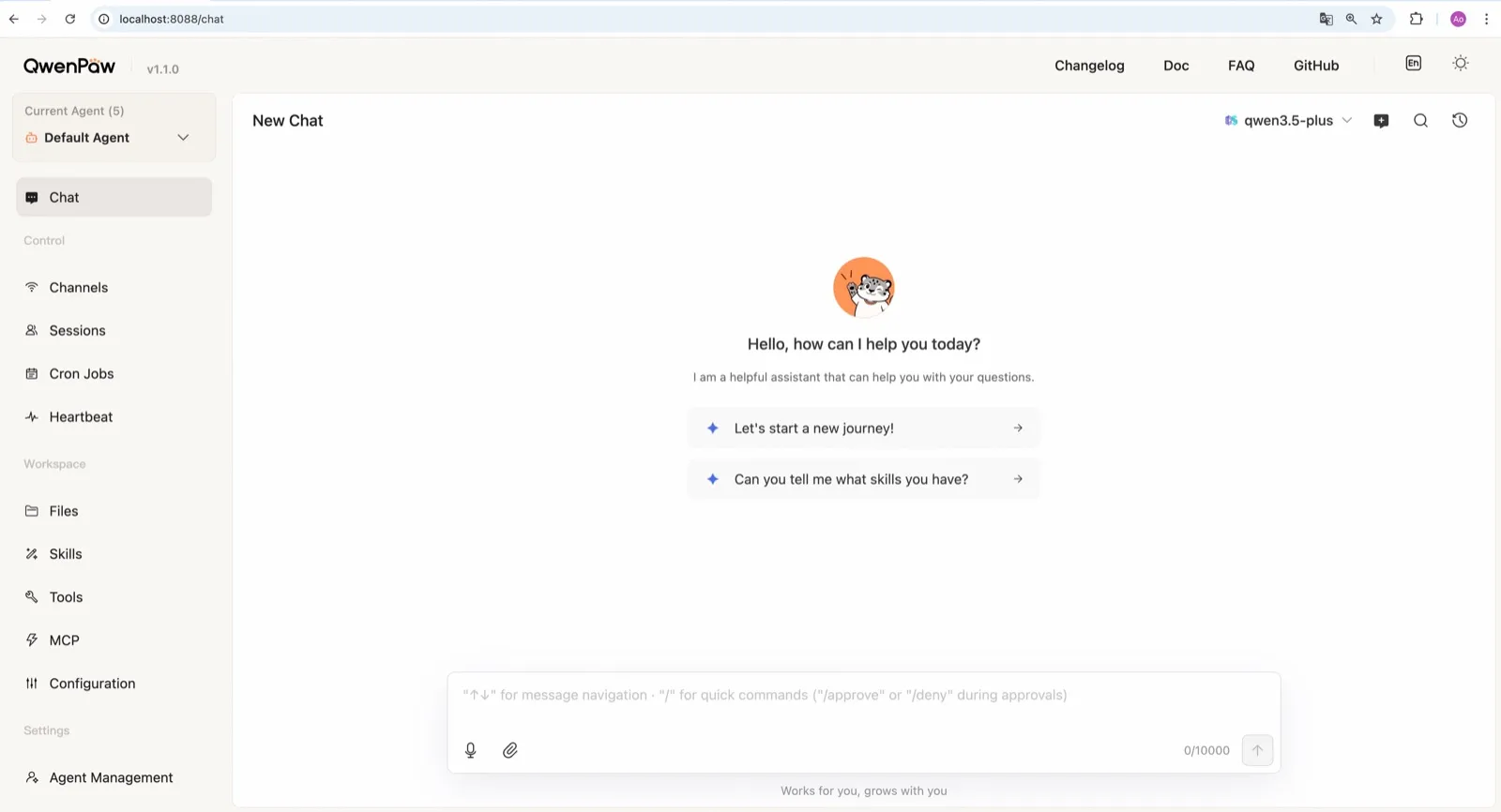
O QwenPaw, da equipe AgentScope da Alibaba, traz o próprio runtime llama.cpp, então pode rodar totalmente offline, sem chave de API e sem instalar o Ollama separadamente (documentação de modelos). A equipe também publica pequenos modelos QwenPaw-Flash treinados para tarefas de agente. Ollama e LM Studio também funcionam.
Ele fica abaixo do Agent Zero em padrões de segurança: o sandbox de comandos vem desligado, e o comando de início rápido documentado, qwenpaw init --defaults, aceita automaticamente a telemetria anônima de instalação. Rode o qwenpaw init interativo para recusar.
3. ZeroClaw
O ZeroClaw é a escolha mais limpa se você já roda o Ollama ou outro servidor de modelos compatível com OpenAI. Não tem telemetria, traz um sandbox do sistema operacional ligado por padrão e cadeias de fallback entre provedores, então um modelo local pode ficar em primeiro lugar com um hospedado atrás dele, ou sem nada atrás. Por ser um único binário Rust, roda em placas pequenas como uma Raspberry Pi, ao lado de um servidor de modelos em uma máquina mais potente.

4. nanobot
O nanobot suporta Ollama, vLLM e LM Studio de fábrica (provedores), não envia telemetria e guarda a memória como arquivos Markdown simples em ~/.nanobot, fáceis de inspecionar e de fazer backup. Sua WebUI torna uma configuração local agradável de usar. Ative o sandbox de bubblewrap ou Seatbelt antes de deixar um modelo local rodar comandos de shell; ele vem desligado por padrão.

5. Khoj
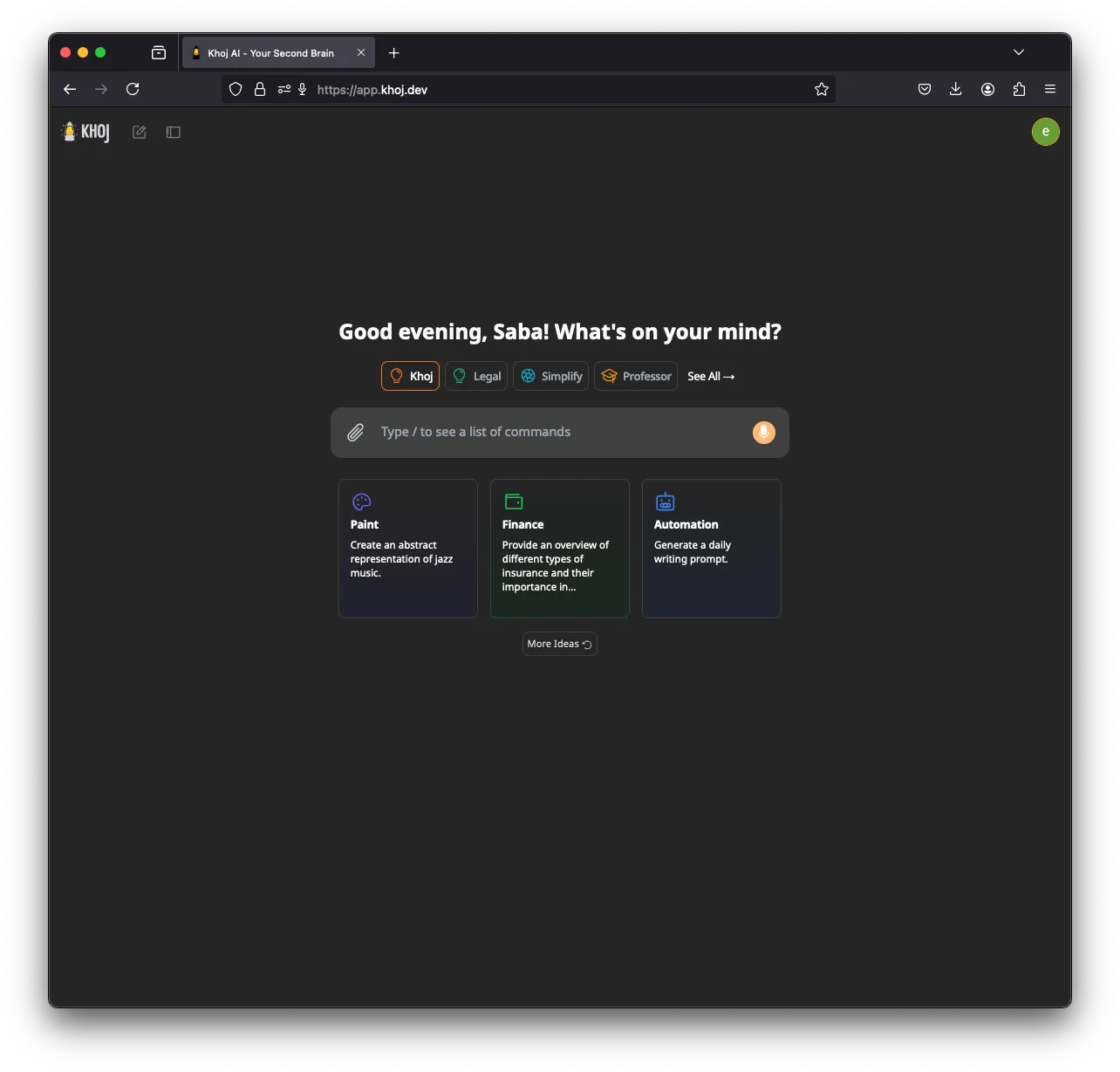
O Khoj é o especialista: um segundo cérebro de IA que indexa suas notas e documentos e responde a partir deles. Ele pode rodar totalmente offline, com modelos GGUF via llama.cpp e embeddings gerados na sua máquina, e também suporta Ollama, LM Studio e vLLM (instalação). Uma GPU (CUDA, ROCm, Vulkan ou Apple Metal) ajuda.
Ele fica em quinto porque o desenvolvimento desacelerou (nenhuma versão desde março de 2026), não tem canais de apps de chat e envia telemetria de uso anonimizada até você definir KHOJ_TELEMETRY_DISABLE=True.
6. Rakazo
O Rakazo, que nós desenvolvemos, roda modelos locais pelo Ollama ou LM Studio (modelos auto-hospedados), não envia analítica de produto a partir de uma instalação auto-hospedada e dá a cada bot um computador isolado. Ele fica nesta posição porque o suporte local é mais limitado que o do Agent Zero ou do QwenPaw: dois runtimes locais, e nenhum embutido. Também está em beta. Veja a análise do Rakazo.


7. OpenClaw
O OpenClaw funciona com Ollama, LM Studio e vLLM (provedor Ollama), então merece estar em qualquer lista de agentes locais, e seu enorme ecossistema de plugins é um motivo para escolhê-lo. Mas, para quem prioriza o local, os padrões puxam para o lado errado: uma verificação diária de atualizações vem ligada (update.checkOnStart: false a interrompe) e os comandos rodam no seu host até você ativar o sandboxing. Se você quer o OpenClaw com inferência local e um sandbox travado, o NemoClaw o envolve com roteamento para Ollama, vLLM ou NVIDIA NIM, ao custo de 8 GB de RAM e do rótulo de alfa.

Rodando o agente e o modelo em máquinas diferentes
O PicoClaw mostra um padrão útil. Seu agente precisa de apenas 10 MB de RAM livre e roda em placas de US$ 10 e celulares antigos, mas ainda precisa de acesso à rede para chegar ao modelo (documentação de hardware). Aponte ele, ou o ZeroClaw, para um servidor Ollama ou vLLM em um desktop com GPU, e você terá um agente sempre ligado em um dispositivo minúsculo, com toda a inferência na sua própria rede. O PicoClaw ficou fora do ranking porque o próprio projeto diz para não usá-lo em produção antes da v1.0.
Para uma visão mais ampla, veja os melhores agentes de IA auto-hospedados.
Melhores escolhas
Free, MIT-licensed AI agent that runs in its own Docker Linux workspace with a terminal, browser and desktop apps, and chats on Telegram and WhatsApp.
Runs in its own Docker container with local models, but sends telemetry by default.
Acessar Agent ZeroPontos fortes
- Free and MIT licensed, with frequent releases (v2.11 to v2.15 between late August and early November 2026)
- The agent works in its own Linux workspace with a terminal, browser, desktop apps and LibreOffice, isolated from your computer unless you grant host access
- Web search runs through a local SearXNG instance, and speech-to-text and text-to-speech can run locally
- Projects keep memory, files, secrets, instructions and model choices separate per job, with workspace snapshots you can roll back
- Built-in Telegram, WhatsApp and email channels, a scheduler, MCP and a community Plugin Hub with 200+ plugins
Pontos fracos
- Needs Docker, and the container image is a full Linux desktop environment rather than a small service
- No built-in image generation; the docs show teaching it an image API yourself
- By default it checks for updates with Agent Zero's server, sending your version and a hashed instance ID
- Code runs in the same container as Agent Zero itself today; per-task sandboxes are only a v3 prototype
- WhatsApp works by linking a phone account through a Baileys bridge, which needs Node.js, rather than the official WhatsApp Business API
Free, Apache-licensed personal AI agent from Alibaba's AgentScope team, formerly CoPaw, with a web console, memory, multiple agents and many chat apps.
Many chat apps and local models, but no sandbox and telemetry on by default.
Acessar QwenPawPontos fortes
- Runs fully offline with a built-in llama.cpp runtime and purpose-trained QwenPaw-Flash models, no API key needed
- Several independent agents, each with its own memory, skills and heartbeat, that can work together
- Layered security: Tool Guard, File Guard, skill scanning, access policies and an optional kernel-level sandbox
- Broad chat coverage, especially for Chinese platforms such as DingTalk, Feishu, WeChat and QQ, alongside Telegram, Discord, Slack and iMessage
- Well-documented web console for channels, cron jobs, heartbeat, skills, MCP and files
Pontos fracos
- The command sandbox is off by default, and inside Docker it falls back to no isolation
- The recommended setup command accepts anonymous install telemetry automatically
- No WhatsApp channel, and iMessage works only on a Mac with a third-party helper and Full Disk Access
- Desktop apps are still in beta, and the project moves fast, with frequent beta releases
Personal AI agent in one Rust binary, MIT or Apache-2.0, with local or cloud models, 30+ channels, approval gates and an OS sandbox on by default.
Meets every check: one Rust binary, approval gates and an OS sandbox on by default, no telemetry, local models.
Acessar ZeroClawPontos fortes
- Safe defaults: the recommended profile asks before medium-risk actions, blocks high-risk ones, keeps files in the workspace and runs tools in an OS sandbox
- One small Rust binary with one config file, running on macOS, Linux, Windows and boards like a Raspberry Pi
- More than 30 channels, plus a web dashboard for chat, memory, config and cron
- Provider fallback chains, local models through Ollama, and cryptographic receipts for tool calls
- States plainly that it sends no telemetry and needs no cloud account or license server
Pontos fracos
- Slack, iMessage, Signal and several other channels are not in the standard release; you build from source with extra features to get them
- `zeroclaw quickstart` only sets up the model provider; channels and risk profiles mean editing the TOML config file
- The Docker sandbox backend isn't picked automatically under the default native runtime
- Model costs are on you
Free, MIT-licensed personal AI agent in Python with a browser UI and terminal app, scheduled tasks, memory, and chat on Telegram, Discord, Slack and more.
Small, readable Python with a good web UI and no telemetry, but shell commands aren't sandboxed by default.
Acessar nanobotPontos fortes
- Free and MIT licensed, with a small Python core that is meant to be read and modified
- Polished bundled WebUI with projects, file diffs, an MCP app catalog and an automations calendar, plus a terminal UI
- Many chat channels, including Telegram, Discord, Slack, WhatsApp, WeChat, Feishu, Teams, Matrix and email
- Scheduled automations, long-running goals and a heartbeat that reports only useful results to your last chat
- Works with local models through Ollama, vLLM or LM Studio
Pontos fracos
- Shell commands are not sandboxed by default; the bubblewrap or macOS Seatbelt sandbox must be turned on, and Windows has none
- Model costs are on you, and voice messages need a separate transcription provider such as Groq or OpenAI
- No native mobile or desktop app; on a phone you use the WebUI in a browser or a chat app
- Missed scheduled runs are not replayed and interrupted subagent tasks are not relaunched after a restart
AGPL-licensed, self-hosted AI second brain that chats over your notes and documents with web search, custom agents and scheduled research emails.
Good at chatting over your own notes and documents, but development has slowed, it has no chat-app channels and telemetry is on by default.
Acessar KhojPontos fortes
- Searches and chats over your own notes and documents, including Markdown, Org-mode, PDF, Word, Notion and GitHub
- Works with local models through Ollama, LM Studio, vLLM or offline llama.cpp, and generates embeddings on your machine
- Custom agents with their own persona, knowledge, chat model and tools
- Automations run a query on a schedule and email you the result
- Generated code runs in a local Terrarium sandbox that the Docker Compose setup starts for you
Pontos fracos
- Development has slowed: no release since March 26, 2026, the last commit was on August 2, 2026, and the team now focuses on other products
- The hosted Khoj Cloud, and with it the WhatsApp bot, shut down on April 15, 2026, so self-hosting is the only way to use it
- AGPL-3.0 requires you to share your changes if you offer a modified version to others over a network
- Sends anonymized usage telemetry by default until you set KHOJ_TELEMETRY_DISABLE
- Scheduled emails need Resend and authentication set up when self-hosting, and no chat apps such as Telegram or Slack are supported
Open-source, self-hostable platform for persistent AI bots that each get a job, a computer, memory and routines, using the model you choose.
Our own product. Meets every check: Apache-2.0, sandboxed bot computers, no telemetry by default, any model you connect.
Acessar RakazoPontos fortes
- Open source (Apache-2.0) and fully self-hostable, including with local models
- Choice of model per bot, including existing Claude or ChatGPT subscriptions
- Bots keep working on schedules and triggers with their own cloud computer
- Approval controls over which actions a bot may take on its own
Pontos fracos
- Still in beta, with frequent releases
- You supply and pay for the model on the hosted plans, unless you buy Rakazo credits
- Telegram, WhatsApp and iMessage/SMS are only available when self-hosted
- More setup than a single chat app
Free, MIT-licensed personal AI agent that runs on your own computer and takes orders from WhatsApp, Telegram, iMessage, Slack and 20+ other chat apps.
The biggest ecosystem and every chat app, but sandboxing is off and telemetry is on by default.
Acessar OpenClawPontos fortes
- Free and MIT licensed, with no paid tier
- Runs on your own hardware, and state, memory and credentials stay there
- Works in 29 chat channels, including WhatsApp, Telegram, iMessage, Slack, Discord and Microsoft Teams
- Model-agnostic: 64 model and media providers, plus local models
- Large ecosystem of skills and 142 official plugins, and very active development
Pontos fracos
- Model costs are on you and can run high: testers and users have reported spending over $100 in a day with expensive models
- Sandboxing is off by default and the agent can run commands on the host unless you turn on approvals
- Setup and upkeep expect comfort with the command line; maintainers warn it is risky for non-technical users
- Broad access to email, messages and the system makes prompt injection and malicious third-party skills a real risk
Recursos
| Agent Zero | QwenPaw | ZeroClaw | nanobot | Khoj | Rakazo | OpenClaw | |
|---|---|---|---|---|---|---|---|
| Busca na web | Sim | Sim | Sim | Sim | Sim | Sim | Sim |
| Geração de imagens | Não | Sim | Sim | Sim | Sim | Sim | Sim |
| Modo de voz | Sim | Sim | Sim | Sim | Sim | Sim | Sim |
| Envio de arquivos | Sim | Sim | Sim | Sim | Sim | Sim | Sim |
| Memória | Sim | Sim | Sim | Sim | Sim | Sim | Sim |
| Executa tarefas por você | Sim | Sim | Sim | Sim | Sim | Sim | Sim |
| Integrações com apps | Sim | Sim | Sim | Sim | Sim | Sim | Sim |
| Trabalha sozinho | Sim | Sim | Sim | Sim | Sim | Sim | Sim |
| Manda mensagem primeiro | Sim | Sim | Sim | Sim | Sim | Sim | Sim |
| Vários bots | Sim | Sim | Sim | Sim | Sim | Sim | Sim |
Fontes
Agent Zero
- agent0ai/agent-zero on GitHub (MIT, README, safety model)
- Agent Zero releases (v0.2 in June 2024 to v2.15 on November 1, 2026)
- Agent Zero homepage
- Agent Zero docs: Installation (Launcher, A0 Install, Docker, local models)
- Agent Zero docs: VPS deployment (hardware requirements)
- Agent Zero model provider list
- Agent Zero update check code (version and hashed ID sent to api.agent-zero.ai)
- Agent Zero built-in Telegram integration plugin
- Agent Zero built-in WhatsApp integration plugin
- Agent Zero built-in plugins (scheduler, notify user, email, SearXNG search, Whisper STT, Kokoro TTS)
- Agent Zero docs: Memory guide
- Agent Zero docs: Agent Profiles
- Agent Zero docs: API integration (adding image generation yourself)
- Agent Zero v3: A Sneak Peek Inside the Sandbox (August 17, 2026)
- Agent Zero LLM API (Venice.ai proxy for A0T token stakers)
QwenPaw
- agentscope-ai/QwenPaw on GitHub (Apache-2.0, README with install options and telemetry)
- QwenPaw documentation
- QwenPaw v1.1.0 release notes: CoPaw rebrands to QwenPaw
- copaw on PyPI (first release February 2026)
- QwenPaw docs: Channels
- QwenPaw docs: Models (cloud providers, llama.cpp, Ollama, LM Studio)
- QwenPaw docs: Security (Tool Guard, File Guard, sandbox)
- QwenPaw source: security.sandbox_enabled defaults to off
- QwenPaw docs: Heartbeat
- QwenPaw docs: Multi-agent
- QwenPaw docs: Comparison (voice and video interaction)
- QwenPaw docs: Desktop application (beta)
- QwenPaw docs: Plugins (GPT Image 2 image generation plugin)
- QwenPaw Qwen-Image tool plugin (image generation and editing)
ZeroClaw
- zeroclaw-labs/zeroclaw on GitHub (MIT OR Apache-2.0, v0.8.7, README)
- ZeroClaw website
- ZeroClaw docs: Sandboxing
- ZeroClaw source: risk presets (Balanced, recommended, has the sandbox on)
- ZeroClaw docs: Channels overview (default and standard release bundles)
- ZeroClaw docs: You own it (no telemetry)
- ZeroClaw docs: Docker and containers
- ZeroClaw source: tools (image generation, screenshot, web)
nanobot
- HKUDS/nanobot on GitHub (MIT, v0.4.1, README)
- nanobot documentation
- nanobot release archive (officially launched February 2, 2026)
- nanobot docs: Chat apps
- nanobot docs: Providers and models (Ollama, vLLM, LM Studio)
- nanobot docs: Configuration (security, exec sandbox off by default, transcription, Langfuse)
- nanobot docs: Automations and heartbeat
- nanobot docs: Concepts (heartbeat delivery, subagent recovery)
- nanobot docs: Memory and Dream
- nanobot docs: Multiple instances
- nanobot docs: Deployment (Docker, services, Render)
- nanobot source: skills installer runs with DISABLE_TELEMETRY
Khoj
- khoj-ai/khoj on GitHub (AGPL-3.0, README)
- Khoj releases (latest 2.0.0-beta.28, March 26, 2026)
- Khoj commit history (last commit August 2, 2026)
- Khoj Cloud Has Been Sunset (April 15, 2026)
- Khoj homepage (Open Paper, Pipali and the Khoj app)
- khoj-assistant on PyPI (first release 0.1.0, August 2, 2022)
- Khoj docs: Self-host setup (Docker, pip, model providers)
- Khoj docs: Ollama
- Khoj docs: Telemetry
- Khoj docs: Privacy
- Stop sending client IP in telemetry so it matches the privacy docs (#1382)
- Khoj docs: Automations
- Khoj docs: Code execution (Terrarium sandbox)
- Khoj docs: Agents
- Khoj docs: Image generation
- Khoj docs: Voice
- Khoj docs: WhatsApp (bot tied to Khoj Cloud)
- Khoj server settings (memory feature enabled and on by default)
Rakazo
- Rakazo homepage
- Rakazo pricing
- Rakazo privacy policy
- Rakazo on GitHub (README and license)
- Rakazo changelog
- Rakazo releases
- Rakazo docs: Image and video generation
- Rakazo docs: Memory
- Rakazo docs: Connect apps
- Rakazo docs: Routines
- Rakazo docs: Chat apps
- Rakazo docs: Messaging apps (self-hosting)
- Rakazo docs: Bots and chats (add another bot, bot templates)
- Rakazo docs: Groups (several bots in one chat)
- Rakazo docs: Mobile app (notifications)
- Rakazo privacy policy (updated Sep 14, 2026)
- Rakazo privacy policy source on GitHub
- Rakazo docs: Logs and monitoring (product analytics off by default)
- Rakazo docs: Desktop app (run locally in Docker, updates)
- Rakazo docs: Docker computers
- Rakazo docs: Self-hosted models (Ollama, LM Studio)
- Rakazo Railway template setup guide
OpenClaw
- OpenClaw homepage and Foundation section
- OpenClaw integrations: channels, providers and plugins
- openclaw/openclaw on GitHub (MIT, v2026.11.1)
- OpenClaw docs: Sandboxing (off by default)
- Wikipedia: OpenClaw
- Notebookcheck: OpenClaw can burn through hundreds of dollars per day
- OpenClaw docs: Memory overview
- OpenClaw docs: Automations
- OpenClaw docs: Chat channels
- OpenClaw docs: iMessage
- OpenClaw docs: Heartbeat, now a default Proactive check job
- OpenClaw docs: Multi-agent routing
- OpenClaw docs: Platforms (macOS, Windows, Linux, iOS and Android apps)
- OpenClaw docs: Tools (exec, browser, web search)
- OpenClaw docs: Audio and voice notes (inbound transcription)
- OpenClaw docs: Image and media support (inbound media)
- OpenClaw docs: Install (system requirements, installer script, npm, desktop apps, Docker)
- OpenClaw docs: One-click deploy on Railway
- OpenClaw docs: Usage telemetry and update checks (on by default, feature statistics opt-in)
- OpenClaw docs: Ollama provider (local models)