Najlepsze lokalne agenty AI: asystent AI na własnym sprzęcie
Siedem lokalnych agentów AI uszeregowanych według tego, jak działają z Ollama, vLLM, LM Studio lub llama.cpp i ile danych zostaje na własnej maszynie.
W skrócie
| Bot | Licencja | Komunikatory | |||||
|---|---|---|---|---|---|---|---|
| Agent Zero | MIT | 19,8 tys. | Tak | Tak | Telegram, WhatsApp | Za darmo | |
| QwenPaw | Apache-2.0 | 37,5 tys. | Tak | Nie | Telegram, iMessage, Discord, Slack | Za darmo | |
| ZeroClaw | MIT OR Apache-2.0 | 33,3 tys. | Tak | Tak | Telegram, WhatsApp, Discord | Za darmo | |
| nanobot | MIT | 49,9 tys. | Tak | Nie | Telegram, WhatsApp, Discord, Slack | Za darmo | |
| Khoj | AGPL-3.0 | 38,1 tys. | Tak | Tak | Brak | Za darmo | |
| Rakazo | Apache-2.0 | 7,5 tys. | Tak | Tak | Telegram, WhatsApp, iMessage, Slack | Od 10 USD/mies. | |
| OpenClaw | MIT | 394,2 tys. | Tak | Nie | Telegram, WhatsApp, iMessage, Discord, Slack | Za darmo |


Lista kontrolna
| Agent Zero | QwenPaw | ZeroClaw | nanobot | Khoj | Rakazo | OpenClaw | |
|---|---|---|---|---|---|---|---|
| Licencja open source | Tak | Tak | Tak | Tak | Tak | Tak | Tak |
| Działa z modelami lokalnymi | Tak | Tak | Tak | Tak | Tak | Tak | Tak |
| Domyślnie w sandboksie | Tak | Nie | Tak | Nie | Tak | Tak | Nie |
| Domyślnie bez telemetrii | Nie | Nie | Tak | Tak | Nie | Tak | Nie |
| Działa w twoich komunikatorach | Tak | Tak | Tak | Tak | Nie | Tak | Tak |
| Pracuje, gdy cię nie ma | Tak | Tak | Tak | Tak | Tak | Tak | Tak |
Każdy agent z naszej listy potrafi komunikować się z lokalnym modelem. To jednak nie to samo, co bycie dobrym lokalnym agentem AI. Przy hostowanym modelu prompty, pliki i fragmenty pamięci opuszczają maszynę przy każdej turze. Pełna lokalność oznacza, że model, wyszukiwanie, mowa i pamięć działają na sprzęcie, który się posiada, a bardzo niewielu agentów pozwala dojść tak daleko.
Jak ustaliliśmy ranking
Ta lista stawia działanie lokalne ponad wszystko inne:
- Obsługiwane lokalne środowiska uruchomieniowe. Ollama, vLLM, LM Studio, llama.cpp. Więcej opcji oznacza większą szansę dopasowania do posiadanego sprzętu.
- Co jeszcze zostaje lokalnie. Wyszukiwanie w sieci, zamiana mowy na tekst, tekstu na mowę i embeddingi. Agent, który uruchamia model lokalnie, ale każde wyszukiwanie wysyła do API w chmurze, nadal zdradza, nad czym się pracuje.
- Brak telemetrii i sandbox, według listy kontrolnej w tabeli powyżej, bo użytkownikom stawiającym na lokalność zwykle zależy na obu.
- Nakład pracy przy instalacji i dojrzałość.
Uwaga o sprzęcie: same agenty są lekkie. To model potrzebuje RAM i GPU, a wydajny model lokalny to znacznie większe wymaganie niż którykolwiek agent z tej listy. Najpierw warto sprawdzić, jaki model udźwignie maszyna, a potem wybrać agenta.
1. Agent Zero
Agent Zero zachodzi najdalej w stronę w pełni lokalnej konfiguracji. Obsługuje Ollama, LM Studio, llama.cpp, vLLM i oMLX (dokumentacja instalacji), wyszukiwanie w sieci działa przez dołączoną instancję SearXNG zamiast przez API wyszukiwarki, a zamiana mowy na tekst i tekstu na mowę może działać lokalnie dzięki wbudowanym wtyczkom Whisper i Kokoro (wtyczki). Agent pracuje we własnym kontenerze Docker, odizolowany od komputera użytkownika, dopóki nie przyzna się mu dostępu.
Jedyna telemetria to sprawdzanie aktualizacji, które wysyła wersję i zahashowany identyfikator instancji; można je wyłączyć w ustawieniach. Warto przewidzieć co najmniej 2 GB RAM dla samego Agent Zero, nie licząc modelu.

2. QwenPaw
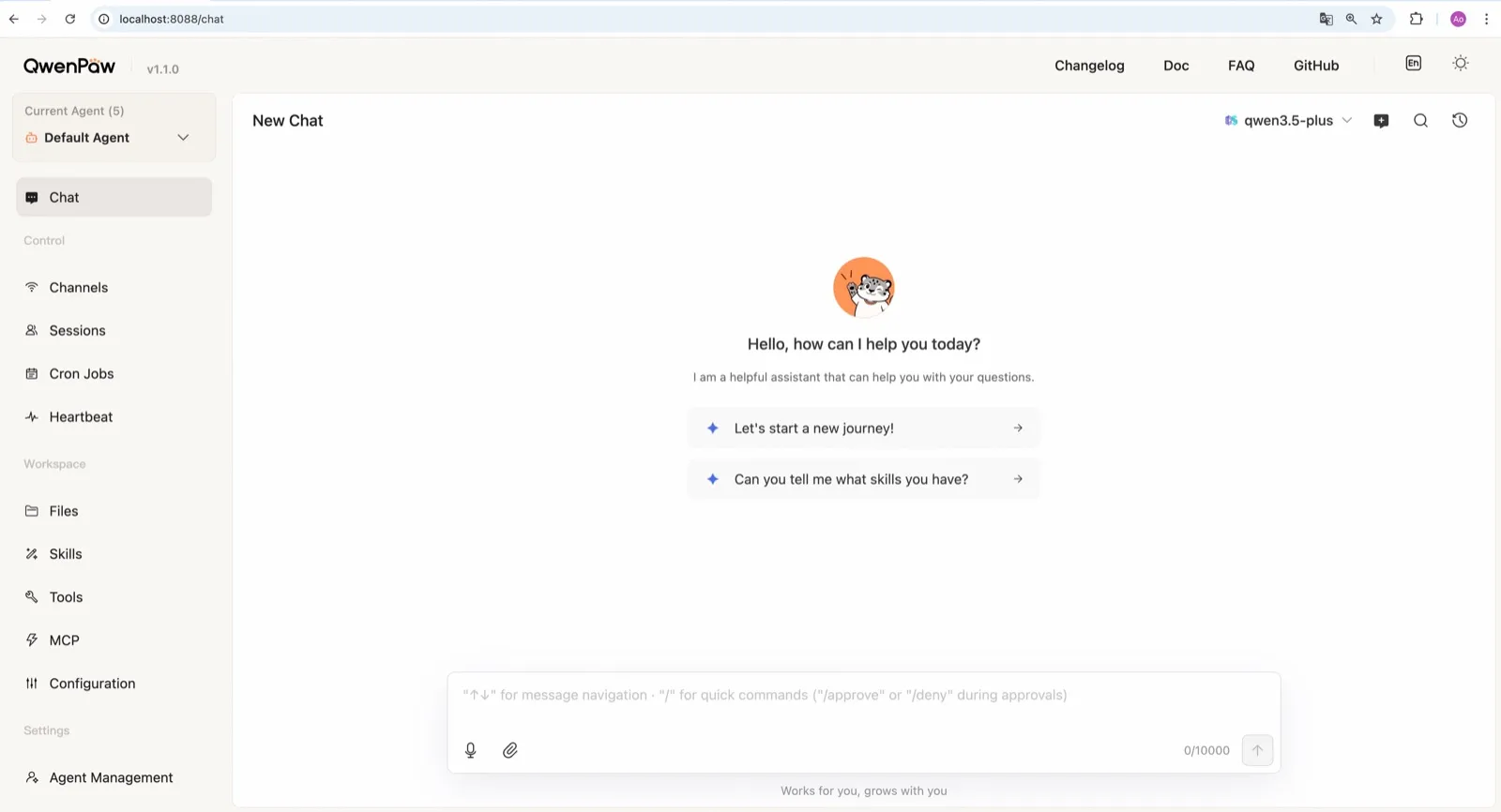
QwenPaw od zespołu AgentScope z Alibaby ma własne środowisko uruchomieniowe llama.cpp, więc może działać całkowicie offline bez klucza API i bez osobnej instalacji Ollama (dokumentacja modeli). Zespół publikuje też małe modele QwenPaw-Flash trenowane do zadań agentowych. Ollama i LM Studio również działają.
W rankingu jest niżej niż Agent Zero ze względu na domyślne ustawienia bezpieczeństwa: sandbox poleceń jest wyłączony, a udokumentowane polecenie szybkiego startu qwenpaw init --defaults automatycznie akceptuje anonimową telemetrię instalacji. Aby z niej zrezygnować, należy zamiast tego uruchomić interaktywne qwenpaw init.
3. ZeroClaw
ZeroClaw to najczystszy wybór dla osób, które już uruchamiają Ollama lub inny serwer modeli zgodny z OpenAI. Nie ma telemetrii, sandbox systemu operacyjnego jest domyślnie włączony, a łańcuchy awaryjne dostawców pozwalają postawić model lokalny na pierwszym miejscu, z hostowanym za nim albo bez żadnego zaplecza. Jako jeden plik binarny w Rust działa na małych płytkach, takich jak Raspberry Pi, obok serwera modeli na mocniejszej maszynie.

4. nanobot
nanobot od razu obsługuje Ollama, vLLM i LM Studio (dostawcy), nie wysyła telemetrii i przechowuje pamięć jako zwykłe pliki Markdown w ~/.nanobot, które łatwo przejrzeć i zarchiwizować. Jego WebUI sprawia, że lokalna konfiguracja jest przyjemna w użyciu. Przed pozwoleniem lokalnemu modelowi na uruchamianie poleceń powłoki warto włączyć sandbox bubblewrap lub Seatbelt; domyślnie jest wyłączony.

5. Khoj
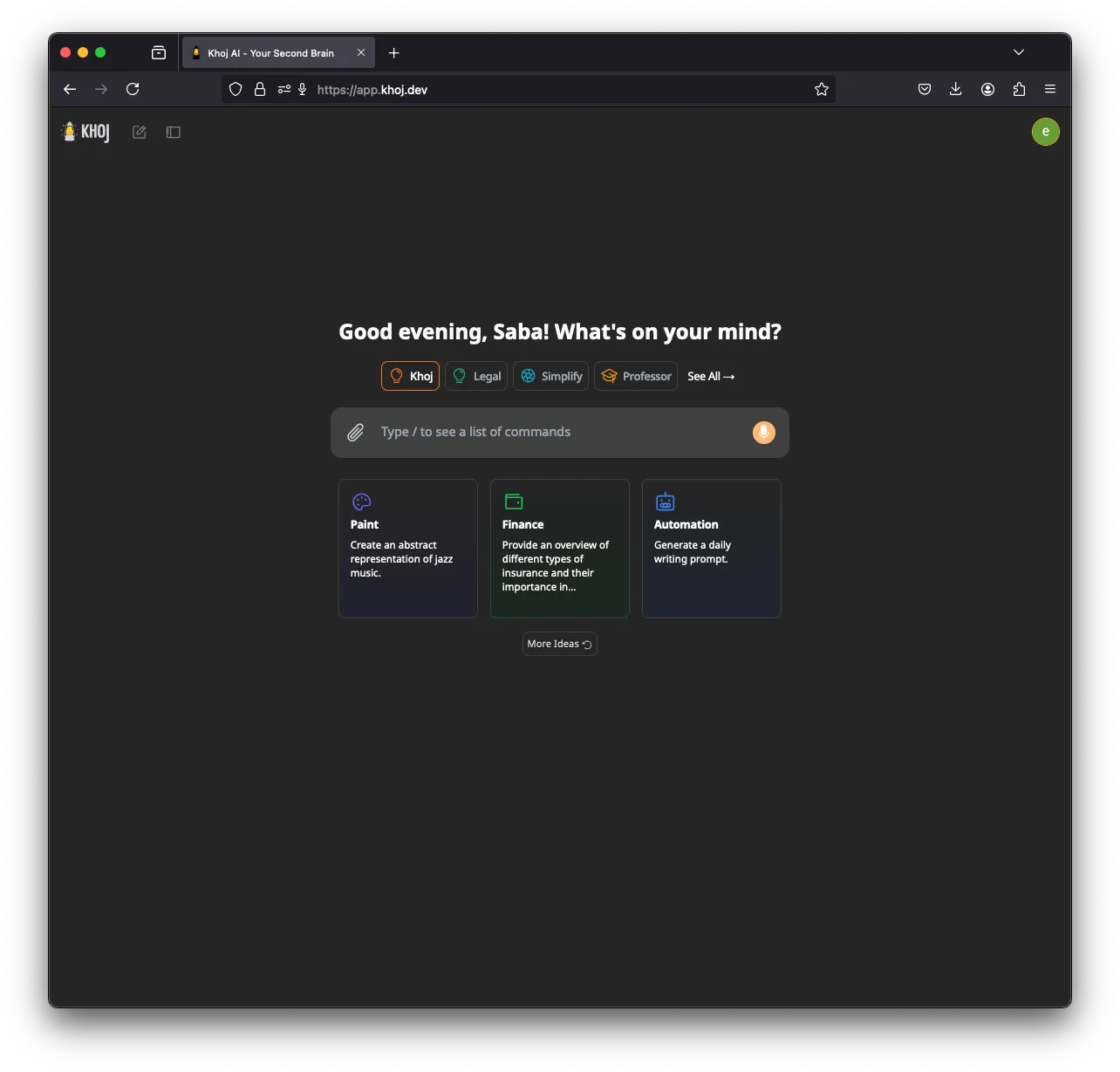
Khoj to specjalista: drugi mózg AI, który indeksuje notatki i dokumenty, a następnie odpowiada na ich podstawie. Może działać całkowicie offline, z modelami GGUF przez llama.cpp i embeddingami generowanymi na lokalnej maszynie, a obsługuje też Ollama, LM Studio i vLLM (instalacja). Pomaga GPU (CUDA, ROCm, Vulkan lub Apple Metal).
Jest na piątym miejscu, bo rozwój zwolnił (brak wydania od marca 2026), nie ma kanałów komunikatorów i wysyła zanonimizowaną telemetrię użycia, dopóki nie ustawi się KHOJ_TELEMETRY_DISABLE=True.
6. Rakazo
Rakazo, które tworzymy, uruchamia modele lokalne przez Ollama lub LM Studio (modele przy samodzielnym hostingu), nie wysyła analityki produktowej z instalacji hostowanej samodzielnie i daje każdemu botowi odizolowany komputer. Jest na tym miejscu, bo jego obsługa lokalnych modeli jest węższa niż w Agent Zero czy QwenPaw: dwa lokalne środowiska uruchomieniowe i żadne wbudowane. Jest też w fazie beta. Zobacz recenzję Rakazo.


7. OpenClaw
OpenClaw współpracuje z Ollama, LM Studio i vLLM (dostawca Ollama), więc należy mu się miejsce na każdej liście lokalnych agentów, a jego ogromny ekosystem wtyczek to powód, by go wybrać. Jednak dla użytkowników stawiających na lokalność ustawienia domyślne ciągną w złą stronę: codzienne sprawdzanie aktualizacji jest włączone (update.checkOnStart: false je zatrzymuje), a polecenia działają na hoście, dopóki nie włączy się sandboksa. Kto chce OpenClaw z lokalnym wnioskowaniem i szczelnym sandboksem, może użyć NemoClaw, który opakowuje go routingiem do Ollama, vLLM lub NVIDIA NIM, kosztem 8 GB RAM i statusu alfa.

Agent i model na różnych maszynach
PicoClaw pokazuje przydatny wzorzec. Jego agent potrzebuje zaledwie 10 MB wolnej pamięci RAM i działa na płytkach za $10 i starych telefonach, ale nadal potrzebuje dostępu do sieci, aby łączyć się z modelem (dokumentacja sprzętu). Po skierowaniu go, albo ZeroClaw, na serwer Ollama lub vLLM na komputerze z GPU uzyskuje się stale działającego agenta na maleńkim urządzeniu, z całym wnioskowaniem we własnej sieci. PicoClaw nie trafił do rankingu, bo sam projekt odradza używanie go produkcyjnie przed wersją v1.0.
Szersze spojrzenie zawiera zestawienie najlepszych samodzielnie hostowanych agentów AI.
Najlepsze wybory
Free, MIT-licensed AI agent that runs in its own Docker Linux workspace with a terminal, browser and desktop apps, and chats on Telegram and WhatsApp.
Runs in its own Docker container with local models, but sends telemetry by default.
Przejdź do Agent ZeroMocne strony
- Free and MIT licensed, with frequent releases (v2.11 to v2.15 between late August and early November 2026)
- The agent works in its own Linux workspace with a terminal, browser, desktop apps and LibreOffice, isolated from your computer unless you grant host access
- Web search runs through a local SearXNG instance, and speech-to-text and text-to-speech can run locally
- Projects keep memory, files, secrets, instructions and model choices separate per job, with workspace snapshots you can roll back
- Built-in Telegram, WhatsApp and email channels, a scheduler, MCP and a community Plugin Hub with 200+ plugins
Słabe strony
- Needs Docker, and the container image is a full Linux desktop environment rather than a small service
- No built-in image generation; the docs show teaching it an image API yourself
- By default it checks for updates with Agent Zero's server, sending your version and a hashed instance ID
- Code runs in the same container as Agent Zero itself today; per-task sandboxes are only a v3 prototype
- WhatsApp works by linking a phone account through a Baileys bridge, which needs Node.js, rather than the official WhatsApp Business API
Free, Apache-licensed personal AI agent from Alibaba's AgentScope team, formerly CoPaw, with a web console, memory, multiple agents and many chat apps.
Many chat apps and local models, but no sandbox and telemetry on by default.
Przejdź do QwenPawMocne strony
- Runs fully offline with a built-in llama.cpp runtime and purpose-trained QwenPaw-Flash models, no API key needed
- Several independent agents, each with its own memory, skills and heartbeat, that can work together
- Layered security: Tool Guard, File Guard, skill scanning, access policies and an optional kernel-level sandbox
- Broad chat coverage, especially for Chinese platforms such as DingTalk, Feishu, WeChat and QQ, alongside Telegram, Discord, Slack and iMessage
- Well-documented web console for channels, cron jobs, heartbeat, skills, MCP and files
Słabe strony
- The command sandbox is off by default, and inside Docker it falls back to no isolation
- The recommended setup command accepts anonymous install telemetry automatically
- No WhatsApp channel, and iMessage works only on a Mac with a third-party helper and Full Disk Access
- Desktop apps are still in beta, and the project moves fast, with frequent beta releases
Personal AI agent in one Rust binary, MIT or Apache-2.0, with local or cloud models, 30+ channels, approval gates and an OS sandbox on by default.
Meets every check: one Rust binary, approval gates and an OS sandbox on by default, no telemetry, local models.
Przejdź do ZeroClawMocne strony
- Safe defaults: the recommended profile asks before medium-risk actions, blocks high-risk ones, keeps files in the workspace and runs tools in an OS sandbox
- One small Rust binary with one config file, running on macOS, Linux, Windows and boards like a Raspberry Pi
- More than 30 channels, plus a web dashboard for chat, memory, config and cron
- Provider fallback chains, local models through Ollama, and cryptographic receipts for tool calls
- States plainly that it sends no telemetry and needs no cloud account or license server
Słabe strony
- Slack, iMessage, Signal and several other channels are not in the standard release; you build from source with extra features to get them
- `zeroclaw quickstart` only sets up the model provider; channels and risk profiles mean editing the TOML config file
- The Docker sandbox backend isn't picked automatically under the default native runtime
- Model costs are on you
Free, MIT-licensed personal AI agent in Python with a browser UI and terminal app, scheduled tasks, memory, and chat on Telegram, Discord, Slack and more.
Small, readable Python with a good web UI and no telemetry, but shell commands aren't sandboxed by default.
Przejdź do nanobotMocne strony
- Free and MIT licensed, with a small Python core that is meant to be read and modified
- Polished bundled WebUI with projects, file diffs, an MCP app catalog and an automations calendar, plus a terminal UI
- Many chat channels, including Telegram, Discord, Slack, WhatsApp, WeChat, Feishu, Teams, Matrix and email
- Scheduled automations, long-running goals and a heartbeat that reports only useful results to your last chat
- Works with local models through Ollama, vLLM or LM Studio
Słabe strony
- Shell commands are not sandboxed by default; the bubblewrap or macOS Seatbelt sandbox must be turned on, and Windows has none
- Model costs are on you, and voice messages need a separate transcription provider such as Groq or OpenAI
- No native mobile or desktop app; on a phone you use the WebUI in a browser or a chat app
- Missed scheduled runs are not replayed and interrupted subagent tasks are not relaunched after a restart
AGPL-licensed, self-hosted AI second brain that chats over your notes and documents with web search, custom agents and scheduled research emails.
Good at chatting over your own notes and documents, but development has slowed, it has no chat-app channels and telemetry is on by default.
Przejdź do KhojMocne strony
- Searches and chats over your own notes and documents, including Markdown, Org-mode, PDF, Word, Notion and GitHub
- Works with local models through Ollama, LM Studio, vLLM or offline llama.cpp, and generates embeddings on your machine
- Custom agents with their own persona, knowledge, chat model and tools
- Automations run a query on a schedule and email you the result
- Generated code runs in a local Terrarium sandbox that the Docker Compose setup starts for you
Słabe strony
- Development has slowed: no release since March 26, 2026, the last commit was on August 2, 2026, and the team now focuses on other products
- The hosted Khoj Cloud, and with it the WhatsApp bot, shut down on April 15, 2026, so self-hosting is the only way to use it
- AGPL-3.0 requires you to share your changes if you offer a modified version to others over a network
- Sends anonymized usage telemetry by default until you set KHOJ_TELEMETRY_DISABLE
- Scheduled emails need Resend and authentication set up when self-hosting, and no chat apps such as Telegram or Slack are supported
Open-source, self-hostable platform for persistent AI bots that each get a job, a computer, memory and routines, using the model you choose.
Our own product. Meets every check: Apache-2.0, sandboxed bot computers, no telemetry by default, any model you connect.
Przejdź do RakazoMocne strony
- Open source (Apache-2.0) and fully self-hostable, including with local models
- Choice of model per bot, including existing Claude or ChatGPT subscriptions
- Bots keep working on schedules and triggers with their own cloud computer
- Approval controls over which actions a bot may take on its own
Słabe strony
- Still in beta, with frequent releases
- You supply and pay for the model on the hosted plans, unless you buy Rakazo credits
- Telegram, WhatsApp and iMessage/SMS are only available when self-hosted
- More setup than a single chat app
Free, MIT-licensed personal AI agent that runs on your own computer and takes orders from WhatsApp, Telegram, iMessage, Slack and 20+ other chat apps.
The biggest ecosystem and every chat app, but sandboxing is off and telemetry is on by default.
Przejdź do OpenClawMocne strony
- Free and MIT licensed, with no paid tier
- Runs on your own hardware, and state, memory and credentials stay there
- Works in 29 chat channels, including WhatsApp, Telegram, iMessage, Slack, Discord and Microsoft Teams
- Model-agnostic: 64 model and media providers, plus local models
- Large ecosystem of skills and 142 official plugins, and very active development
Słabe strony
- Model costs are on you and can run high: testers and users have reported spending over $100 in a day with expensive models
- Sandboxing is off by default and the agent can run commands on the host unless you turn on approvals
- Setup and upkeep expect comfort with the command line; maintainers warn it is risky for non-technical users
- Broad access to email, messages and the system makes prompt injection and malicious third-party skills a real risk
Funkcje
| Agent Zero | QwenPaw | ZeroClaw | nanobot | Khoj | Rakazo | OpenClaw | |
|---|---|---|---|---|---|---|---|
| Wyszukiwanie w sieci | Tak | Tak | Tak | Tak | Tak | Tak | Tak |
| Generowanie obrazów | Nie | Tak | Tak | Tak | Tak | Tak | Tak |
| Tryb głosowy | Tak | Tak | Tak | Tak | Tak | Tak | Tak |
| Przesyłanie plików | Tak | Tak | Tak | Tak | Tak | Tak | Tak |
| Pamięć | Tak | Tak | Tak | Tak | Tak | Tak | Tak |
| Wykonuje zadania za ciebie | Tak | Tak | Tak | Tak | Tak | Tak | Tak |
| Integracje z aplikacjami | Tak | Tak | Tak | Tak | Tak | Tak | Tak |
| Działa samodzielnie | Tak | Tak | Tak | Tak | Tak | Tak | Tak |
| Pisze pierwszy | Tak | Tak | Tak | Tak | Tak | Tak | Tak |
| Wiele botów | Tak | Tak | Tak | Tak | Tak | Tak | Tak |
Źródła
Agent Zero
- agent0ai/agent-zero on GitHub (MIT, README, safety model)
- Agent Zero releases (v0.2 in June 2024 to v2.15 on November 1, 2026)
- Agent Zero homepage
- Agent Zero docs: Installation (Launcher, A0 Install, Docker, local models)
- Agent Zero docs: VPS deployment (hardware requirements)
- Agent Zero model provider list
- Agent Zero update check code (version and hashed ID sent to api.agent-zero.ai)
- Agent Zero built-in Telegram integration plugin
- Agent Zero built-in WhatsApp integration plugin
- Agent Zero built-in plugins (scheduler, notify user, email, SearXNG search, Whisper STT, Kokoro TTS)
- Agent Zero docs: Memory guide
- Agent Zero docs: Agent Profiles
- Agent Zero docs: API integration (adding image generation yourself)
- Agent Zero v3: A Sneak Peek Inside the Sandbox (August 17, 2026)
- Agent Zero LLM API (Venice.ai proxy for A0T token stakers)
QwenPaw
- agentscope-ai/QwenPaw on GitHub (Apache-2.0, README with install options and telemetry)
- QwenPaw documentation
- QwenPaw v1.1.0 release notes: CoPaw rebrands to QwenPaw
- copaw on PyPI (first release February 2026)
- QwenPaw docs: Channels
- QwenPaw docs: Models (cloud providers, llama.cpp, Ollama, LM Studio)
- QwenPaw docs: Security (Tool Guard, File Guard, sandbox)
- QwenPaw source: security.sandbox_enabled defaults to off
- QwenPaw docs: Heartbeat
- QwenPaw docs: Multi-agent
- QwenPaw docs: Comparison (voice and video interaction)
- QwenPaw docs: Desktop application (beta)
- QwenPaw docs: Plugins (GPT Image 2 image generation plugin)
- QwenPaw Qwen-Image tool plugin (image generation and editing)
ZeroClaw
- zeroclaw-labs/zeroclaw on GitHub (MIT OR Apache-2.0, v0.8.7, README)
- ZeroClaw website
- ZeroClaw docs: Sandboxing
- ZeroClaw source: risk presets (Balanced, recommended, has the sandbox on)
- ZeroClaw docs: Channels overview (default and standard release bundles)
- ZeroClaw docs: You own it (no telemetry)
- ZeroClaw docs: Docker and containers
- ZeroClaw source: tools (image generation, screenshot, web)
nanobot
- HKUDS/nanobot on GitHub (MIT, v0.4.1, README)
- nanobot documentation
- nanobot release archive (officially launched February 2, 2026)
- nanobot docs: Chat apps
- nanobot docs: Providers and models (Ollama, vLLM, LM Studio)
- nanobot docs: Configuration (security, exec sandbox off by default, transcription, Langfuse)
- nanobot docs: Automations and heartbeat
- nanobot docs: Concepts (heartbeat delivery, subagent recovery)
- nanobot docs: Memory and Dream
- nanobot docs: Multiple instances
- nanobot docs: Deployment (Docker, services, Render)
- nanobot source: skills installer runs with DISABLE_TELEMETRY
Khoj
- khoj-ai/khoj on GitHub (AGPL-3.0, README)
- Khoj releases (latest 2.0.0-beta.28, March 26, 2026)
- Khoj commit history (last commit August 2, 2026)
- Khoj Cloud Has Been Sunset (April 15, 2026)
- Khoj homepage (Open Paper, Pipali and the Khoj app)
- khoj-assistant on PyPI (first release 0.1.0, August 2, 2022)
- Khoj docs: Self-host setup (Docker, pip, model providers)
- Khoj docs: Ollama
- Khoj docs: Telemetry
- Khoj docs: Privacy
- Stop sending client IP in telemetry so it matches the privacy docs (#1382)
- Khoj docs: Automations
- Khoj docs: Code execution (Terrarium sandbox)
- Khoj docs: Agents
- Khoj docs: Image generation
- Khoj docs: Voice
- Khoj docs: WhatsApp (bot tied to Khoj Cloud)
- Khoj server settings (memory feature enabled and on by default)
Rakazo
- Rakazo homepage
- Rakazo pricing
- Rakazo privacy policy
- Rakazo on GitHub (README and license)
- Rakazo changelog
- Rakazo releases
- Rakazo docs: Image and video generation
- Rakazo docs: Memory
- Rakazo docs: Connect apps
- Rakazo docs: Routines
- Rakazo docs: Chat apps
- Rakazo docs: Messaging apps (self-hosting)
- Rakazo docs: Bots and chats (add another bot, bot templates)
- Rakazo docs: Groups (several bots in one chat)
- Rakazo docs: Mobile app (notifications)
- Rakazo privacy policy (updated Sep 14, 2026)
- Rakazo privacy policy source on GitHub
- Rakazo docs: Logs and monitoring (product analytics off by default)
- Rakazo docs: Desktop app (run locally in Docker, updates)
- Rakazo docs: Docker computers
- Rakazo docs: Self-hosted models (Ollama, LM Studio)
- Rakazo Railway template setup guide
OpenClaw
- OpenClaw homepage and Foundation section
- OpenClaw integrations: channels, providers and plugins
- openclaw/openclaw on GitHub (MIT, v2026.11.1)
- OpenClaw docs: Sandboxing (off by default)
- Wikipedia: OpenClaw
- Notebookcheck: OpenClaw can burn through hundreds of dollars per day
- OpenClaw docs: Memory overview
- OpenClaw docs: Automations
- OpenClaw docs: Chat channels
- OpenClaw docs: iMessage
- OpenClaw docs: Heartbeat, now a default Proactive check job
- OpenClaw docs: Multi-agent routing
- OpenClaw docs: Platforms (macOS, Windows, Linux, iOS and Android apps)
- OpenClaw docs: Tools (exec, browser, web search)
- OpenClaw docs: Audio and voice notes (inbound transcription)
- OpenClaw docs: Image and media support (inbound media)
- OpenClaw docs: Install (system requirements, installer script, npm, desktop apps, Docker)
- OpenClaw docs: One-click deploy on Railway
- OpenClaw docs: Usage telemetry and update checks (on by default, feature statistics opt-in)
- OpenClaw docs: Ollama provider (local models)