Los mejores agentes de IA locales: un asistente de IA en su propio hardware
Siete agentes de IA locales clasificados según lo bien que funcionan con Ollama, vLLM, LM Studio o llama.cpp, y cuántos de sus datos se quedan en su máquina.
De un vistazo
| Bot | Licencia | Apps de chat | |||||
|---|---|---|---|---|---|---|---|
| Agent Zero | MIT | 19,8 mil | Sí | Sí | Telegram, WhatsApp | Gratis | |
| QwenPaw | Apache-2.0 | 37,5 mil | Sí | No | Telegram, iMessage, Discord, Slack | Gratis | |
| ZeroClaw | MIT OR Apache-2.0 | 33,3 mil | Sí | Sí | Telegram, WhatsApp, Discord | Gratis | |
| nanobot | MIT | 49,9 mil | Sí | No | Telegram, WhatsApp, Discord, Slack | Gratis | |
| Khoj | AGPL-3.0 | 38,1 mil | Sí | Sí | Ninguno | Gratis | |
| Rakazo | Apache-2.0 | 7,5 mil | Sí | Sí | Telegram, WhatsApp, iMessage, Slack | Desde 10 US$/mes | |
| OpenClaw | MIT | 394,2 mil | Sí | No | Telegram, WhatsApp, iMessage, Discord, Slack | Gratis |


Lista de control
Todos los agentes de nuestra lista pueden hablar con un modelo local. Eso no es lo mismo que ser un buen agente de IA local. Con un modelo alojado, sus prompts, archivos y fragmentos de memoria salen de su máquina en cada turno. Ir totalmente en local significa que el modelo, la búsqueda, la voz y la memoria se ejecutan en hardware suyo, y muy pocos agentes le llevan hasta ahí.
Cómo los clasificamos
Esta lista prioriza el funcionamiento local sobre todo lo demás:
- Runtimes locales compatibles. Ollama, vLLM, LM Studio, llama.cpp. Más opciones significa que se adapta al hardware que ya tiene.
- Qué más se queda en local. Búsqueda web, voz a texto, texto a voz y embeddings. Un agente que ejecuta el modelo en local pero envía cada búsqueda a una API en la nube sigue filtrando en qué está trabajando.
- Sin telemetría y con sandbox, según la lista de comprobación de la tabla de arriba, porque a quienes priorizan lo local suelen importarles ambas cosas.
- Esfuerzo de instalación y madurez.
Una nota sobre el hardware: los agentes en sí son ligeros. Lo que necesita RAM y GPU es el modelo, y un modelo local capaz es un requisito mucho mayor que cualquier agente de esta lista. Empiece por comprobar qué modelo puede ejecutar su máquina y después elija el agente.
1. Agent Zero
Agent Zero es el que más se acerca a una configuración totalmente local. Es compatible con Ollama, LM Studio, llama.cpp, vLLM y oMLX (documentación de instalación), la búsqueda web pasa por una instancia de SearXNG incluida en lugar de una API de búsqueda, y la voz a texto y el texto a voz pueden ejecutarse en local mediante los plugins integrados de Whisper y Kokoro (plugins). El agente trabaja dentro de su propio contenedor Docker, aislado de su ordenador salvo que usted le dé acceso.
Su única telemetría es una comprobación de actualizaciones que envía su versión y un ID de instancia con hash; puede desactivarla en los ajustes. Cuente con al menos 2 GB de RAM para el propio Agent Zero, sin contar el modelo.

2. QwenPaw
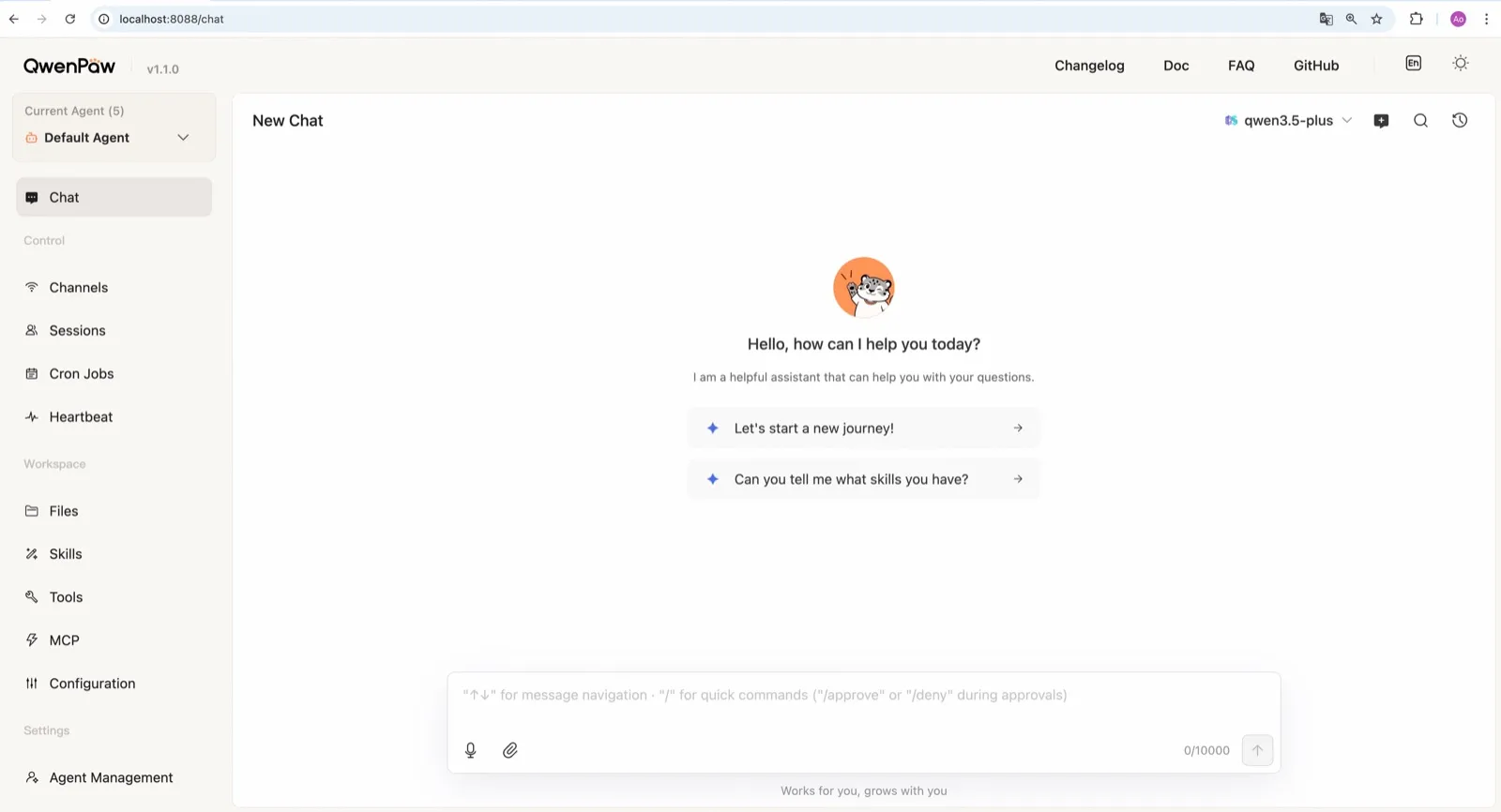
QwenPaw, del equipo AgentScope de Alibaba, incluye su propio runtime de llama.cpp, así que puede funcionar totalmente sin conexión, sin clave de API y sin instalar Ollama por separado (documentación de modelos). El equipo también publica pequeños modelos QwenPaw-Flash entrenados para tareas de agente. Ollama y LM Studio también funcionan.
Queda por debajo de Agent Zero en valores de seguridad por defecto: el sandbox de comandos está desactivado, y el comando de inicio rápido documentado, qwenpaw init --defaults, acepta automáticamente la telemetría anónima de instalación. Ejecute en su lugar el qwenpaw init interactivo para rechazarla.
3. ZeroClaw
ZeroClaw es la opción más limpia si ya usa Ollama u otro servidor de modelos compatible con OpenAI. No tiene telemetría, trae un sandbox del sistema operativo activado por defecto y cadenas de respaldo entre proveedores, de modo que un modelo local puede ir primero con uno alojado detrás, o sin nada detrás. Como es un único binario de Rust, funciona en placas pequeñas como una Raspberry Pi, junto a un servidor de modelos en una máquina más potente.

4. nanobot
nanobot es compatible de serie con Ollama, vLLM y LM Studio (proveedores), no envía telemetría y guarda la memoria como archivos Markdown planos en ~/.nanobot, fáciles de inspeccionar y de respaldar. Su WebUI hace que una configuración local resulte agradable de usar. Active su sandbox de bubblewrap o Seatbelt antes de dejar que un modelo local ejecute comandos de shell; está desactivado por defecto.

5. Khoj
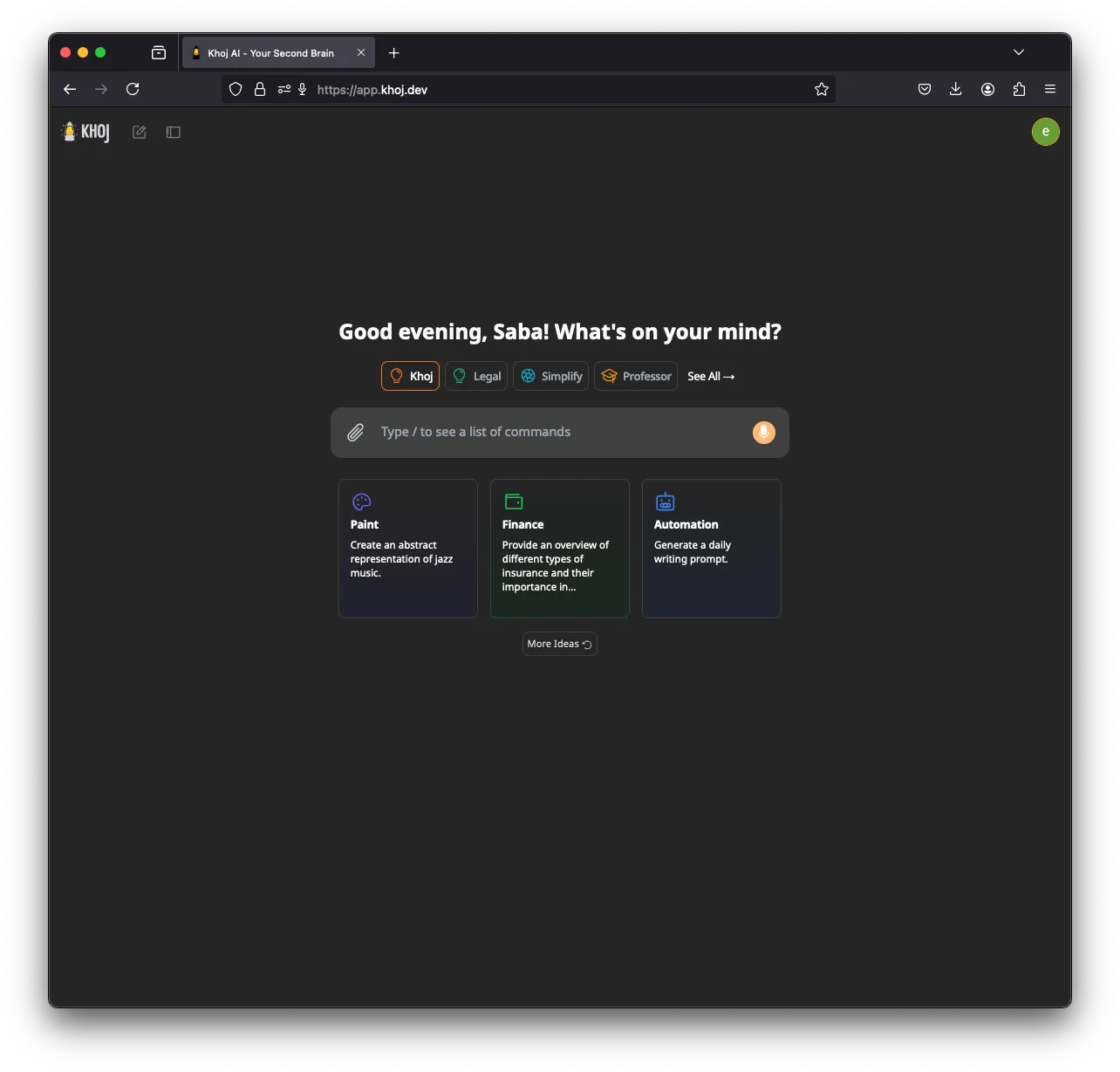
Khoj es el especialista: un segundo cerebro de IA que indexa sus notas y documentos y responde a partir de ellos. Puede funcionar totalmente sin conexión, con modelos GGUF mediante llama.cpp y embeddings generados en su máquina, y también es compatible con Ollama, LM Studio y vLLM (instalación). Ayuda tener una GPU (CUDA, ROCm, Vulkan o Apple Metal).
Queda quinto porque su desarrollo se ha frenado (ninguna versión desde marzo de 2026), no tiene canales de apps de chat y envía telemetría de uso anonimizada hasta que configura KHOJ_TELEMETRY_DISABLE=True.
6. Rakazo
Rakazo, que desarrollamos nosotros, ejecuta modelos locales a través de Ollama o LM Studio (modelos autoalojados), no envía analítica de producto desde una instalación autoalojada y da a cada bot un ordenador aislado. Queda en este puesto porque su soporte local es más limitado que el de Agent Zero o QwenPaw: dos runtimes locales y ninguno integrado. Además, está en beta. Consulte la reseña de Rakazo.


7. OpenClaw
OpenClaw funciona con Ollama, LM Studio y vLLM (proveedor Ollama), así que merece estar en cualquier lista de agentes locales, y su enorme ecosistema de plugins es un motivo para elegirlo. Pero para quienes priorizan lo local, los valores por defecto tiran en la dirección equivocada: hay una comprobación diaria de actualizaciones activada (update.checkOnStart: false la detiene) y los comandos se ejecutan en su host hasta que activa el sandboxing. Si quiere OpenClaw con inferencia local y un sandbox blindado, NemoClaw lo envuelve con enrutamiento a Ollama, vLLM o NVIDIA NIM, a cambio de 8 GB de RAM y la etiqueta de alfa.

Ejecutar el agente y el modelo en máquinas distintas
PicoClaw muestra un patrón útil. Su agente necesita apenas 10 MB de RAM libre y funciona en placas de 10 $ y móviles viejos, pero sigue necesitando acceso a la red para llegar al modelo (documentación de hardware). Apúntelo, a él o a ZeroClaw, a un servidor de Ollama o vLLM en un ordenador de sobremesa con GPU, y tendrá un agente siempre encendido en un dispositivo diminuto con toda la inferencia en su propia red. PicoClaw no entró en la clasificación porque el propio proyecto dice que no se use en producción antes de la v1.0.
Para una visión más amplia, consulte los mejores agentes de IA autoalojados.
Los mejores
Free, MIT-licensed AI agent that runs in its own Docker Linux workspace with a terminal, browser and desktop apps, and chats on Telegram and WhatsApp.
Runs in its own Docker container with local models, but sends telemetry by default.
Ir a Agent ZeroPuntos fuertes
- Free and MIT licensed, with frequent releases (v2.11 to v2.15 between late August and early November 2026)
- The agent works in its own Linux workspace with a terminal, browser, desktop apps and LibreOffice, isolated from your computer unless you grant host access
- Web search runs through a local SearXNG instance, and speech-to-text and text-to-speech can run locally
- Projects keep memory, files, secrets, instructions and model choices separate per job, with workspace snapshots you can roll back
- Built-in Telegram, WhatsApp and email channels, a scheduler, MCP and a community Plugin Hub with 200+ plugins
Puntos débiles
- Needs Docker, and the container image is a full Linux desktop environment rather than a small service
- No built-in image generation; the docs show teaching it an image API yourself
- By default it checks for updates with Agent Zero's server, sending your version and a hashed instance ID
- Code runs in the same container as Agent Zero itself today; per-task sandboxes are only a v3 prototype
- WhatsApp works by linking a phone account through a Baileys bridge, which needs Node.js, rather than the official WhatsApp Business API
Free, Apache-licensed personal AI agent from Alibaba's AgentScope team, formerly CoPaw, with a web console, memory, multiple agents and many chat apps.
Many chat apps and local models, but no sandbox and telemetry on by default.
Ir a QwenPawPuntos fuertes
- Runs fully offline with a built-in llama.cpp runtime and purpose-trained QwenPaw-Flash models, no API key needed
- Several independent agents, each with its own memory, skills and heartbeat, that can work together
- Layered security: Tool Guard, File Guard, skill scanning, access policies and an optional kernel-level sandbox
- Broad chat coverage, especially for Chinese platforms such as DingTalk, Feishu, WeChat and QQ, alongside Telegram, Discord, Slack and iMessage
- Well-documented web console for channels, cron jobs, heartbeat, skills, MCP and files
Puntos débiles
- The command sandbox is off by default, and inside Docker it falls back to no isolation
- The recommended setup command accepts anonymous install telemetry automatically
- No WhatsApp channel, and iMessage works only on a Mac with a third-party helper and Full Disk Access
- Desktop apps are still in beta, and the project moves fast, with frequent beta releases
Personal AI agent in one Rust binary, MIT or Apache-2.0, with local or cloud models, 30+ channels, approval gates and an OS sandbox on by default.
Meets every check: one Rust binary, approval gates and an OS sandbox on by default, no telemetry, local models.
Ir a ZeroClawPuntos fuertes
- Safe defaults: the recommended profile asks before medium-risk actions, blocks high-risk ones, keeps files in the workspace and runs tools in an OS sandbox
- One small Rust binary with one config file, running on macOS, Linux, Windows and boards like a Raspberry Pi
- More than 30 channels, plus a web dashboard for chat, memory, config and cron
- Provider fallback chains, local models through Ollama, and cryptographic receipts for tool calls
- States plainly that it sends no telemetry and needs no cloud account or license server
Puntos débiles
- Slack, iMessage, Signal and several other channels are not in the standard release; you build from source with extra features to get them
- `zeroclaw quickstart` only sets up the model provider; channels and risk profiles mean editing the TOML config file
- The Docker sandbox backend isn't picked automatically under the default native runtime
- Model costs are on you
Free, MIT-licensed personal AI agent in Python with a browser UI and terminal app, scheduled tasks, memory, and chat on Telegram, Discord, Slack and more.
Small, readable Python with a good web UI and no telemetry, but shell commands aren't sandboxed by default.
Ir a nanobotPuntos fuertes
- Free and MIT licensed, with a small Python core that is meant to be read and modified
- Polished bundled WebUI with projects, file diffs, an MCP app catalog and an automations calendar, plus a terminal UI
- Many chat channels, including Telegram, Discord, Slack, WhatsApp, WeChat, Feishu, Teams, Matrix and email
- Scheduled automations, long-running goals and a heartbeat that reports only useful results to your last chat
- Works with local models through Ollama, vLLM or LM Studio
Puntos débiles
- Shell commands are not sandboxed by default; the bubblewrap or macOS Seatbelt sandbox must be turned on, and Windows has none
- Model costs are on you, and voice messages need a separate transcription provider such as Groq or OpenAI
- No native mobile or desktop app; on a phone you use the WebUI in a browser or a chat app
- Missed scheduled runs are not replayed and interrupted subagent tasks are not relaunched after a restart
AGPL-licensed, self-hosted AI second brain that chats over your notes and documents with web search, custom agents and scheduled research emails.
Good at chatting over your own notes and documents, but development has slowed, it has no chat-app channels and telemetry is on by default.
Ir a KhojPuntos fuertes
- Searches and chats over your own notes and documents, including Markdown, Org-mode, PDF, Word, Notion and GitHub
- Works with local models through Ollama, LM Studio, vLLM or offline llama.cpp, and generates embeddings on your machine
- Custom agents with their own persona, knowledge, chat model and tools
- Automations run a query on a schedule and email you the result
- Generated code runs in a local Terrarium sandbox that the Docker Compose setup starts for you
Puntos débiles
- Development has slowed: no release since March 26, 2026, the last commit was on August 2, 2026, and the team now focuses on other products
- The hosted Khoj Cloud, and with it the WhatsApp bot, shut down on April 15, 2026, so self-hosting is the only way to use it
- AGPL-3.0 requires you to share your changes if you offer a modified version to others over a network
- Sends anonymized usage telemetry by default until you set KHOJ_TELEMETRY_DISABLE
- Scheduled emails need Resend and authentication set up when self-hosting, and no chat apps such as Telegram or Slack are supported
Open-source, self-hostable platform for persistent AI bots that each get a job, a computer, memory and routines, using the model you choose.
Our own product. Meets every check: Apache-2.0, sandboxed bot computers, no telemetry by default, any model you connect.
Ir a RakazoPuntos fuertes
- Open source (Apache-2.0) and fully self-hostable, including with local models
- Choice of model per bot, including existing Claude or ChatGPT subscriptions
- Bots keep working on schedules and triggers with their own cloud computer
- Approval controls over which actions a bot may take on its own
Puntos débiles
- Still in beta, with frequent releases
- You supply and pay for the model on the hosted plans, unless you buy Rakazo credits
- Telegram, WhatsApp and iMessage/SMS are only available when self-hosted
- More setup than a single chat app
Free, MIT-licensed personal AI agent that runs on your own computer and takes orders from WhatsApp, Telegram, iMessage, Slack and 20+ other chat apps.
The biggest ecosystem and every chat app, but sandboxing is off and telemetry is on by default.
Ir a OpenClawPuntos fuertes
- Free and MIT licensed, with no paid tier
- Runs on your own hardware, and state, memory and credentials stay there
- Works in 29 chat channels, including WhatsApp, Telegram, iMessage, Slack, Discord and Microsoft Teams
- Model-agnostic: 64 model and media providers, plus local models
- Large ecosystem of skills and 142 official plugins, and very active development
Puntos débiles
- Model costs are on you and can run high: testers and users have reported spending over $100 in a day with expensive models
- Sandboxing is off by default and the agent can run commands on the host unless you turn on approvals
- Setup and upkeep expect comfort with the command line; maintainers warn it is risky for non-technical users
- Broad access to email, messages and the system makes prompt injection and malicious third-party skills a real risk
Funciones
| Agent Zero | QwenPaw | ZeroClaw | nanobot | Khoj | Rakazo | OpenClaw | |
|---|---|---|---|---|---|---|---|
| Búsqueda web | Sí | Sí | Sí | Sí | Sí | Sí | Sí |
| Generación de imágenes | No | Sí | Sí | Sí | Sí | Sí | Sí |
| Modo de voz | Sí | Sí | Sí | Sí | Sí | Sí | Sí |
| Subida de archivos | Sí | Sí | Sí | Sí | Sí | Sí | Sí |
| Memoria | Sí | Sí | Sí | Sí | Sí | Sí | Sí |
| Hace tareas por ti | Sí | Sí | Sí | Sí | Sí | Sí | Sí |
| Integraciones con apps | Sí | Sí | Sí | Sí | Sí | Sí | Sí |
| Trabaja por su cuenta | Sí | Sí | Sí | Sí | Sí | Sí | Sí |
| Te escribe primero | Sí | Sí | Sí | Sí | Sí | Sí | Sí |
| Varios bots | Sí | Sí | Sí | Sí | Sí | Sí | Sí |
Fuentes
Agent Zero
- agent0ai/agent-zero on GitHub (MIT, README, safety model)
- Agent Zero releases (v0.2 in June 2024 to v2.15 on November 1, 2026)
- Agent Zero homepage
- Agent Zero docs: Installation (Launcher, A0 Install, Docker, local models)
- Agent Zero docs: VPS deployment (hardware requirements)
- Agent Zero model provider list
- Agent Zero update check code (version and hashed ID sent to api.agent-zero.ai)
- Agent Zero built-in Telegram integration plugin
- Agent Zero built-in WhatsApp integration plugin
- Agent Zero built-in plugins (scheduler, notify user, email, SearXNG search, Whisper STT, Kokoro TTS)
- Agent Zero docs: Memory guide
- Agent Zero docs: Agent Profiles
- Agent Zero docs: API integration (adding image generation yourself)
- Agent Zero v3: A Sneak Peek Inside the Sandbox (August 17, 2026)
- Agent Zero LLM API (Venice.ai proxy for A0T token stakers)
QwenPaw
- agentscope-ai/QwenPaw on GitHub (Apache-2.0, README with install options and telemetry)
- QwenPaw documentation
- QwenPaw v1.1.0 release notes: CoPaw rebrands to QwenPaw
- copaw on PyPI (first release February 2026)
- QwenPaw docs: Channels
- QwenPaw docs: Models (cloud providers, llama.cpp, Ollama, LM Studio)
- QwenPaw docs: Security (Tool Guard, File Guard, sandbox)
- QwenPaw source: security.sandbox_enabled defaults to off
- QwenPaw docs: Heartbeat
- QwenPaw docs: Multi-agent
- QwenPaw docs: Comparison (voice and video interaction)
- QwenPaw docs: Desktop application (beta)
- QwenPaw docs: Plugins (GPT Image 2 image generation plugin)
- QwenPaw Qwen-Image tool plugin (image generation and editing)
ZeroClaw
- zeroclaw-labs/zeroclaw on GitHub (MIT OR Apache-2.0, v0.8.7, README)
- ZeroClaw website
- ZeroClaw docs: Sandboxing
- ZeroClaw source: risk presets (Balanced, recommended, has the sandbox on)
- ZeroClaw docs: Channels overview (default and standard release bundles)
- ZeroClaw docs: You own it (no telemetry)
- ZeroClaw docs: Docker and containers
- ZeroClaw source: tools (image generation, screenshot, web)
nanobot
- HKUDS/nanobot on GitHub (MIT, v0.4.1, README)
- nanobot documentation
- nanobot release archive (officially launched February 2, 2026)
- nanobot docs: Chat apps
- nanobot docs: Providers and models (Ollama, vLLM, LM Studio)
- nanobot docs: Configuration (security, exec sandbox off by default, transcription, Langfuse)
- nanobot docs: Automations and heartbeat
- nanobot docs: Concepts (heartbeat delivery, subagent recovery)
- nanobot docs: Memory and Dream
- nanobot docs: Multiple instances
- nanobot docs: Deployment (Docker, services, Render)
- nanobot source: skills installer runs with DISABLE_TELEMETRY
Khoj
- khoj-ai/khoj on GitHub (AGPL-3.0, README)
- Khoj releases (latest 2.0.0-beta.28, March 26, 2026)
- Khoj commit history (last commit August 2, 2026)
- Khoj Cloud Has Been Sunset (April 15, 2026)
- Khoj homepage (Open Paper, Pipali and the Khoj app)
- khoj-assistant on PyPI (first release 0.1.0, August 2, 2022)
- Khoj docs: Self-host setup (Docker, pip, model providers)
- Khoj docs: Ollama
- Khoj docs: Telemetry
- Khoj docs: Privacy
- Stop sending client IP in telemetry so it matches the privacy docs (#1382)
- Khoj docs: Automations
- Khoj docs: Code execution (Terrarium sandbox)
- Khoj docs: Agents
- Khoj docs: Image generation
- Khoj docs: Voice
- Khoj docs: WhatsApp (bot tied to Khoj Cloud)
- Khoj server settings (memory feature enabled and on by default)
Rakazo
- Rakazo homepage
- Rakazo pricing
- Rakazo privacy policy
- Rakazo on GitHub (README and license)
- Rakazo changelog
- Rakazo releases
- Rakazo docs: Image and video generation
- Rakazo docs: Memory
- Rakazo docs: Connect apps
- Rakazo docs: Routines
- Rakazo docs: Chat apps
- Rakazo docs: Messaging apps (self-hosting)
- Rakazo docs: Bots and chats (add another bot, bot templates)
- Rakazo docs: Groups (several bots in one chat)
- Rakazo docs: Mobile app (notifications)
- Rakazo privacy policy (updated Sep 14, 2026)
- Rakazo privacy policy source on GitHub
- Rakazo docs: Logs and monitoring (product analytics off by default)
- Rakazo docs: Desktop app (run locally in Docker, updates)
- Rakazo docs: Docker computers
- Rakazo docs: Self-hosted models (Ollama, LM Studio)
- Rakazo Railway template setup guide
OpenClaw
- OpenClaw homepage and Foundation section
- OpenClaw integrations: channels, providers and plugins
- openclaw/openclaw on GitHub (MIT, v2026.11.1)
- OpenClaw docs: Sandboxing (off by default)
- Wikipedia: OpenClaw
- Notebookcheck: OpenClaw can burn through hundreds of dollars per day
- OpenClaw docs: Memory overview
- OpenClaw docs: Automations
- OpenClaw docs: Chat channels
- OpenClaw docs: iMessage
- OpenClaw docs: Heartbeat, now a default Proactive check job
- OpenClaw docs: Multi-agent routing
- OpenClaw docs: Platforms (macOS, Windows, Linux, iOS and Android apps)
- OpenClaw docs: Tools (exec, browser, web search)
- OpenClaw docs: Audio and voice notes (inbound transcription)
- OpenClaw docs: Image and media support (inbound media)
- OpenClaw docs: Install (system requirements, installer script, npm, desktop apps, Docker)
- OpenClaw docs: One-click deploy on Railway
- OpenClaw docs: Usage telemetry and update checks (on by default, feature statistics opt-in)
- OpenClaw docs: Ollama provider (local models)