En İyi Yerel Yapay Zekâ Ajanları: Kendi Donanımınızda Bir Yapay Zekâ Asistanı Çalıştırın
Ollama, vLLM, LM Studio veya llama.cpp ile ne kadar iyi çalıştıklarına ve verinizin ne kadarının makinenizde kaldığına göre sıralanmış yedi yerel yapay zekâ ajanı.
Kısaca
| Bot | Lisans | Sohbet uygulamaları | |||||
|---|---|---|---|---|---|---|---|
| Agent Zero | MIT | 19,8 B | Evet | Evet | Telegram, WhatsApp | Ücretsiz | |
| QwenPaw | Apache-2.0 | 37,5 B | Evet | Hayır | Telegram, iMessage, Discord, Slack | Ücretsiz | |
| ZeroClaw | MIT OR Apache-2.0 | 33,3 B | Evet | Evet | Telegram, WhatsApp, Discord | Ücretsiz | |
| nanobot | MIT | 49,9 B | Evet | Hayır | Telegram, WhatsApp, Discord, Slack | Ücretsiz | |
| Khoj | AGPL-3.0 | 38,1 B | Evet | Evet | Yok | Ücretsiz | |
| Rakazo | Apache-2.0 | 7,5 B | Evet | Evet | Telegram, WhatsApp, iMessage, Slack | Aylık $10 ve üzeri | |
| OpenClaw | MIT | 394,2 B | Evet | Hayır | Telegram, WhatsApp, iMessage, Discord, Slack | Ücretsiz |


Kontrol listesi
| Agent Zero | QwenPaw | ZeroClaw | nanobot | Khoj | Rakazo | OpenClaw | |
|---|---|---|---|---|---|---|---|
| Açık kaynak lisans | Evet | Evet | Evet | Evet | Evet | Evet | Evet |
| Yerel modellerle çalışır | Evet | Evet | Evet | Evet | Evet | Evet | Evet |
| Varsayılan olarak sandbox | Evet | Hayır | Evet | Hayır | Evet | Evet | Hayır |
| Varsayılan olarak telemetri yok | Hayır | Hayır | Evet | Evet | Hayır | Evet | Hayır |
| Sohbet uygulamalarınızda yaşar | Evet | Evet | Evet | Evet | Hayır | Evet | Evet |
| Siz yokken de çalışır | Evet | Evet | Evet | Evet | Evet | Evet | Evet |
Listelediğimiz her ajan yerel bir modelle konuşabilir. Bu, iyi bir yerel yapay zekâ ajanı olmakla aynı şey değildir. Barındırılan bir modelle prompt’larınız, dosyalarınız ve bellek parçalarınız her turda makinenizden çıkar. Tamamen yerel olmak; modelin, aramanın, sesin ve belleğin hepsinin size ait donanımda çalışması demektir ve sizi oraya kadar götüren ajan sayısı çok azdır.
Nasıl sıraladık
Bu liste, yerel çalışmayı her şeyin önünde tutar:
- Desteklenen yerel çalışma ortamları. Ollama, vLLM, LM Studio, llama.cpp. Daha fazla seçenek, zaten sahip olduğunuz donanıma uyması demektir.
- Başka neyin yerelde kaldığı. Web araması, konuşmadan metne, metinden konuşmaya ve embedding’ler. Modeli yerelde çalıştırıp her aramayı bir bulut API’sine gönderen bir ajan, üzerinde çalıştığınız şeyi yine de sızdırır.
- Yukarıdaki tablodaki kontrol listesinden telemetri olmaması ve bir sandbox, çünkü yerel öncelikli kullanıcılar genellikle ikisini de önemser.
- Kurulum zahmeti ve olgunluk.
Donanım hakkında bir not: ajanların kendileri hafiftir. RAM ve GPU’ya ihtiyaç duyan modeldir ve yetenekli bir yerel model, bu listedeki herhangi bir ajandan çok daha büyük bir gereksinimdir. Önce makinenizin hangi modeli çalıştırabildiğini kontrol edin, sonra ajanı seçin.
1. Agent Zero
Tamamen yerel bir kuruluma en çok yaklaşan Agent Zero’dur. Ollama, LM Studio, llama.cpp, vLLM ve oMLX’i destekler (kurulum belgeleri), web araması bir arama API’si yerine paketle gelen bir SearXNG örneği üzerinden yapılır, konuşmadan metne ve metinden konuşmaya dönüştürme de yerleşik Whisper ve Kokoro eklentileriyle yerelde çalışabilir (eklentiler). Ajan kendi Docker konteynerinde çalışır ve siz erişim vermedikçe bilgisayarınızdan izole kalır.
Tek telemetrisi, sürümünüzü ve hash’lenmiş bir örnek kimliğini gönderen bir güncelleme kontrolüdür; ayarlardan kapatabilirsiniz. Model hariç, Agent Zero’nun kendisi için en az 2 GB RAM planlayın.

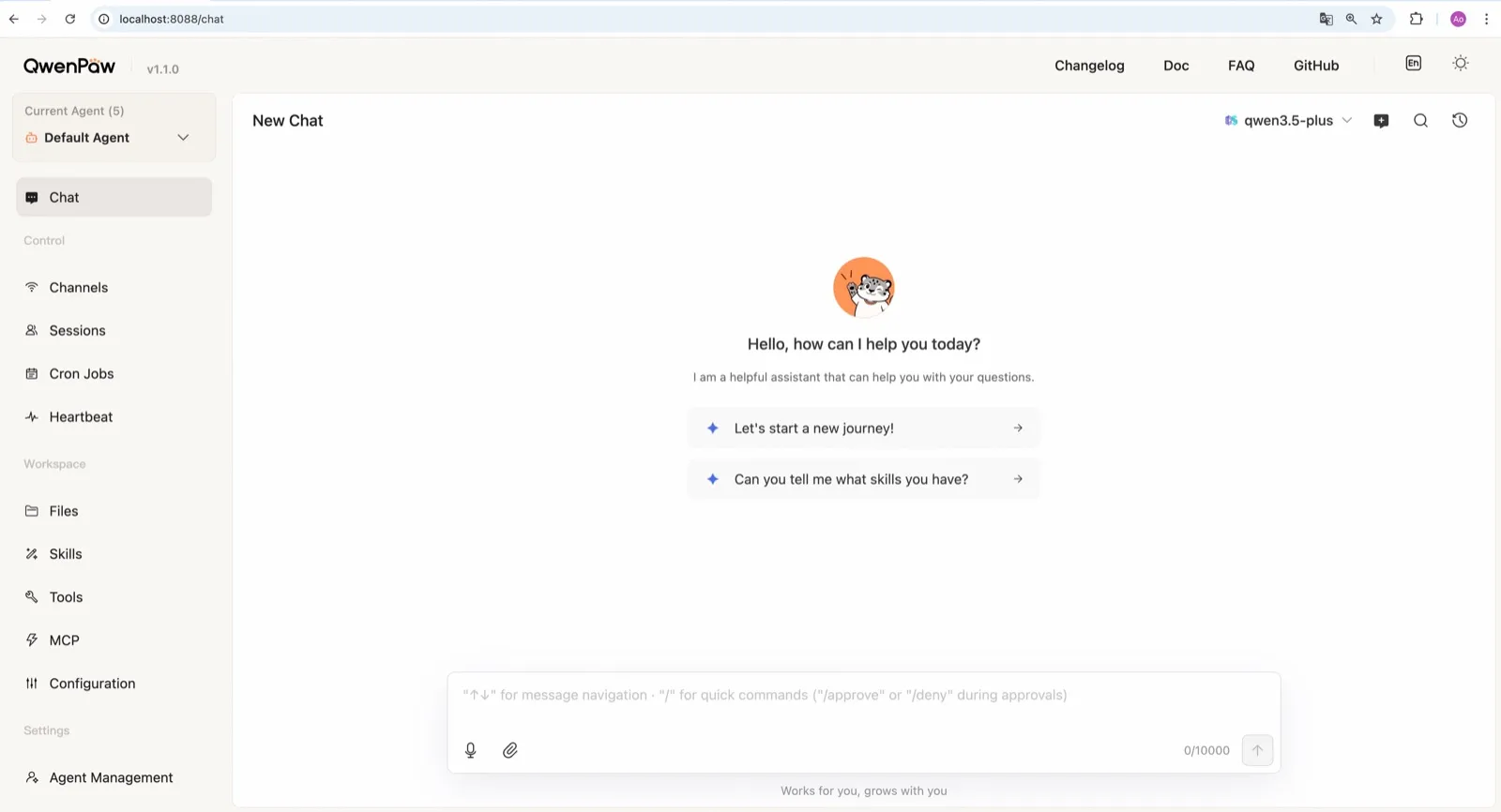
2. QwenPaw
Alibaba’nın AgentScope ekibinden çıkan QwenPaw, kendi llama.cpp çalışma ortamıyla gelir; böylece API anahtarı ve ayrı bir Ollama kurulumu olmadan tamamen çevrimdışı çalışabilir (model belgeleri). Ekip ayrıca ajan görevleri için eğitilmiş küçük QwenPaw-Flash modelleri de yayımlıyor. Ollama ve LM Studio da çalışır.
Güvenlik varsayılanlarında Agent Zero’nun gerisinde kalır: komut sandbox’ı kapalıdır ve belgelenmiş hızlı başlangıç komutu qwenpaw init --defaults, anonim kurulum telemetrisini otomatik olarak kabul eder. Reddetmek için bunun yerine etkileşimli qwenpaw init komutunu çalıştırın.
3. ZeroClaw
Zaten Ollama veya OpenAI uyumlu başka bir model sunucusu çalıştırıyorsanız en temiz seçim ZeroClaw’dur. Telemetrisi yoktur, işletim sistemi sandbox’ı varsayılan olarak açıktır ve sağlayıcı yedek zincirleri vardır; böylece yerel bir model sırada ilk olabilir, arkasında barındırılan bir model bulunabilir ya da arkasında hiçbir şey olmayabilir. Tek bir Rust binary’si olarak, daha büyük bir makinedeki model sunucusunun yanında Raspberry Pi gibi küçük kartlarda çalışır.

4. nanobot
nanobot Ollama, vLLM ve LM Studio’yu kutudan çıktığı hâliyle destekler (sağlayıcılar), telemetri göndermez ve belleği ~/.nanobot içinde düz Markdown dosyaları olarak tutar; bu da incelemeyi ve yedeklemeyi kolaylaştırır. WebUI’ı yerel bir kurulumu kullanmayı keyifli hâle getirir. Yerel bir modelin kabuk komutları çalıştırmasına izin vermeden önce bubblewrap veya Seatbelt sandbox’ını açın; varsayılan olarak kapalıdır.

5. Khoj
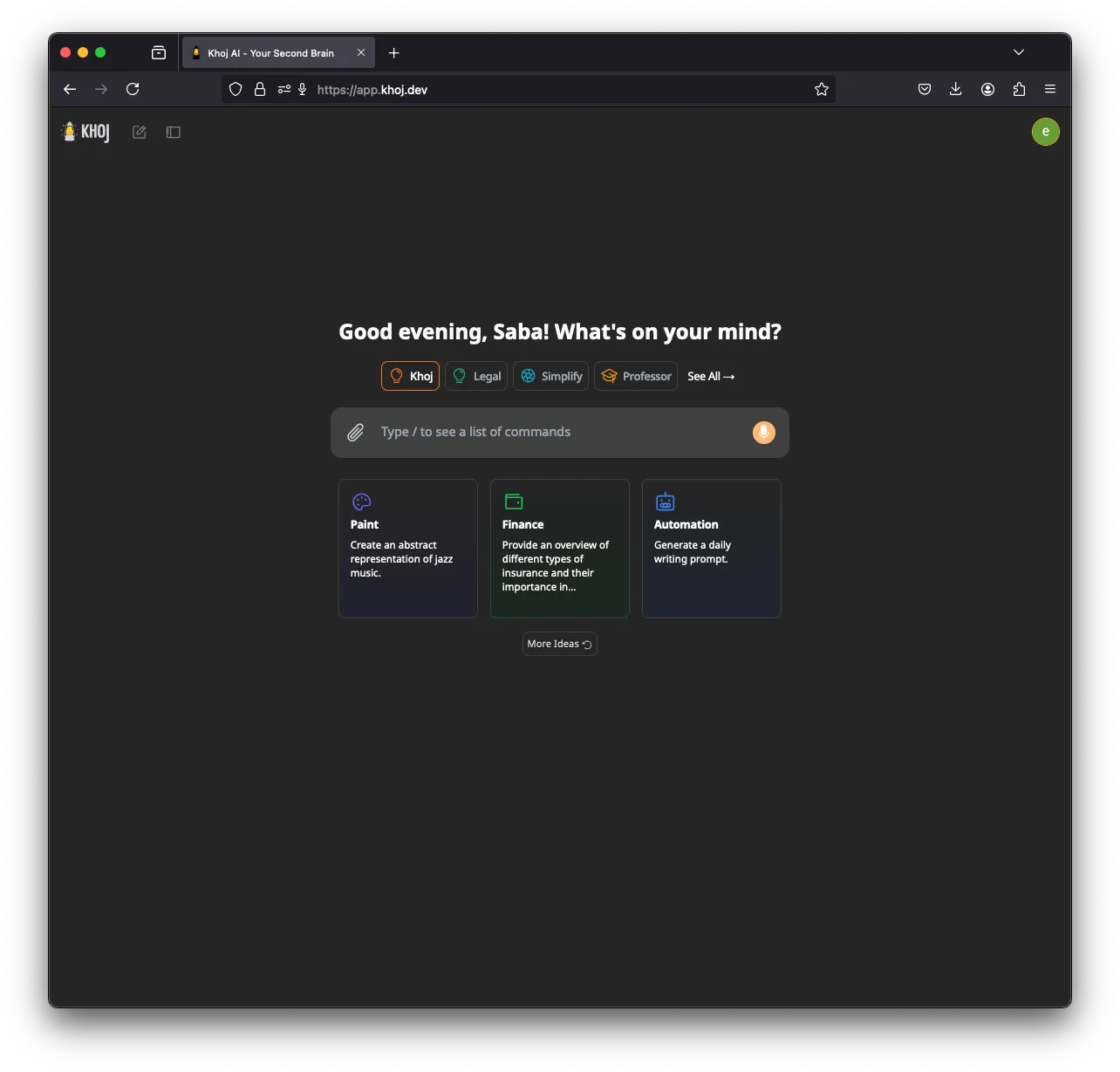
Khoj uzman olandır: notlarınızı ve belgelerinizi dizinleyen ve onlardan yanıt veren bir yapay zekâ ikinci beyni. llama.cpp üzerinden GGUF modelleri ve makinenizde üretilen embedding’lerle tamamen çevrimdışı çalışabilir; ayrıca Ollama, LM Studio ve vLLM’yi de destekler (kurulum). Bir GPU (CUDA, ROCm, Vulkan veya Apple Metal) yardımcı olur.
Beşinci sırada çünkü geliştirme yavaşladı (Mart 2026’dan beri sürüm yok), sohbet uygulaması kanalları yok ve siz KHOJ_TELEMETRY_DISABLE=True ayarlayana kadar anonimleştirilmiş kullanım telemetrisi gönderiyor.
6. Rakazo
Bizim geliştirdiğimiz Rakazo, yerel modelleri Ollama veya LM Studio üzerinden çalıştırır (self-hosted modeller), kendi sunucunuzdaki bir kurulumdan ürün analitiği göndermez ve her bota sandbox’lı bir bilgisayar verir. Burada yer almasının nedeni, yerel desteğinin Agent Zero’nunkinden veya QwenPaw’ınkinden daha dar olmasıdır: iki yerel çalışma ortamı ve hiçbiri yerleşik değil. Ayrıca beta aşamasındadır. Rakazo incelemesine bakın.


7. OpenClaw
OpenClaw Ollama, LM Studio ve vLLM ile çalışır (Ollama sağlayıcısı), bu yüzden her yerel listede yer almayı hak eder ve devasa eklenti ekosistemi onu seçmek için bir nedendir. Ancak yerel öncelikli kullanıcılar için varsayılanlar ters yöne çeker: günlük bir güncelleme kontrolü açıktır (update.checkOnStart: false bunu durdurur) ve siz sandbox’ı açana kadar komutlar ana makinenizde çalışır. Yerel çıkarım ve sıkılaştırılmış bir sandbox ile OpenClaw istiyorsanız, NemoClaw onu Ollama, vLLM veya NVIDIA NIM yönlendirmesiyle sarar; bunun bedeli 8 GB RAM ve bir alfa etiketidir.

Ajanı ve modeli farklı makinelerde çalıştırmak
PicoClaw faydalı bir kalıp gösteriyor. Ajanı 10 MB kadar az boş RAM’e ihtiyaç duyar ve 10 dolarlık kartlarda ve eski telefonlarda çalışır, ancak modele ulaşmak için yine de ağ erişimine ihtiyaç duyar (donanım belgeleri). Onu ya da ZeroClaw’ı GPU’lu bir masaüstü bilgisayardaki bir Ollama veya vLLM sunucusuna yönlendirin; tüm çıkarımın kendi ağınızda yapıldığı, küçücük bir cihazda sürekli açık bir ajana sahip olursunuz. PicoClaw sıralamaya girmedi, çünkü proje v1.0’dan önce onu üretimde kullanmamanızı söylüyor.
Daha geniş bir bakış için en iyi self-hosted yapay zekâ ajanlarına bakın.
En iyi seçimler
Free, MIT-licensed AI agent that runs in its own Docker Linux workspace with a terminal, browser and desktop apps, and chats on Telegram and WhatsApp.
Runs in its own Docker container with local models, but sends telemetry by default.
Agent Zero sitesine gitGüçlü yanlar
- Free and MIT licensed, with frequent releases (v2.11 to v2.15 between late August and early November 2026)
- The agent works in its own Linux workspace with a terminal, browser, desktop apps and LibreOffice, isolated from your computer unless you grant host access
- Web search runs through a local SearXNG instance, and speech-to-text and text-to-speech can run locally
- Projects keep memory, files, secrets, instructions and model choices separate per job, with workspace snapshots you can roll back
- Built-in Telegram, WhatsApp and email channels, a scheduler, MCP and a community Plugin Hub with 200+ plugins
Zayıf yanlar
- Needs Docker, and the container image is a full Linux desktop environment rather than a small service
- No built-in image generation; the docs show teaching it an image API yourself
- By default it checks for updates with Agent Zero's server, sending your version and a hashed instance ID
- Code runs in the same container as Agent Zero itself today; per-task sandboxes are only a v3 prototype
- WhatsApp works by linking a phone account through a Baileys bridge, which needs Node.js, rather than the official WhatsApp Business API
Free, Apache-licensed personal AI agent from Alibaba's AgentScope team, formerly CoPaw, with a web console, memory, multiple agents and many chat apps.
Many chat apps and local models, but no sandbox and telemetry on by default.
QwenPaw sitesine gitGüçlü yanlar
- Runs fully offline with a built-in llama.cpp runtime and purpose-trained QwenPaw-Flash models, no API key needed
- Several independent agents, each with its own memory, skills and heartbeat, that can work together
- Layered security: Tool Guard, File Guard, skill scanning, access policies and an optional kernel-level sandbox
- Broad chat coverage, especially for Chinese platforms such as DingTalk, Feishu, WeChat and QQ, alongside Telegram, Discord, Slack and iMessage
- Well-documented web console for channels, cron jobs, heartbeat, skills, MCP and files
Zayıf yanlar
- The command sandbox is off by default, and inside Docker it falls back to no isolation
- The recommended setup command accepts anonymous install telemetry automatically
- No WhatsApp channel, and iMessage works only on a Mac with a third-party helper and Full Disk Access
- Desktop apps are still in beta, and the project moves fast, with frequent beta releases
Personal AI agent in one Rust binary, MIT or Apache-2.0, with local or cloud models, 30+ channels, approval gates and an OS sandbox on by default.
Meets every check: one Rust binary, approval gates and an OS sandbox on by default, no telemetry, local models.
ZeroClaw sitesine gitGüçlü yanlar
- Safe defaults: the recommended profile asks before medium-risk actions, blocks high-risk ones, keeps files in the workspace and runs tools in an OS sandbox
- One small Rust binary with one config file, running on macOS, Linux, Windows and boards like a Raspberry Pi
- More than 30 channels, plus a web dashboard for chat, memory, config and cron
- Provider fallback chains, local models through Ollama, and cryptographic receipts for tool calls
- States plainly that it sends no telemetry and needs no cloud account or license server
Zayıf yanlar
- Slack, iMessage, Signal and several other channels are not in the standard release; you build from source with extra features to get them
- `zeroclaw quickstart` only sets up the model provider; channels and risk profiles mean editing the TOML config file
- The Docker sandbox backend isn't picked automatically under the default native runtime
- Model costs are on you
Free, MIT-licensed personal AI agent in Python with a browser UI and terminal app, scheduled tasks, memory, and chat on Telegram, Discord, Slack and more.
Small, readable Python with a good web UI and no telemetry, but shell commands aren't sandboxed by default.
nanobot sitesine gitGüçlü yanlar
- Free and MIT licensed, with a small Python core that is meant to be read and modified
- Polished bundled WebUI with projects, file diffs, an MCP app catalog and an automations calendar, plus a terminal UI
- Many chat channels, including Telegram, Discord, Slack, WhatsApp, WeChat, Feishu, Teams, Matrix and email
- Scheduled automations, long-running goals and a heartbeat that reports only useful results to your last chat
- Works with local models through Ollama, vLLM or LM Studio
Zayıf yanlar
- Shell commands are not sandboxed by default; the bubblewrap or macOS Seatbelt sandbox must be turned on, and Windows has none
- Model costs are on you, and voice messages need a separate transcription provider such as Groq or OpenAI
- No native mobile or desktop app; on a phone you use the WebUI in a browser or a chat app
- Missed scheduled runs are not replayed and interrupted subagent tasks are not relaunched after a restart
AGPL-licensed, self-hosted AI second brain that chats over your notes and documents with web search, custom agents and scheduled research emails.
Good at chatting over your own notes and documents, but development has slowed, it has no chat-app channels and telemetry is on by default.
Khoj sitesine gitGüçlü yanlar
- Searches and chats over your own notes and documents, including Markdown, Org-mode, PDF, Word, Notion and GitHub
- Works with local models through Ollama, LM Studio, vLLM or offline llama.cpp, and generates embeddings on your machine
- Custom agents with their own persona, knowledge, chat model and tools
- Automations run a query on a schedule and email you the result
- Generated code runs in a local Terrarium sandbox that the Docker Compose setup starts for you
Zayıf yanlar
- Development has slowed: no release since March 26, 2026, the last commit was on August 2, 2026, and the team now focuses on other products
- The hosted Khoj Cloud, and with it the WhatsApp bot, shut down on April 15, 2026, so self-hosting is the only way to use it
- AGPL-3.0 requires you to share your changes if you offer a modified version to others over a network
- Sends anonymized usage telemetry by default until you set KHOJ_TELEMETRY_DISABLE
- Scheduled emails need Resend and authentication set up when self-hosting, and no chat apps such as Telegram or Slack are supported
Open-source, self-hostable platform for persistent AI bots that each get a job, a computer, memory and routines, using the model you choose.
Our own product. Meets every check: Apache-2.0, sandboxed bot computers, no telemetry by default, any model you connect.
Rakazo sitesine gitGüçlü yanlar
- Open source (Apache-2.0) and fully self-hostable, including with local models
- Choice of model per bot, including existing Claude or ChatGPT subscriptions
- Bots keep working on schedules and triggers with their own cloud computer
- Approval controls over which actions a bot may take on its own
Zayıf yanlar
- Still in beta, with frequent releases
- You supply and pay for the model on the hosted plans, unless you buy Rakazo credits
- Telegram, WhatsApp and iMessage/SMS are only available when self-hosted
- More setup than a single chat app
Free, MIT-licensed personal AI agent that runs on your own computer and takes orders from WhatsApp, Telegram, iMessage, Slack and 20+ other chat apps.
The biggest ecosystem and every chat app, but sandboxing is off and telemetry is on by default.
OpenClaw sitesine gitGüçlü yanlar
- Free and MIT licensed, with no paid tier
- Runs on your own hardware, and state, memory and credentials stay there
- Works in 29 chat channels, including WhatsApp, Telegram, iMessage, Slack, Discord and Microsoft Teams
- Model-agnostic: 64 model and media providers, plus local models
- Large ecosystem of skills and 142 official plugins, and very active development
Zayıf yanlar
- Model costs are on you and can run high: testers and users have reported spending over $100 in a day with expensive models
- Sandboxing is off by default and the agent can run commands on the host unless you turn on approvals
- Setup and upkeep expect comfort with the command line; maintainers warn it is risky for non-technical users
- Broad access to email, messages and the system makes prompt injection and malicious third-party skills a real risk
Özellikler
| Agent Zero | QwenPaw | ZeroClaw | nanobot | Khoj | Rakazo | OpenClaw | |
|---|---|---|---|---|---|---|---|
| Web araması | Evet | Evet | Evet | Evet | Evet | Evet | Evet |
| Görsel üretimi | Hayır | Evet | Evet | Evet | Evet | Evet | Evet |
| Sesli mod | Evet | Evet | Evet | Evet | Evet | Evet | Evet |
| Dosya yükleme | Evet | Evet | Evet | Evet | Evet | Evet | Evet |
| Hafıza | Evet | Evet | Evet | Evet | Evet | Evet | Evet |
| Sizin yerinize işlem yapar | Evet | Evet | Evet | Evet | Evet | Evet | Evet |
| Uygulama entegrasyonları | Evet | Evet | Evet | Evet | Evet | Evet | Evet |
| Kendi başına çalışır | Evet | Evet | Evet | Evet | Evet | Evet | Evet |
| İlk mesajı kendisi atar | Evet | Evet | Evet | Evet | Evet | Evet | Evet |
| Birden çok bot | Evet | Evet | Evet | Evet | Evet | Evet | Evet |
Kaynaklar
Agent Zero
- agent0ai/agent-zero on GitHub (MIT, README, safety model)
- Agent Zero releases (v0.2 in June 2024 to v2.15 on November 1, 2026)
- Agent Zero homepage
- Agent Zero docs: Installation (Launcher, A0 Install, Docker, local models)
- Agent Zero docs: VPS deployment (hardware requirements)
- Agent Zero model provider list
- Agent Zero update check code (version and hashed ID sent to api.agent-zero.ai)
- Agent Zero built-in Telegram integration plugin
- Agent Zero built-in WhatsApp integration plugin
- Agent Zero built-in plugins (scheduler, notify user, email, SearXNG search, Whisper STT, Kokoro TTS)
- Agent Zero docs: Memory guide
- Agent Zero docs: Agent Profiles
- Agent Zero docs: API integration (adding image generation yourself)
- Agent Zero v3: A Sneak Peek Inside the Sandbox (August 17, 2026)
- Agent Zero LLM API (Venice.ai proxy for A0T token stakers)
QwenPaw
- agentscope-ai/QwenPaw on GitHub (Apache-2.0, README with install options and telemetry)
- QwenPaw documentation
- QwenPaw v1.1.0 release notes: CoPaw rebrands to QwenPaw
- copaw on PyPI (first release February 2026)
- QwenPaw docs: Channels
- QwenPaw docs: Models (cloud providers, llama.cpp, Ollama, LM Studio)
- QwenPaw docs: Security (Tool Guard, File Guard, sandbox)
- QwenPaw source: security.sandbox_enabled defaults to off
- QwenPaw docs: Heartbeat
- QwenPaw docs: Multi-agent
- QwenPaw docs: Comparison (voice and video interaction)
- QwenPaw docs: Desktop application (beta)
- QwenPaw docs: Plugins (GPT Image 2 image generation plugin)
- QwenPaw Qwen-Image tool plugin (image generation and editing)
ZeroClaw
- zeroclaw-labs/zeroclaw on GitHub (MIT OR Apache-2.0, v0.8.7, README)
- ZeroClaw website
- ZeroClaw docs: Sandboxing
- ZeroClaw source: risk presets (Balanced, recommended, has the sandbox on)
- ZeroClaw docs: Channels overview (default and standard release bundles)
- ZeroClaw docs: You own it (no telemetry)
- ZeroClaw docs: Docker and containers
- ZeroClaw source: tools (image generation, screenshot, web)
nanobot
- HKUDS/nanobot on GitHub (MIT, v0.4.1, README)
- nanobot documentation
- nanobot release archive (officially launched February 2, 2026)
- nanobot docs: Chat apps
- nanobot docs: Providers and models (Ollama, vLLM, LM Studio)
- nanobot docs: Configuration (security, exec sandbox off by default, transcription, Langfuse)
- nanobot docs: Automations and heartbeat
- nanobot docs: Concepts (heartbeat delivery, subagent recovery)
- nanobot docs: Memory and Dream
- nanobot docs: Multiple instances
- nanobot docs: Deployment (Docker, services, Render)
- nanobot source: skills installer runs with DISABLE_TELEMETRY
Khoj
- khoj-ai/khoj on GitHub (AGPL-3.0, README)
- Khoj releases (latest 2.0.0-beta.28, March 26, 2026)
- Khoj commit history (last commit August 2, 2026)
- Khoj Cloud Has Been Sunset (April 15, 2026)
- Khoj homepage (Open Paper, Pipali and the Khoj app)
- khoj-assistant on PyPI (first release 0.1.0, August 2, 2022)
- Khoj docs: Self-host setup (Docker, pip, model providers)
- Khoj docs: Ollama
- Khoj docs: Telemetry
- Khoj docs: Privacy
- Stop sending client IP in telemetry so it matches the privacy docs (#1382)
- Khoj docs: Automations
- Khoj docs: Code execution (Terrarium sandbox)
- Khoj docs: Agents
- Khoj docs: Image generation
- Khoj docs: Voice
- Khoj docs: WhatsApp (bot tied to Khoj Cloud)
- Khoj server settings (memory feature enabled and on by default)
Rakazo
- Rakazo homepage
- Rakazo pricing
- Rakazo privacy policy
- Rakazo on GitHub (README and license)
- Rakazo changelog
- Rakazo releases
- Rakazo docs: Image and video generation
- Rakazo docs: Memory
- Rakazo docs: Connect apps
- Rakazo docs: Routines
- Rakazo docs: Chat apps
- Rakazo docs: Messaging apps (self-hosting)
- Rakazo docs: Bots and chats (add another bot, bot templates)
- Rakazo docs: Groups (several bots in one chat)
- Rakazo docs: Mobile app (notifications)
- Rakazo privacy policy (updated Sep 14, 2026)
- Rakazo privacy policy source on GitHub
- Rakazo docs: Logs and monitoring (product analytics off by default)
- Rakazo docs: Desktop app (run locally in Docker, updates)
- Rakazo docs: Docker computers
- Rakazo docs: Self-hosted models (Ollama, LM Studio)
- Rakazo Railway template setup guide
OpenClaw
- OpenClaw homepage and Foundation section
- OpenClaw integrations: channels, providers and plugins
- openclaw/openclaw on GitHub (MIT, v2026.11.1)
- OpenClaw docs: Sandboxing (off by default)
- Wikipedia: OpenClaw
- Notebookcheck: OpenClaw can burn through hundreds of dollars per day
- OpenClaw docs: Memory overview
- OpenClaw docs: Automations
- OpenClaw docs: Chat channels
- OpenClaw docs: iMessage
- OpenClaw docs: Heartbeat, now a default Proactive check job
- OpenClaw docs: Multi-agent routing
- OpenClaw docs: Platforms (macOS, Windows, Linux, iOS and Android apps)
- OpenClaw docs: Tools (exec, browser, web search)
- OpenClaw docs: Audio and voice notes (inbound transcription)
- OpenClaw docs: Image and media support (inbound media)
- OpenClaw docs: Install (system requirements, installer script, npm, desktop apps, Docker)
- OpenClaw docs: One-click deploy on Railway
- OpenClaw docs: Usage telemetry and update checks (on by default, feature statistics opt-in)
- OpenClaw docs: Ollama provider (local models)