
nanobot रिव्यू: HKUDS का हल्का self-hosted AI एजेंट
nanobot, University of Hong Kong का एक छोटा MIT-लाइसेंस Python एजेंट है जिसका WebUI बढ़िया है। सेटअप, sandboxing, लोकल मॉडल और रखरखाव कैसा है।
nanobot, University of Hong Kong की Data Intelligence Lab (HKUDS) का एक पर्सनल एजेंट फ़्रेमवर्क है। यह आधिकारिक रूप से 2 फ़रवरी 2026 को लॉन्च हुआ, और 8 नवंबर 2026 को जब हमने देखा तब इसके 49,932 GitHub stars थे, जो OpenClaw और Hermes Agent को छोड़कर हमारी सूची के किसी भी एजेंट से ज़्यादा हैं। यह रिव्यू HKUDS/nanobot एजेंट को कवर करता है।
इसका विचार है एक छोटा Python core जिसे पढ़ा और बदला जा सके, एक हैरानी की हद तक पूरे ब्राउज़र UI में लिपटा हुआ।

इसे इंस्टॉल करना
चार रास्ते हैं: एक इंस्टॉल स्क्रिप्ट, pip, Docker, या one-click क्लाउड deploy (deployment docs Render को कवर करते हैं)। इसे macOS 13+, Linux या Windows पर Python 3.11 या नया चाहिए, और इंस्टॉल स्क्रिप्ट अपना Python एनवायरनमेंट खुद सेट करती है ताकि आपको उसे संभालना न पड़े। Sessions, मेमोरी और सेटिंग्स ~/.nanobot में रहती हैं।
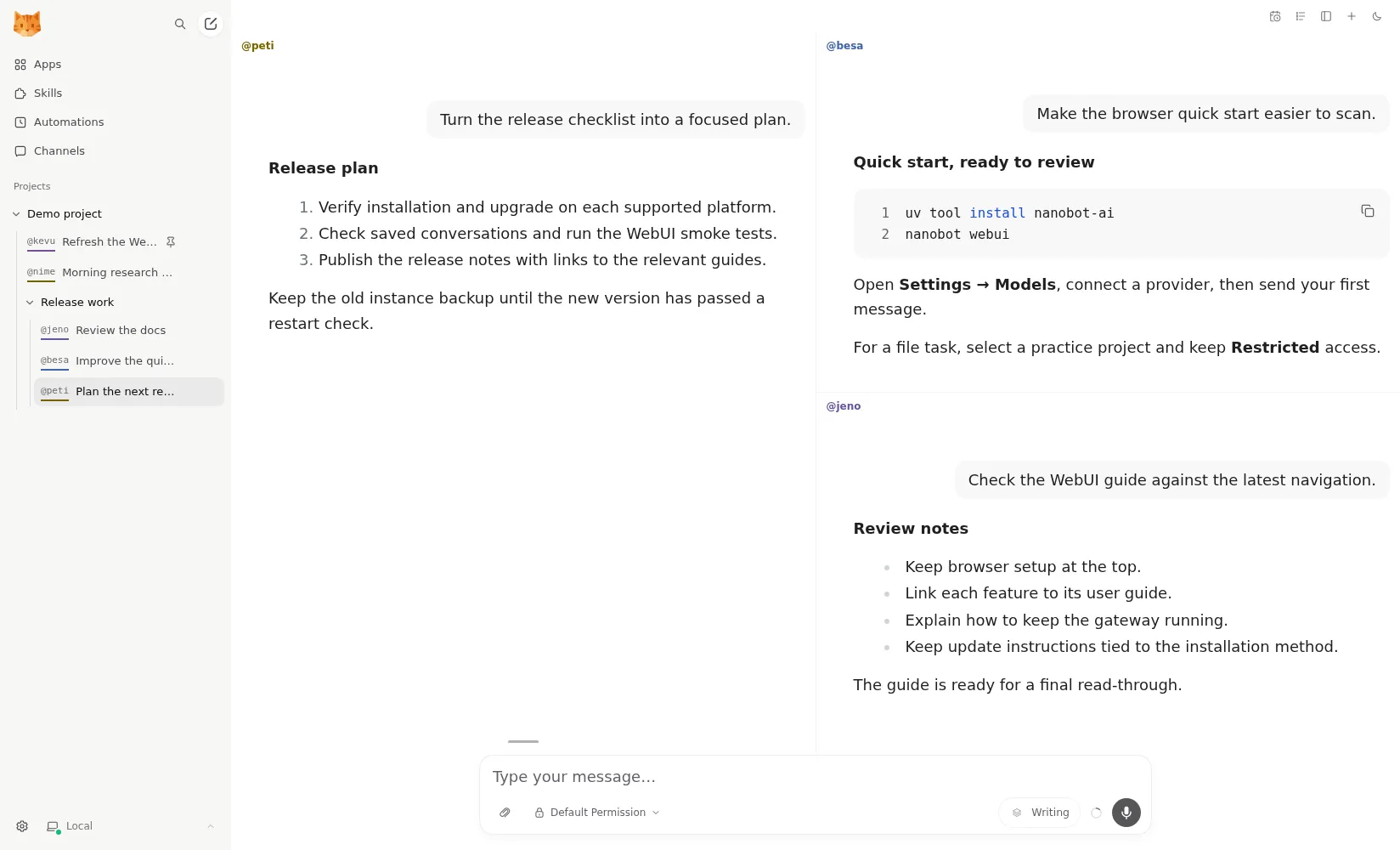
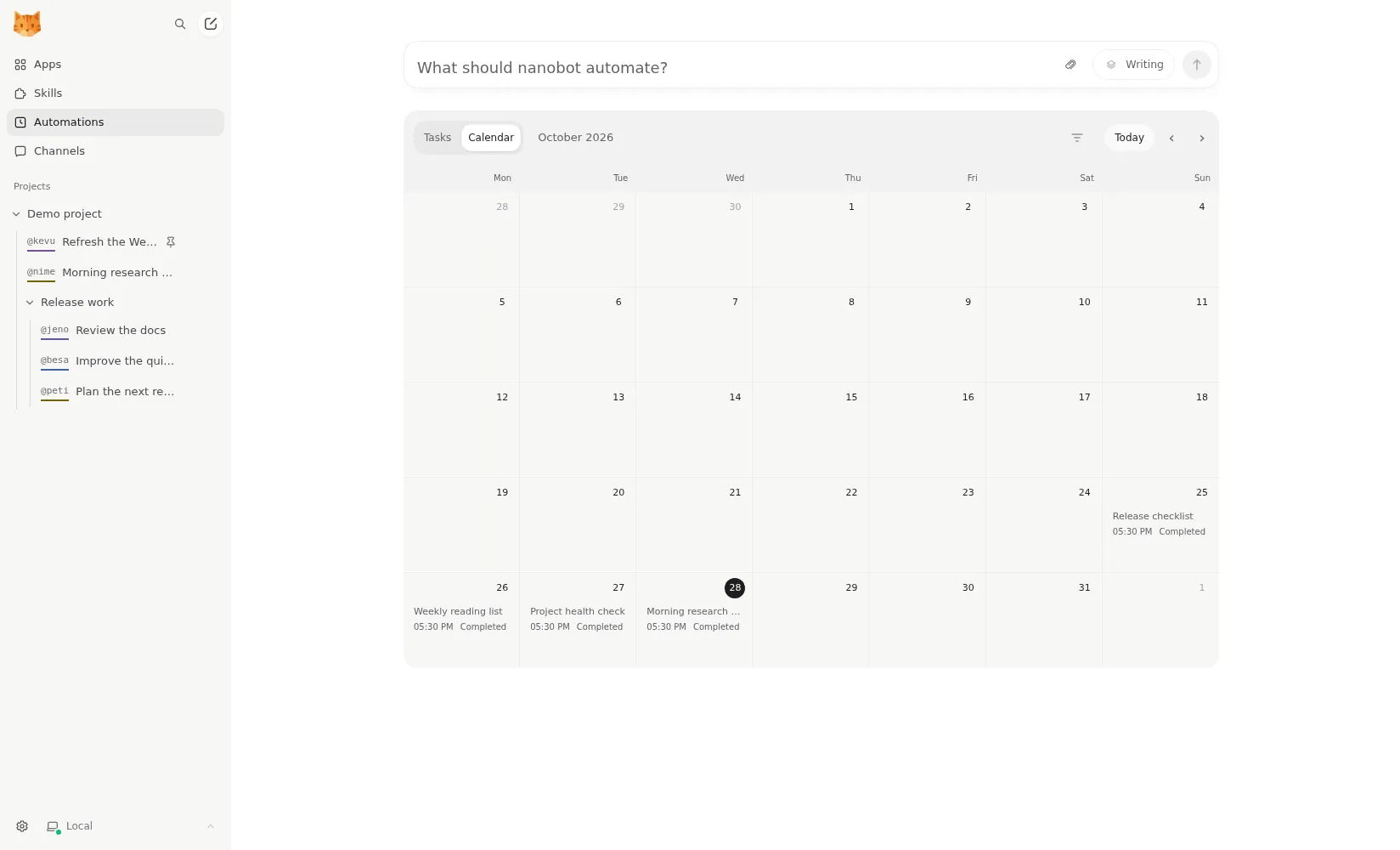
चलने के बाद आप चुनते हैं कि इससे कैसे बात करें: ब्राउज़र में बंडल किया गया WebUI, एक टर्मिनल UI, या चैट ऐप। WebUI सबसे ख़ास है। यह बातचीत को projects में समूहित करता है, फ़ाइल diffs दिखाता है, इसमें एक MCP ऐप कैटलॉग है, और शेड्यूल्ड automations को कैलेंडर पर रखता है। चार तक बातचीत अगल-बगल रह सकती हैं (README)।
कोई नेटिव मोबाइल या डेस्कटॉप ऐप नहीं है। फ़ोन पर आप ब्राउज़र में WebUI या किसी चैट ऐप का इस्तेमाल करते हैं।
Sandboxing आपकी ज़िम्मेदारी है
nanobot shell कमांड चलाता है और एक project फ़ोल्डर में फ़ाइलों के साथ काम करता है। डिफ़ॉल्ट रूप से वे कमांड sandboxed नहीं होते। configuration docs Linux पर एक bubblewrap sandbox और macOS पर Seatbelt का वर्णन करते हैं जिन्हें आपको चालू करना पड़ता है, और Windows पर कोई sandbox नहीं है।
अगर आप nanobot को अपने मुख्य कंप्यूटर पर इंस्टॉल करते हैं, तो कोई भी चैट ऐप जोड़ने से पहले sandbox चालू करें, क्योंकि चैट चैनल का मतलब है कि बाहर के मैसेज कमांड चलाने वाले एजेंट तक पहुँच सकते हैं। Windows पर, इसके बजाय इसे Docker में या अलग मशीन पर चलाएँ। इसकी तुलना ZeroClaw से करें, जिसकी सुझाई गई प्रोफ़ाइल में शुरू से OS sandbox चालू है, या NanoClaw से, जो हर एजेंट को एक कंटेनर में रखता है।
टेलीमेट्री और प्राइवेसी
nanobot कोई usage टेलीमेट्री नहीं भेजता। डॉक्स में किसी का ज़िक्र नहीं, कोड में कोई analytics client नहीं है, और थर्ड-पार्टी skills installer को कॉल करते समय यह DISABLE_TELEMETRY भी सेट करता है (source)। Langfuse tracing मौजूद है लेकिन तभी चलता है जब आप इसे अपनी keys के साथ चालू करें। Prompts और अटैच की गई फ़ाइलें आपके चुने हुए मॉडल provider और चैट प्लेटफ़ॉर्म को जाती हैं।
लोकल मॉडल
यह OpenAI, Anthropic, DeepSeek, OpenRouter, AWS Bedrock या किसी भी OpenAI-compatible endpoint के साथ काम करता है, और Ollama, vLLM या LM Studio के ज़रिए लोकल मॉडल के साथ भी (providers docs)। इसका मतलब है कि अगर आपका हार्डवेयर एक सक्षम लोकल मॉडल संभाल सकता है, तो आप इसे बिना किसी क्लाउड मॉडल के चला सकते हैं। nanobot कोई होस्टेड सर्विस नहीं बेचता, इसलिए इकलौता बिल आपके मॉडल provider का है। वॉइस मैसेज के लिए Groq या OpenAI जैसा अलग transcription provider चाहिए।
आपकी ग़ैरमौजूदगी में काम करना
यहीं nanobot अपनी जगह कमाता है। यह शेड्यूल्ड automations और लंबे चलने वाले goals चलाता है, और एक heartbeat सिर्फ़ काम के नतीजे उस चैट में वापस भेजता है जिसे आपने आख़िरी बार इस्तेमाल किया था। Dream नाम की एक background process लंबी अवधि की मेमोरी को सादी Markdown फ़ाइलों में समेटती है (memory docs), जिन्हें आप खुद पढ़ और एडिट कर सकते हैं। self-hoster के लिए यह अच्छी बात है: आपके एजेंट की मेमोरी किसी ऐसे डेटाबेस में बंद नहीं है जिसे आप जाँच न सकें।
बिना निगरानी के इस्तेमाल में दो कमियाँ, दोनों concepts docs से: छूटे हुए शेड्यूल्ड रन दोबारा नहीं चलाए जाते, और बाधित subagent टास्क restart के बाद फिर से शुरू नहीं होते। अगर होस्ट 9:00 बजे reboot होता है, तो 9:00 बजे की रिपोर्ट बस नहीं बनती। इसे ऐसी मशीन पर सर्विस के रूप में चलाएँ जो चालू रहती हो।
चैनल और इसका विस्तार
चैट ऐप्स में Telegram, Discord, Slack, WhatsApp, WeChat, Feishu, Microsoft Teams, Matrix और ईमेल शामिल हैं। यह कई इंस्टेंस के रूप में भी चल सकता है (multiple instances docs), और डेवलपर्स को एक Python SDK और एक OpenAI-compatible API मिलता है, ताकि दूसरे टूल nanobot को ऐसे कॉल कर सकें जैसे वह कोई मॉडल हो।
इसे किसे इस्तेमाल करना चाहिए
nanobot उन डेवलपर्स के लिए है जो एक हल्का एजेंट चाहते हैं जिसे वे Python में पढ़ और बढ़ा सकें, और उन लोगों के लिए जो असली ब्राउज़र UI और चैट-ऐप एक्सेस वाला self-hosted असिस्टेंट चाहते हैं। अगर आप बिना कॉन्फ़िगर किए आइसोलेशन चाहते हैं, या नेटिव फ़ोन ऐप चाहते हैं, तो यह कमज़ोर विकल्प है।
तुलना में यह कैसा है
- PicoClaw nanobot से प्रेरित था और megabytes RAM में चलने के लिए Go में दोबारा लिखा गया। यह nanobot के समृद्ध UI और Python विस्तार-क्षमता के बदले बहुत छोटा footprint देता है।
- OpenClaw का ecosystem बड़ा है और इसके मोबाइल ऐप हैं, लेकिन यह डिफ़ॉल्ट रूप से टेलीमेट्री भेजता है; दोनों में से किसी में भी डिफ़ॉल्ट रूप से sandbox चालू नहीं है।
- Hermes Agent भी Python और MIT है, डेस्कटॉप ऐप और खुद को बेहतर बनाने वाले skills सिस्टम के साथ, और डिफ़ॉल्ट रूप से कोई टेलीमेट्री नहीं।
- QwenPaw बनावट में सबसे क़रीब है: Python, वेब कंसोल, कई एजेंट, लोकल मॉडल, और चीनी चैट ऐप्स की बेहतर कवरेज।
और जानकारी के लिए OpenClaw के विकल्प और सबसे अच्छे ओपन-सोर्स AI एजेंट की सूची देखें।
कीमतें
| Open source | मुफ़्त |
|
|---|
फ़ीचर
| वेब सर्च | हाँ |
|---|---|
| इमेज बनाना | हाँ |
| वॉइस मोड | हाँ |
| फ़ाइल अपलोड | हाँ |
| मेमोरी | हाँ |
| आपके लिए काम करता है | हाँ |
| ऐप इंटीग्रेशन | हाँ |
| खुद से काम करता है | हाँ |
| पहले ख़ुद मैसेज करता है | हाँ |
| कई बॉट | हाँ |
खूबियाँ
- Free and MIT licensed, with a small Python core that is meant to be read and modified
- Polished bundled WebUI with projects, file diffs, an MCP app catalog and an automations calendar, plus a terminal UI
- Many chat channels, including Telegram, Discord, Slack, WhatsApp, WeChat, Feishu, Teams, Matrix and email
- Scheduled automations, long-running goals and a heartbeat that reports only useful results to your last chat
- Works with local models through Ollama, vLLM or LM Studio
कमियाँ
- Shell commands are not sandboxed by default; the bubblewrap or macOS Seatbelt sandbox must be turned on, and Windows has none
- Model costs are on you, and voice messages need a separate transcription provider such as Groq or OpenAI
- No native mobile or desktop app; on a phone you use the WebUI in a browser or a chat app
- Missed scheduled runs are not replayed and interrupted subagent tasks are not relaunched after a restart
किसके लिए सबसे अच्छा
- Developers who want a lightweight agent they can read and extend in Python
- People who want a self-hosted assistant with a browser UI and chat-app access
- Running scheduled checks and reports with a local or cloud model
स्रोत
- HKUDS/nanobot on GitHub (MIT, v0.4.1, README)
- nanobot documentation
- nanobot release archive (officially launched February 2, 2026)
- nanobot docs: Chat apps
- nanobot docs: Providers and models (Ollama, vLLM, LM Studio)
- nanobot docs: Configuration (security, exec sandbox off by default, transcription, Langfuse)
- nanobot docs: Automations and heartbeat
- nanobot docs: Concepts (heartbeat delivery, subagent recovery)
- nanobot docs: Memory and Dream
- nanobot docs: Multiple instances
- nanobot docs: Deployment (Docker, services, Render)
- nanobot source: skills installer runs with DISABLE_TELEMETRY