
nanobot 评测:HKUDS 的轻量级自托管 AI 智能体
nanobot 是香港大学推出的小巧 Python 智能体,采用 MIT 许可证,带有精致的 WebUI。本文介绍部署、沙箱、本地模型以及日常维护。
nanobot 是香港大学数据智能实验室(HKUDS)推出的个人智能体框架。它于 2026 年 2 月 2 日正式发布,截至我们 2026 年 11 月 8 日查看时有 49,932 颗 GitHub 星,在我们的列表中仅次于 OpenClaw 和 Hermes Agent。本评测针对的是 HKUDS/nanobot 智能体。
它的思路是一个便于阅读和修改的小型 Python 核心,外面包裹着一个完成度出人意料的浏览器 UI。

安装
有四种方式:安装脚本、pip、Docker,或一键云端部署(部署文档介绍了 Render)。它需要 Python 3.11 或更高版本,支持 macOS 13+、Linux 和 Windows,安装脚本会自行配置 Python 环境,你无需自己管理。会话、记忆和设置都保存在 ~/.nanobot 中。
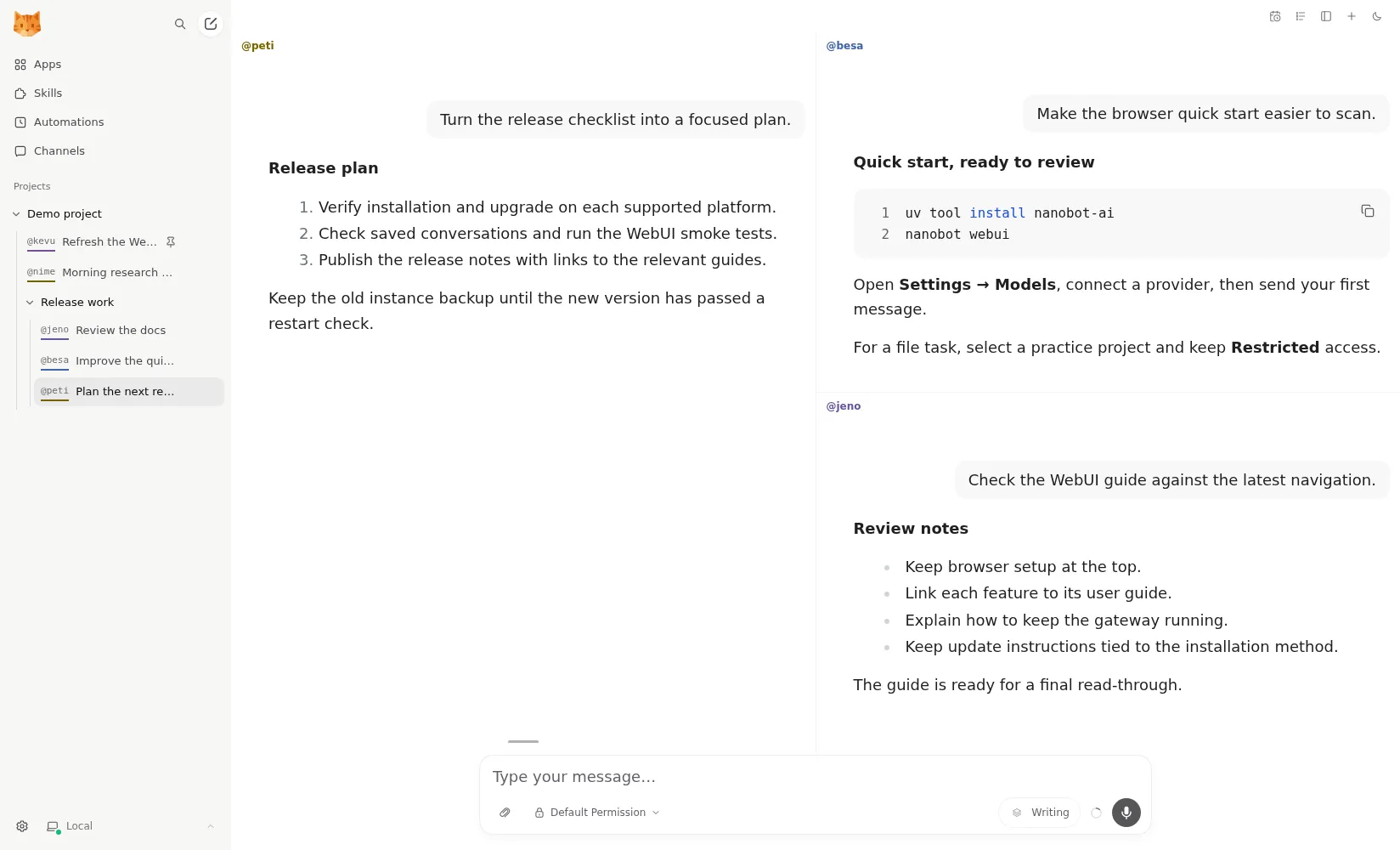
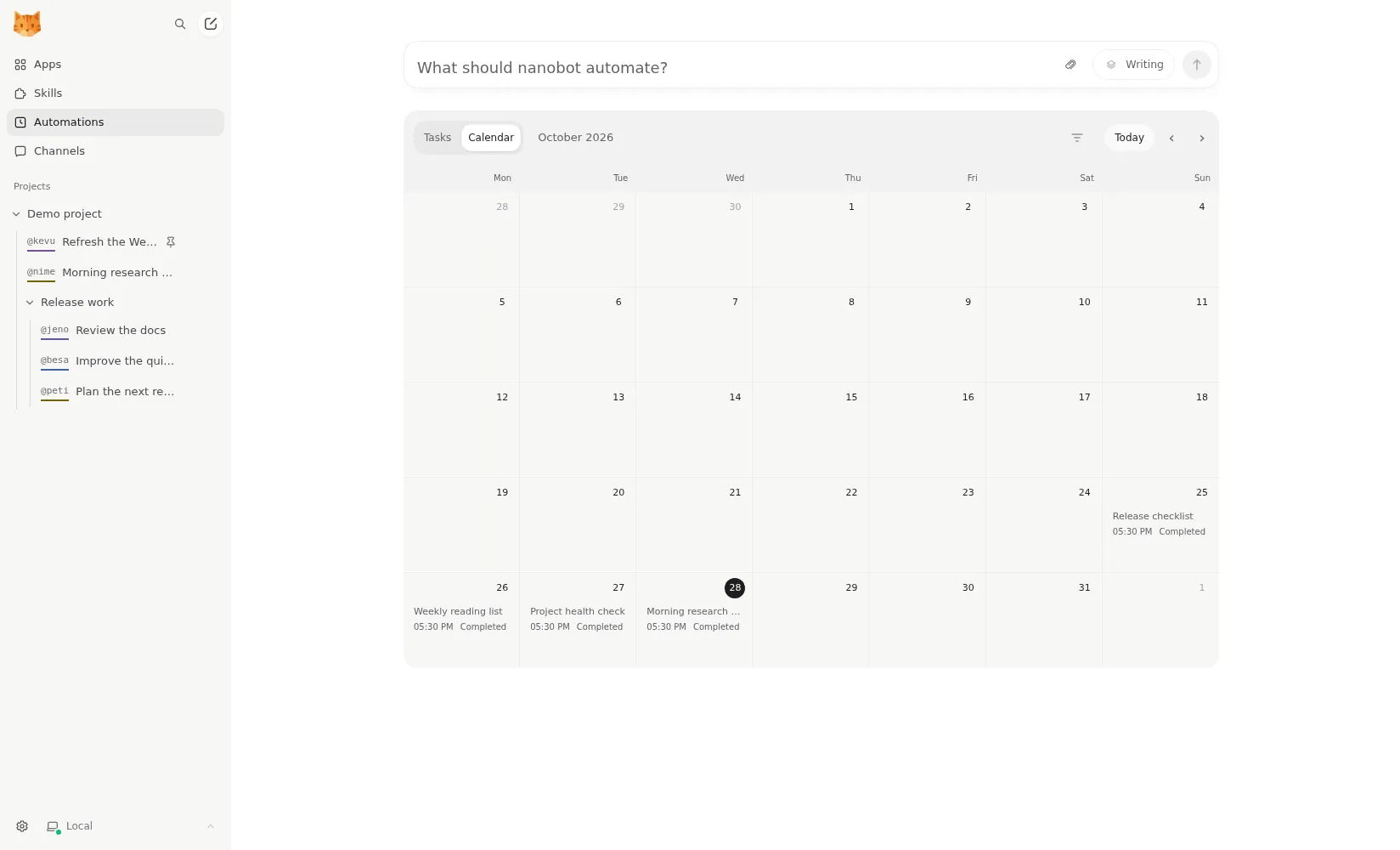
运行起来后,你可以选择与它交互的方式:在浏览器中使用内置的 WebUI、终端 UI,或聊天应用。WebUI 是最大亮点。它把对话按项目分组,显示文件 diff,有 MCP 应用目录,并把定时自动化显示在日历上。最多可以并排显示四个对话(README)。
没有原生的移动或桌面应用。在手机上,你可以在浏览器中使用 WebUI,或使用某个聊天应用。
沙箱得靠你自己
nanobot 会运行 shell 命令,并操作项目文件夹中的文件。默认情况下,这些命令不在沙箱中运行。配置文档介绍了需要手动开启的 Linux 上的 bubblewrap 沙箱和 macOS 上的 Seatbelt 沙箱,Windows 上则没有沙箱。
如果你把 nanobot 安装在自己的主力电脑上,请在连接任何聊天应用之前开启沙箱,因为聊天渠道意味着外部消息可以触达一个会运行命令的智能体。在 Windows 上,请改为在 Docker 中或另一台机器上运行它。相比之下,ZeroClaw 的推荐配置从一开始就开启了操作系统沙箱,NanoClaw 则把每个智能体都放进一个容器。
遥测与隐私
nanobot 不发送使用遥测。文档中没有提及任何遥测,代码中没有分析客户端,它甚至在调用第三方技能安装程序时设置了 DISABLE_TELEMETRY(源码)。Langfuse 追踪功能存在,但只有在你用自己的密钥启用时才会运行。提示词和附件会发送给你选择的模型提供商和聊天平台。
本地模型
它支持 OpenAI、Anthropic、DeepSeek、OpenRouter、AWS Bedrock 或任何 OpenAI 兼容端点,也支持通过 Ollama、vLLM 或 LM Studio 运行本地模型(提供商文档)。这意味着如果你的硬件能跑得动一个能力足够的本地模型,你完全可以不用任何云端模型。nanobot 不销售托管服务,所以唯一的账单来自你的模型提供商。语音消息需要单独的转写提供商,例如 Groq 或 OpenAI。
在你离开时工作
这正是 nanobot 值得一席之地的原因。它可以运行定时自动化和长期目标,heartbeat 只会把有用的结果报告回你最后使用的聊天中。一个名为 Dream 的后台进程会把长期记忆整合进纯 Markdown 文件(记忆文档),你可以自己阅读和编辑。这对自托管用户来说是个很好的特性:你的智能体记忆不会被锁在一个你无法查看的数据库里。
在无人值守使用方面有两个缺口,都来自概念文档:错过的定时运行不会补跑,被中断的子智能体任务在重启后也不会重新启动。如果主机在 9:00 重启,9:00 的报告就直接没了。请把它作为服务运行在一台保持开机的机器上。
渠道与扩展
聊天应用包括 Telegram、Discord、Slack、WhatsApp、微信、飞书、Microsoft Teams、Matrix 和邮件。它还可以以多实例方式运行(多实例文档),开发者还能使用 Python SDK 和一个 OpenAI 兼容 API,这样其他工具就可以像调用模型一样调用 nanobot。
适合谁用
nanobot 适合想要一个可以用 Python 阅读和扩展的轻量级智能体的开发者,也适合想要一个带真正浏览器 UI 并能通过聊天应用访问的自托管助手的人。如果你希望无需配置就有隔离,或者想要原生手机应用,它就不是那么好的选择。
横向对比
- PicoClaw 受 nanobot 启发,用 Go 重写,只需几 MB 内存即可运行。它用极小的资源占用换掉了 nanobot 更丰富的 UI 和 Python 的可扩展性。
- OpenClaw 生态更大,还有移动应用,但默认发送遥测;两者都默认不开启沙箱。
- Hermes Agent 同样基于 Python、采用 MIT 许可证,有桌面应用和自我改进的技能系统,默认无遥测。
- QwenPaw 形态最接近:Python、Web 控制台、多智能体、本地模型,对中文聊天应用的覆盖更强。
更多内容请看 OpenClaw 替代品和最佳开源 AI 智能体榜单。
价格
| Open source | 免费 |
|
|---|
功能
| 联网搜索 | 是 |
|---|---|
| 图像生成 | 是 |
| 语音模式 | 是 |
| 文件上传 | 是 |
| 记忆 | 是 |
| 代你执行操作 | 是 |
| 应用集成 | 是 |
| 自主运行 | 是 |
| 主动给你发消息 | 是 |
| 可运行多个机器人 | 是 |
优点
- Free and MIT licensed, with a small Python core that is meant to be read and modified
- Polished bundled WebUI with projects, file diffs, an MCP app catalog and an automations calendar, plus a terminal UI
- Many chat channels, including Telegram, Discord, Slack, WhatsApp, WeChat, Feishu, Teams, Matrix and email
- Scheduled automations, long-running goals and a heartbeat that reports only useful results to your last chat
- Works with local models through Ollama, vLLM or LM Studio
缺点
- Shell commands are not sandboxed by default; the bubblewrap or macOS Seatbelt sandbox must be turned on, and Windows has none
- Model costs are on you, and voice messages need a separate transcription provider such as Groq or OpenAI
- No native mobile or desktop app; on a phone you use the WebUI in a browser or a chat app
- Missed scheduled runs are not replayed and interrupted subagent tasks are not relaunched after a restart
适合人群
- Developers who want a lightweight agent they can read and extend in Python
- People who want a self-hosted assistant with a browser UI and chat-app access
- Running scheduled checks and reports with a local or cloud model
来源
- HKUDS/nanobot on GitHub (MIT, v0.4.1, README)
- nanobot documentation
- nanobot release archive (officially launched February 2, 2026)
- nanobot docs: Chat apps
- nanobot docs: Providers and models (Ollama, vLLM, LM Studio)
- nanobot docs: Configuration (security, exec sandbox off by default, transcription, Langfuse)
- nanobot docs: Automations and heartbeat
- nanobot docs: Concepts (heartbeat delivery, subagent recovery)
- nanobot docs: Memory and Dream
- nanobot docs: Multiple instances
- nanobot docs: Deployment (Docker, services, Render)
- nanobot source: skills installer runs with DISABLE_TELEMETRY