
nanobot Review: HKUDS's Lightweight Self-Hosted AI Agent
nanobot is a small MIT-licensed Python agent from the University of Hong Kong with a polished WebUI. Setup, sandboxing, local models and what upkeep looks like.
nanobot is a personal agent framework from the Data Intelligence Lab at the University of Hong Kong (HKUDS). It officially launched on February 2, 2026 and had 49,932 GitHub stars when we checked on November 8, 2026, more than any other agent on our list except OpenClaw and Hermes Agent. This review covers the HKUDS/nanobot agent.
Its idea is a small Python core that is meant to be read and modified, wrapped in a surprisingly finished browser UI.

Installing it
There are four routes: an install script, pip, Docker, or a one-click cloud deploy (the deployment docs cover Render). It needs Python 3.11 or newer on macOS 13+, Linux or Windows, and the install script sets up its own Python environment so you don’t have to manage one. Sessions, memory and settings live in ~/.nanobot.
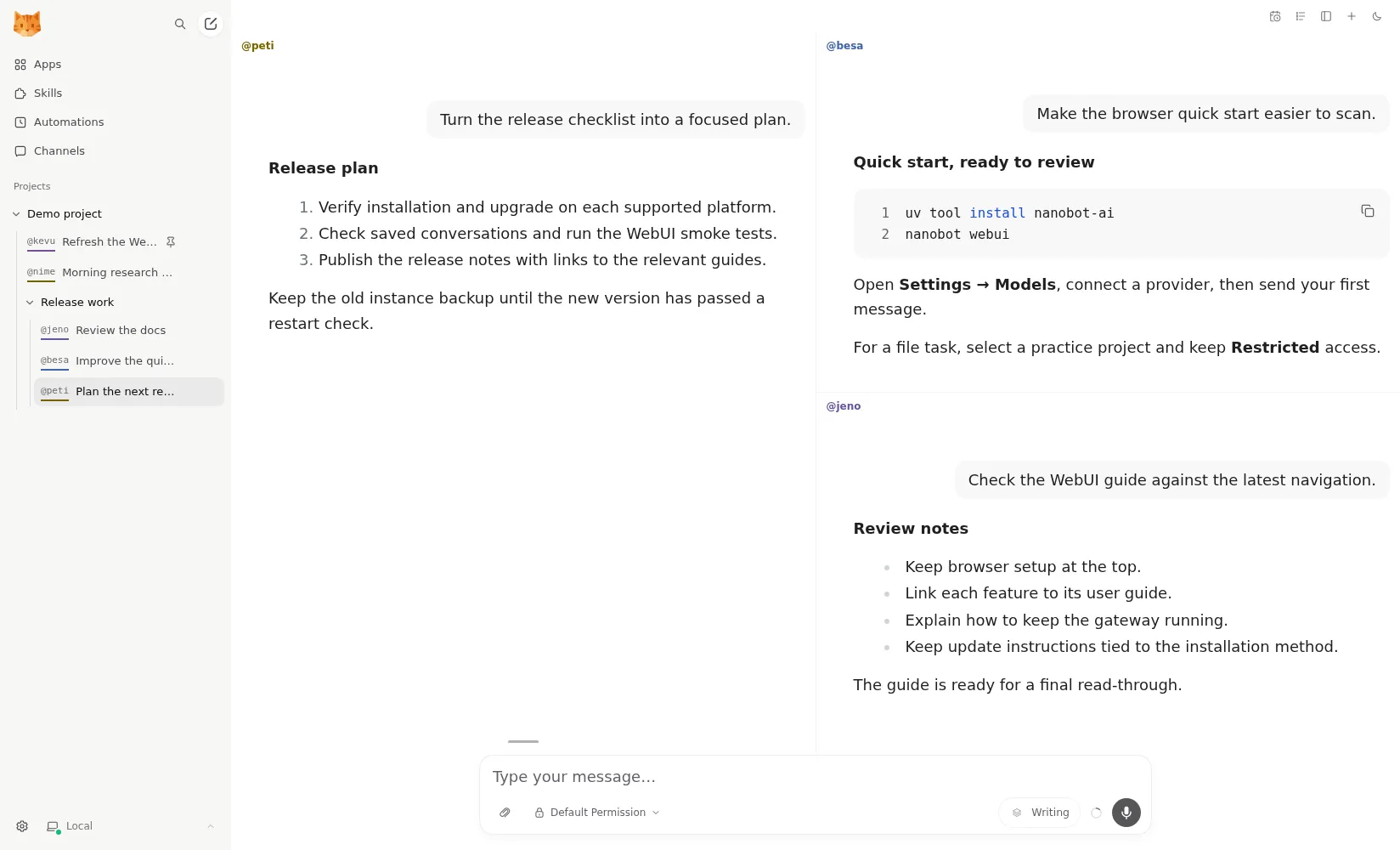
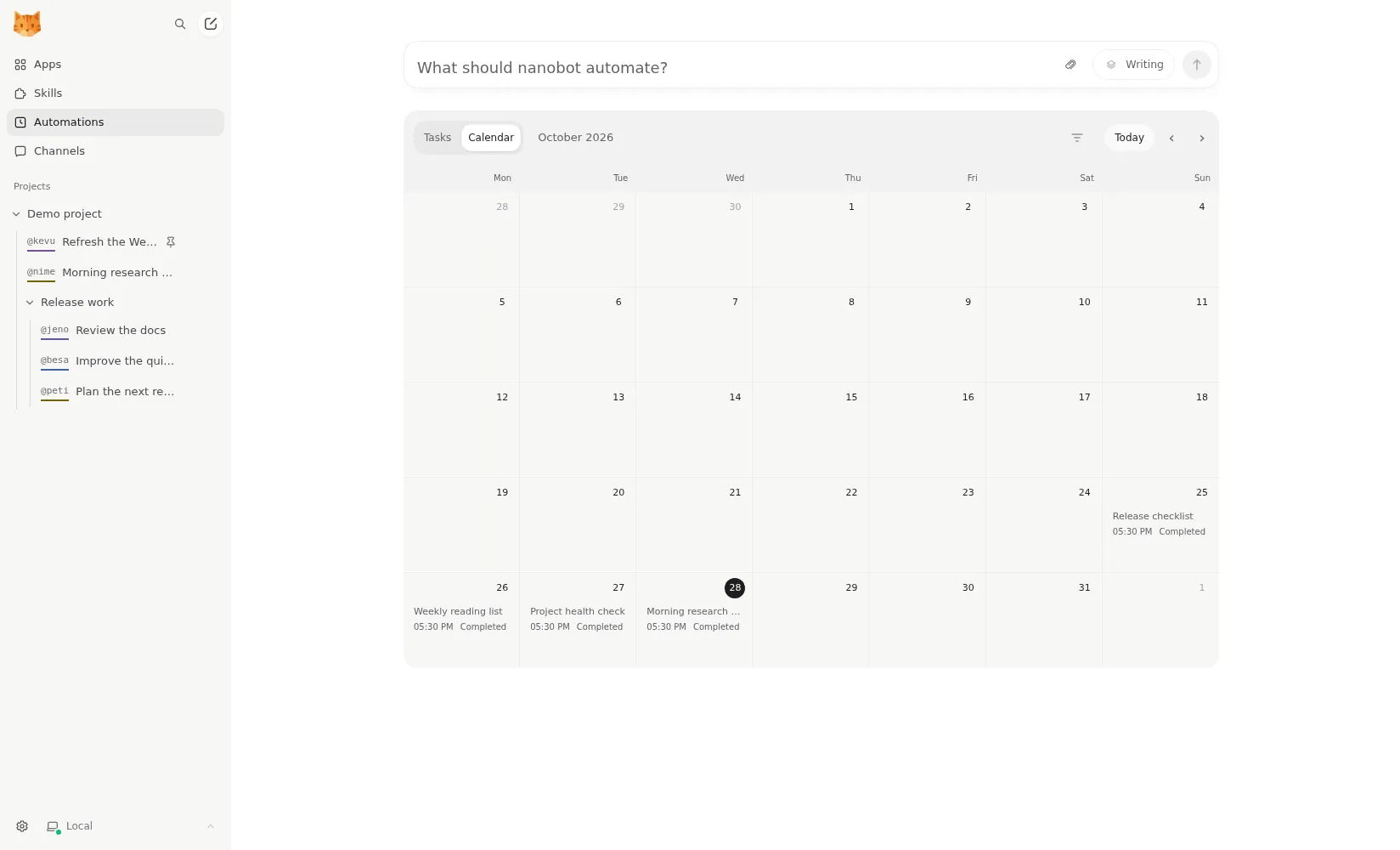
Once it’s running you choose how to talk to it: the bundled WebUI in a browser, a terminal UI, or chat apps. The WebUI is the standout. It groups conversations into projects, shows file diffs, has an MCP app catalog, and puts scheduled automations on a calendar. Up to four conversations can sit side by side (README).
There is no native mobile or desktop app. On a phone you use the WebUI in a browser or one of the chat apps.
Sandboxing is your job
nanobot runs shell commands and works with files in a project folder. By default those commands are not sandboxed. The configuration docs describe a bubblewrap sandbox on Linux and Seatbelt on macOS that you have to switch on, and there is no sandbox on Windows.
If you install nanobot on your main computer, turn the sandbox on before connecting any chat app, since a chat channel means messages from outside can reach an agent that runs commands. On Windows, run it in Docker or on a separate machine instead. Compare that with ZeroClaw, whose recommended profile has an OS sandbox on from the start, or NanoClaw, which puts every agent in a container.
Telemetry and privacy
nanobot sends no usage telemetry. The docs describe none, the code has no analytics client, and it even sets DISABLE_TELEMETRY when it calls the third-party skills installer (source). Langfuse tracing exists but only runs if you enable it with your own keys. Prompts and attached files go to the model provider and chat platforms you choose.
Local models
It works with OpenAI, Anthropic, DeepSeek, OpenRouter, AWS Bedrock or any OpenAI-compatible endpoint, and with local models through Ollama, vLLM or LM Studio (providers docs). That means you can run it with no cloud model at all if your hardware can carry a capable local model. nanobot sells no hosted service, so the only bill is your model provider’s. Voice messages need a separate transcription provider such as Groq or OpenAI.
Working while you’re away
This is where nanobot earns a place. It runs scheduled automations and long-running goals, and a heartbeat reports only useful results back to the chat you last used. A background process called Dream consolidates long-term memory into plain Markdown files (memory docs), which you can read and edit yourself. That is a nice property for a self-hoster: your agent’s memory is not locked in a database you can’t inspect.
Two gaps for unattended use, both from the concepts docs: missed scheduled runs are not replayed, and interrupted subagent tasks are not relaunched after a restart. If the host reboots at 9:00, the 9:00 report just doesn’t happen. Run it as a service on a machine that stays up.
Channels and extending it
Chat apps include Telegram, Discord, Slack, WhatsApp, WeChat, Feishu, Microsoft Teams, Matrix and email. It can also run as several instances (multiple instances docs), and developers get a Python SDK and an OpenAI-compatible API, so other tools can call nanobot as if it were a model.
Who should use it
nanobot suits developers who want a lightweight agent they can read and extend in Python, and people who want a self-hosted assistant with a real browser UI plus chat-app access. It is a weaker pick if you want isolation without configuring it, or a native phone app.
How it compares
- PicoClaw was inspired by nanobot and rewritten in Go to run in megabytes of RAM. It trades nanobot’s richer UI and Python extensibility for a tiny footprint.
- OpenClaw has the larger ecosystem and mobile apps, but sends telemetry by default; neither has a sandbox on by default.
- Hermes Agent is also Python and MIT, with a desktop app and a self-improving skills system, and no telemetry by default.
- QwenPaw is the closest in shape: Python, web console, multiple agents, local models, with stronger coverage of Chinese chat apps.
For more, see OpenClaw alternatives and the best open-source AI agent list.
Pricing
| Open source | Free |
|
|---|
Features
| Web search | Yes |
|---|---|
| Image generation | Yes |
| Voice mode | Yes |
| File uploads | Yes |
| Memory | Yes |
| Takes actions for you | Yes |
| App integrations | Yes |
| Works on its own | Yes |
| Messages you first | Yes |
| Runs several bots | Yes |
Strengths
- Free and MIT licensed, with a small Python core that is meant to be read and modified
- Polished bundled WebUI with projects, file diffs, an MCP app catalog and an automations calendar, plus a terminal UI
- Many chat channels, including Telegram, Discord, Slack, WhatsApp, WeChat, Feishu, Teams, Matrix and email
- Scheduled automations, long-running goals and a heartbeat that reports only useful results to your last chat
- Works with local models through Ollama, vLLM or LM Studio
Weaknesses
- Shell commands are not sandboxed by default; the bubblewrap or macOS Seatbelt sandbox must be turned on, and Windows has none
- Model costs are on you, and voice messages need a separate transcription provider such as Groq or OpenAI
- No native mobile or desktop app; on a phone you use the WebUI in a browser or a chat app
- Missed scheduled runs are not replayed and interrupted subagent tasks are not relaunched after a restart
Best for
- Developers who want a lightweight agent they can read and extend in Python
- People who want a self-hosted assistant with a browser UI and chat-app access
- Running scheduled checks and reports with a local or cloud model
Sources
- HKUDS/nanobot on GitHub (MIT, v0.4.1, README)
- nanobot documentation
- nanobot release archive (officially launched February 2, 2026)
- nanobot docs: Chat apps
- nanobot docs: Providers and models (Ollama, vLLM, LM Studio)
- nanobot docs: Configuration (security, exec sandbox off by default, transcription, Langfuse)
- nanobot docs: Automations and heartbeat
- nanobot docs: Concepts (heartbeat delivery, subagent recovery)
- nanobot docs: Memory and Dream
- nanobot docs: Multiple instances
- nanobot docs: Deployment (Docker, services, Render)
- nanobot source: skills installer runs with DISABLE_TELEMETRY