
Agent Zero Review: An AI Agent With Its Own Linux Computer
Agent Zero runs in a Docker container with a terminal, browser and Linux desktop. What that isolation covers, the default update check, and the hardware it needs.
Agent Zero is an open-source agent from Agent Zero s.r.o., a small Czech company. It is older than most tools on our list: the first release came in June 2024, and it reached v2.15 on November 1, 2026 (releases). It had 19,799 GitHub stars when we checked on November 8, 2026.
Where OpenClaw and its lightweight cousins run on your computer, Agent Zero gives the AI a computer of its own. That one design choice drives most of what it is like to self-host.

The agent’s own computer
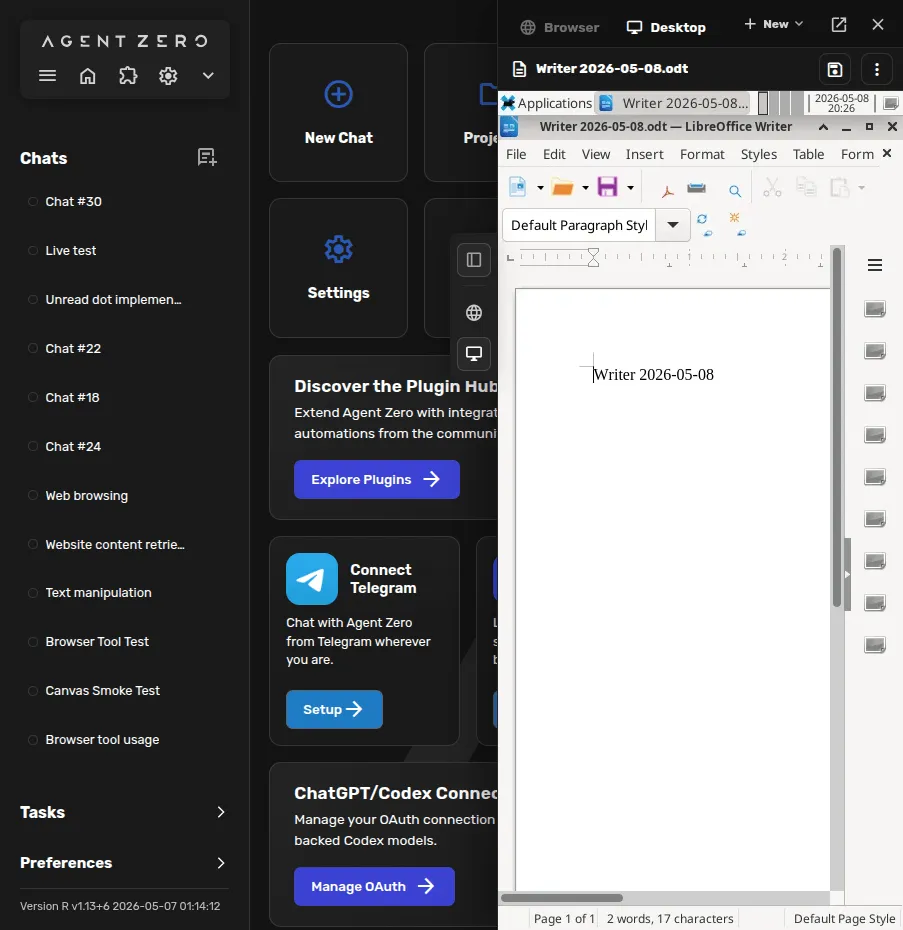
Agent Zero runs inside a Docker container that holds a full Linux environment: a terminal, a built-in browser, a Linux desktop and LibreOffice. You watch the agent work, or take over, from a web UI. When it browses, it uses its own browser, not yours.
For a self-hoster, this is the main appeal. The agent can install packages, break things and run code without touching your machine. Access to your own files, commands and browser is opt-in, through the desktop Launcher or the A0 CLI. Projects keep memory, files, secrets, instructions and model choices separate per job, and workspace snapshots let you roll back.
The limit is worth understanding. Today, code the agent runs executes in the same container as Agent Zero itself. That keeps the agent away from your computer, but nothing separates the code it runs from Agent Zero’s own files and settings. Separate gVisor sandboxes per task were shown in an August 2026 preview of v3 and are not in the v2 releases.
Installing it
There are three ways in, per the installation docs:
- a desktop Launcher for macOS, Windows and Linux that sets up Docker and the instance for you
- an install script for servers
- a plain Docker command
The Launcher hides most of the Docker work. The cost is weight. The image is a full Linux desktop environment, not a small service, and the VPS guide asks for at least 2 GB of RAM, 20 GB of storage and one vCPU, with 4 GB of RAM recommended. That rules out the Raspberry Pi class of hardware that ZeroClaw and PicoClaw aim at, but any modest VPS or home server will do.
Upkeep means following a fast release cadence: v2.11 to v2.15 shipped between late August and early November 2026.
Telemetry: an update check you can turn off
Agent Zero makes one outbound call by default. When you send a message, with a cooldown, it posts the installed version and an anonymized ID, a hash of the instance’s persistent ID, to api.agent-zero.ai to check for updates. You can read the update check code and turn it off with the update check setting. No other analytics were found in the code. If you want zero calls home, flip that setting on first run.
Models, search and voice
You can bring OpenAI, Anthropic, Google, DeepSeek, Mistral, xAI, Groq, OpenRouter, AWS Bedrock, Azure and other OpenAI-compatible endpoints, sign in with a ChatGPT account for Codex models, or run local models through Ollama, LM Studio, llama.cpp, vLLM or oMLX.
Agent Zero keeps more of the stack local than most. Web search goes through a bundled SearXNG instance instead of a search API, and speech-to-text and text-to-speech can run locally. Pair that with a local model and you need no AI or search API keys. There is no built-in image generation; the docs show how to teach it an image API yourself.
The project also runs a model proxy to Venice.ai for holders who stake its A0T crypto token. It is optional, and you can ignore it entirely.
Chat apps and plugins
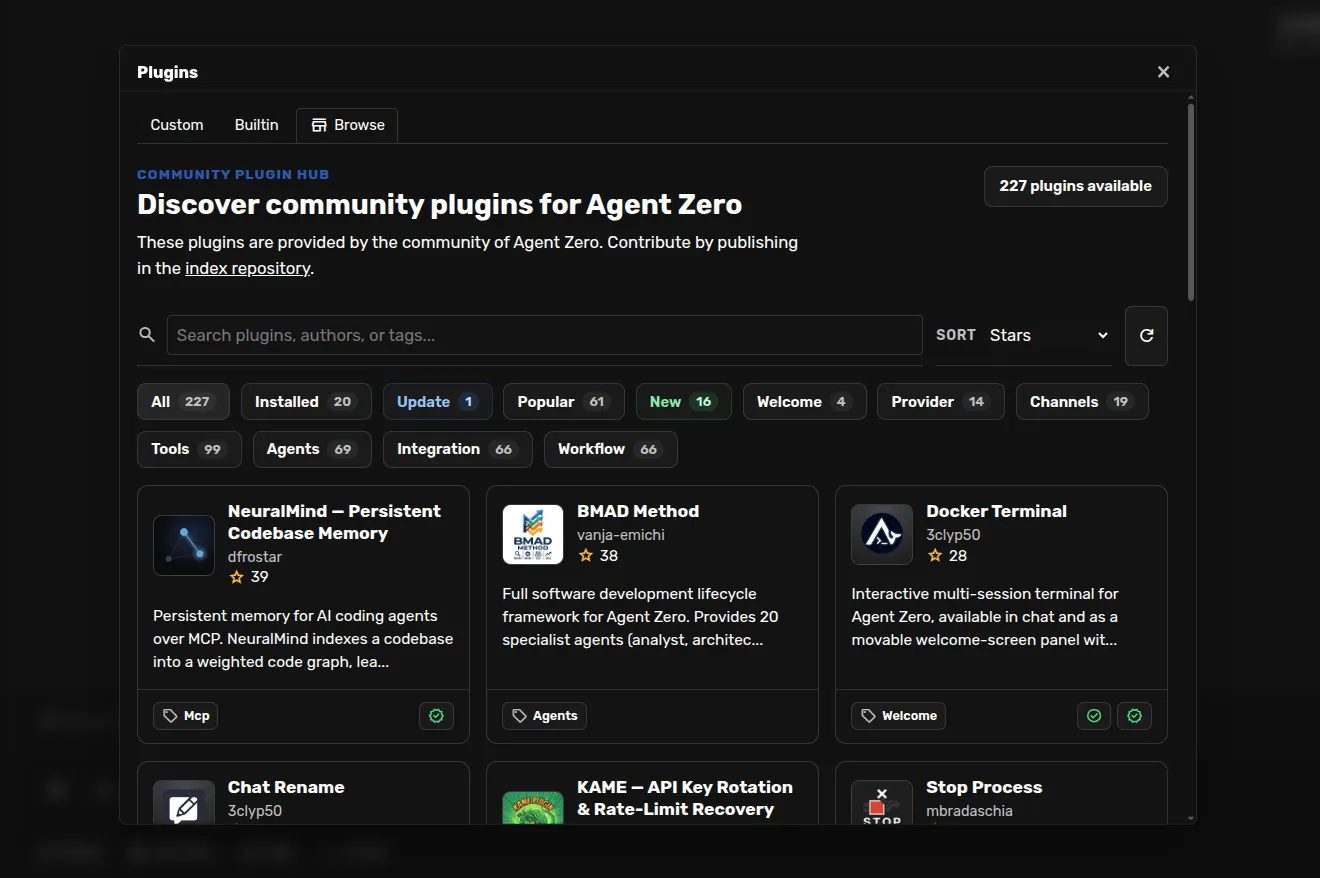
Telegram, WhatsApp and email come as built-in plugins, alongside a scheduler, MCP and a community Plugin Hub with more than 200 plugins. WhatsApp works by linking a phone account through a Baileys bridge that needs Node.js, rather than through the official WhatsApp Business API. As with any plugin hub, community plugins are third-party code running inside the agent’s container.
Who should use it
Agent Zero suits people who want an agent that can use a whole computer without touching theirs, and developers who want to read and change every prompt and tool. It fits research, document and coding jobs on a home server or VPS. It is a poor fit for small boards, or if you want the agent working directly in your own apps and files by default.
How it compares
- Rakazo, which we make, takes a similar approach, giving each bot a sandboxed computer with browser, terminal and desktop, and also needs Docker. It adds mobile apps and Slack, and is in beta.
- NanoClaw also isolates agents in containers, built around Claude and Claude Code.
- OpenClaw runs on your host with sandboxing off by default, and has the largest ecosystem.
See the best self-hosted AI agent list and OpenClaw alternatives for more.
Pricing
| Open source | Free |
|
|---|
Features
| Web search | Yes |
|---|---|
| Image generation | No |
| Voice mode | Yes |
| File uploads | Yes |
| Memory | Yes |
| Takes actions for you | Yes |
| App integrations | Yes |
| Works on its own | Yes |
| Messages you first | Yes |
| Runs several bots | Yes |
Strengths
- Free and MIT licensed, with frequent releases (v2.11 to v2.15 between late August and early November 2026)
- The agent works in its own Linux workspace with a terminal, browser, desktop apps and LibreOffice, isolated from your computer unless you grant host access
- Web search runs through a local SearXNG instance, and speech-to-text and text-to-speech can run locally
- Projects keep memory, files, secrets, instructions and model choices separate per job, with workspace snapshots you can roll back
- Built-in Telegram, WhatsApp and email channels, a scheduler, MCP and a community Plugin Hub with 200+ plugins
Weaknesses
- Needs Docker, and the container image is a full Linux desktop environment rather than a small service
- No built-in image generation; the docs show teaching it an image API yourself
- By default it checks for updates with Agent Zero's server, sending your version and a hashed instance ID
- Code runs in the same container as Agent Zero itself today; per-task sandboxes are only a v3 prototype
- WhatsApp works by linking a phone account through a Baileys bridge, which needs Node.js, rather than the official WhatsApp Business API
Best for
- People who want an agent that can use a full computer without touching their own
- Developers who want to read and change every prompt and tool
- Running research, document and coding jobs on a home server or VPS
Sources
- agent0ai/agent-zero on GitHub (MIT, README, safety model)
- Agent Zero releases (v0.2 in June 2024 to v2.15 on November 1, 2026)
- Agent Zero homepage
- Agent Zero docs: Installation (Launcher, A0 Install, Docker, local models)
- Agent Zero docs: VPS deployment (hardware requirements)
- Agent Zero model provider list
- Agent Zero update check code (version and hashed ID sent to api.agent-zero.ai)
- Agent Zero built-in Telegram integration plugin
- Agent Zero built-in WhatsApp integration plugin
- Agent Zero built-in plugins (scheduler, notify user, email, SearXNG search, Whisper STT, Kokoro TTS)
- Agent Zero docs: Memory guide
- Agent Zero docs: Agent Profiles
- Agent Zero docs: API integration (adding image generation yourself)
- Agent Zero v3: A Sneak Peek Inside the Sandbox (August 17, 2026)
- Agent Zero LLM API (Venice.ai proxy for A0T token stakers)